Goaml Registration UAE 2027: Complete Guide To Requirements, Login, Rules And Online Process

Goaml Registration UAE 2027. GoAML registration is an important compliance requirement for regulated businesses in the UAE that need to report suspicious activities or transactions to the UAE Financial Intelligence Unit (UAE FIU).
The registration is completed through the UAE FIU’s online systems. In simple terms, a regulated entity first completes the required pre-registration through the Services Access Control Manager (SACM) and then completes its organization registration on the goAML portal.
This guide explains the complete GoAML registration UAE process, including who needs to register, required documents, goAML login, deregistration And common mistakes.
What Is GoAML in the UAE?
GoAML is a reporting platform used by the UAE Financial Intelligence Unit to receive and manage reports related to suspicious financial activity.
The system supports the UAE’s efforts to detect and prevent:
- Money laundering
- Terrorist financing
- Proliferation financing
- Other financial crimes
The UAE FIU uses goAML to receive suspicious reports from reporting entities and to support financial intelligence work.
The official UAE FIU registration guide states that organizations registering as reporting entities, stakeholders, or supervisory bodies can use the goAML system according to their role.
The UAE FIU’s SACM registration page also explains that the service provides access to the goAML application for filing suspicious transaction and suspicious activity reports.
What does GoAML stand for?
GoAML is the name of a financial intelligence reporting application developed for Financial Intelligence Units. It is used in many jurisdictions as part of the fight against money laundering and other financial crimes.
In the UAE, the system is operated as part of the UAE FIU’s reporting framework.
Why Is GoAML Registration Important?
GoAML registration is important because regulated businesses need access to the official reporting system to submit the reports required under the UAE AML framework.
A business may have strong AML policies, customer due diligence procedures, and transaction monitoring systems, but it still needs the appropriate reporting access when a report must be submitted to the FIU.
The UAE FIU’s registration guide states that completing goAML registration gives reporting entities the ability to submit suspicious reports through the FIU’s reporting platform.
GoAML helps regulated businesses with:
- Suspicious Activity Report (SAR) – Used to report suspicious activities that may indicate financial crime.
- Suspicious Transaction Report (STR) – Used when a transaction or series of transactions raises suspicion.
- Additional Information File Without Transaction (AIF) – Used to provide additional information when no transaction is involved.
- Additional Information File With Transaction (AIFT) – Used to provide additional information connected with transactions.
- Request for Information Without Transaction (RFI) – Used when information is requested without a specific transaction.
- Request for Information With Transaction (RFIT) – Used for information linked to one or more transactions.
- Dealers in Precious Metals and Stones Report (DPMSR) – Relevant reporting for applicable dealers in precious metals and stones.
- Real Estate Activity Report (REAR) – Used for applicable real estate-related reporting requirements.
- Confirmed Name Match Report (CNMR) – Used when a confirmed name match requires reporting.
- Partial Name Match Report (PNMR) – Used for applicable partial name-match cases.
- High-Risk Country Transaction Report (HRC) – Used for reportable transactions involving high-risk countries or jurisdictions.
- High-Risk Country Activity Report (HRCA) – Used for applicable activities connected with high-risk countries or jurisdictions.
The exact reporting requirements can depend on the entity’s sector, regulator, and applicable UAE laws and regulations.
Is GoAML Registration Mandatory in the UAE?
For entities that fall within the UAE’s reporting and AML requirements, goAML registration is a required part of their compliance setup.
The UAE FIU’s official registration guidance says that accountable and reporting entities are required to register on goAML in order to submit suspicious reports.
This means a business should not treat goAML registration as an optional online account.
It is better to complete the registration as soon as the entity becomes subject to the applicable reporting requirements and has the necessary licensing information.

Important point
GoAML registration is not the same thing as having a complete AML compliance program. A business may also need appropriate:
- AML policies
- Customer due diligence procedures
- Risk assessments
- Transaction monitoring
- Record keeping
- Compliance controls
- Sanctions screening
- Internal reporting procedures
- MLRO or Compliance Officer arrangements
GoAML is the reporting platform. It does not replace the wider AML compliance duties of the business.
What Are the GoAML Registration Types?
The UAE FIU’s goAML registration framework includes three main registration types:
| Registration Type | General Purpose |
|---|---|
| Reporting Entity | Organizations that have reporting obligations |
| Stakeholder | Relevant authorities and organizations involved in the AML/CFT framework |
| Supervisory Body | Authorities that supervise or regulate reporting entities |
For most businesses that are registering because they have AML reporting obligations, the relevant option is generally:
- Reporting Entity: The official UAE FIU guide explains these categories and their roles in the goAML system.
GoAML Registration Requirements in the UAE
Before starting the application, prepare the required information and supporting documents.
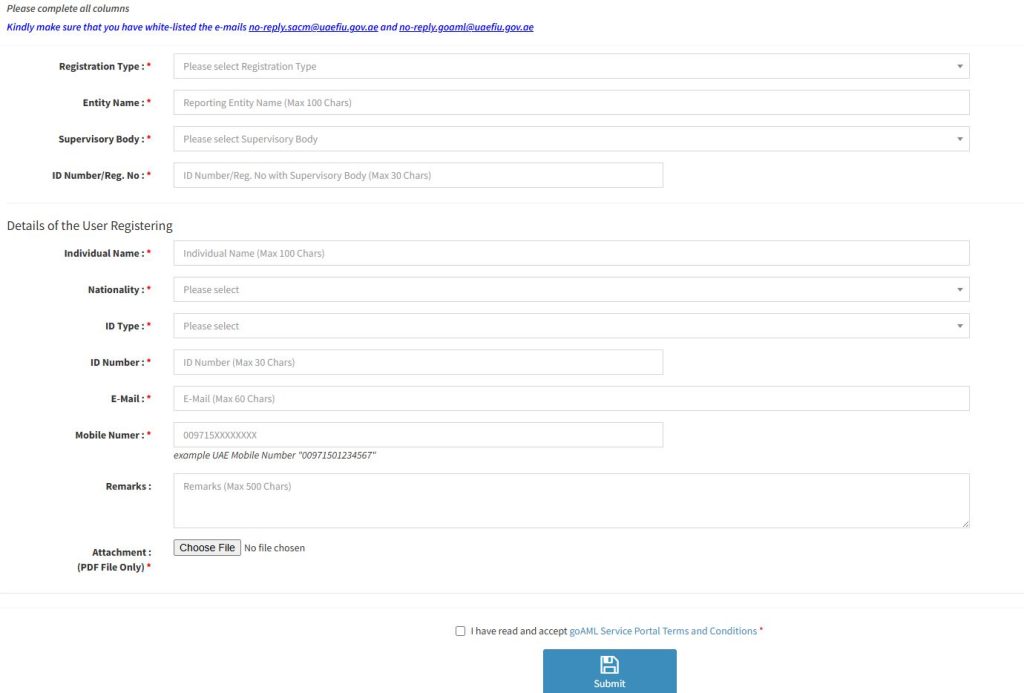
The SACM registration page currently asks applicants to provide information such as the registration type, entity name, supervisory body, registration number, registering person’s details, email address, mobile number, remarks, and a PDF attachment. A typical application may require the following:
- Commercial or Trade License
- Authorization Letter
- Passport copy of the relevant compliance person
- Emirates ID
- UAE residence visa, where applicable
- Organization details
- Compliance Officer or MLRO details
- Registered email address
- Registered UAE mobile number
- Supervisory authority information
Always check the latest UAE FIU requirements before submitting because government procedures and document requirements can change.
GoAML Registration Documents Checklist
Before you start, use this simple checklist.
| Document / Information | Usually Required |
| Trade or Commercial License | Yes |
| Authorization Letter | Yes |
| Passport copy | Yes |
| Emirates ID | Yes |
| Residence Visa, where applicable | Yes |
| Registered email | Yes |
| Mobile number | Yes |
| Supervisory Body | Yes |
| Organization details | Yes |
| Compliance Officer details | Yes |
The official SACM registration page currently allows a PDF file only for the attachment.
Therefore, do not assume that you can upload several separate files if the portal requires a single attachment.
How To login GoAML
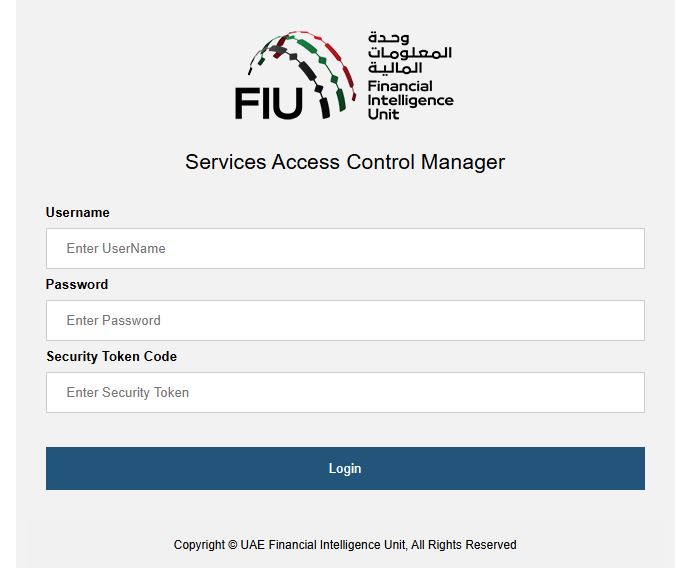
To access the UAE FIU services, users need to sign in through the Services Access Control Manager (SACM). The login page requires the following information:
- Username: Enter your registered username.
- Password: Enter your account password.
- Security Token Code: Enter the security code generated through your registered authentication method.
- Login: After entering all required details, click the Login button to access your account.
Register as a New Organization
After signing in, locate the option for registering a new organization. The goAML registration process includes an organization registration form.
You will need to provide accurate information about your business. Typical information can include:
- Organization name
- Organization registration information
- Supervisory authority
- Business activity
- Contact details
- Compliance Officer details
- Other information requested by the FIU
Make sure all details match your official company documents.
How to Complete GoAML Web Access Registration?
To register for GoAML web access, complete the required organization details, applicant information, supporting documents, and verification steps before submitting the form.
- Step 1: Open the official GoAML Web Access registration page and start a new registration request.
- Step 2: First, make sure your email system has whitelisted [email protected] and [email protected].
- Step 3: Select the correct Registration Type, such as Reporting Entity, according to your organization’s status.
- Step 4: Enter your company’s official Entity Name exactly as shown on the relevant business documents.
- Step 5: Select the correct Supervisory Body responsible for regulating your organization.
- Step 6: Enter the required ID Number or Registration Number linked with your supervisory authority.
- Step 7: Enter the full Individual Name of the person submitting the registration.
- Step 8: Select the applicant’s correct Nationality from the available list.
- Step 9: Choose the appropriate ID Type for the registering individual.
- Step 10: Enter the applicant’s ID Number exactly as it appears on the selected identification document.
- Step 11: Provide a valid Email Address that can receive GoAML registration and verification messages.
- Step 12: Enter the applicant’s Mobile Number using the international format accepted by the portal.
- Step 13: Add any useful information in the Remarks section if additional details are needed.
- Step 14: Prepare the required supporting documents and upload them as a PDF file according to the portal’s requirements.
- Step 15: Read the GoAML Service Portal Terms and Conditions carefully and tick the acceptance box.
- Step 16: Review every field and confirm that your company, personal, contact, and document details are correct.
- Step 17: Click the Submit button to send your GoAML Web Access registration request.
- Step 18: After submission, regularly check your registered email, including the spam or junk folder, for further instructions from the UAE FIU.
How to Register on the GoAML Portal in the UAE?
The UAE FIU GoAML registration process allows eligible businesses and authorized users to set up access for their required AML-related reporting and compliance activities.
1. Access the UAE FIU GoAML Portal
- Open the official UAE Financial Intelligence Unit website.
- Find the GoAML services or registration section.
- Open the GoAML registration portal.
- Select the registration option that applies to your role.
- Choose Reporting Entity, Stakeholder, or Supervisory Body as applicable.
- Enter all requested information carefully and accurately.
2. Complete the Organization Registration
- Enter your company’s official trade or commercial license details.
- Add the registered trade name and relevant business sector.
- Prepare the required supporting documents before starting the application.
- Upload the Trade or Commercial License as requested.
- Provide the required Passport copy.
- Upload the Emirates ID where applicable.
- Provide the UAE Residence Visa where required.
- Attach the Authorization Letter if applicable.
- Nominate the appropriate Compliance Officer for the organization.
- Enter the Compliance Officer’s personal and contact information accurately.
3. Register as a Person
- Select the Register as a Person option if you need individual GoAML access.
- Enter your personal information exactly as shown on your identification documents.
- Upload the required Emirates ID or Passport copy.
- Provide the required employment or authorization document from your organization.
- Enter the correct Organization ID when linking your profile to the company.
- Complete the registration and submit the request for approval.
4. Wait for Verification and Approval
- After submission, the application is reviewed by the relevant authority.
- Check all submitted details and documents carefully to avoid unnecessary delays.
- Monitor your registered email for updates about the application.
- If the application is approved, follow the email instructions to access the GoAML portal.
- If the application is rejected, review the reason provided by the authority.
- Correct the required information and submit the application again.
How Long Does GoAML Registration Take?
There is no single guaranteed processing time for every organization. The time can depend on factors such as:

- Completeness of the application
- Quality of uploaded documents
- Correct supervisory authority
- Verification requirements
- Supervisory authority approval
- FIU processing
- Whether additional information is requested
A clean and complete application generally reduces avoidable delays. Do not submit incomplete or incorrect information just to finish the application quickly.
Is GoAML Registration Free?
Yes. The UAE FIU’s current SACM terms state that the service is provided free of cost for entities and individuals seeking credentials to access the services portal.
Therefore, businesses should be careful with websites or individuals claiming that the official UAE FIU charges a mandatory government fee for basic goAML registration.
Professional compliance services may charge their own consulting fees, but that is different from an official government registration fee.
What Reports Can Be Submitted Through GoAML?
The goAML platform is designed for financial intelligence reporting. Depending on the entity and applicable requirements, reporting can include:
- Suspicious Activity Reports
- Suspicious Transaction Reports
- Additional Information Files
- Requests for Information
- Other report types required through the system
Some sectors may also have specific reporting obligations.
GoAML Registration vs AML Registration
These two terms are sometimes used as if they mean exactly the same thing, but they are not.
GoAML Registration
This means registering for access to the UAE FIU’s goAML reporting system.
AML Compliance
This is much broader. It can include:
- Risk assessment
- Customer identification
- Customer due diligence
- Enhanced due diligence
- Transaction monitoring
- Sanctions screening
- Suspicious activity identification
- Internal escalation
- Record keeping
- Training
- AML policies
- Reporting
Therefore, completing goAML registration does not mean a business has completed all of its AML compliance duties.
How to Register a New Person on GoAML?
After the organization has been registered, additional authorized users may need access. The new person generally needs to complete the required access and registration process.
A simplified process is:
- Complete the required SACM registration.
- Receive the relevant login/access information.
- Set up the required authentication method.
- Open the goAML portal.
- Select the option to register as a new person.
- Enter the organization’s Org ID.
- Provide the requested personal information.
- Submit the request.
- Wait for the organization administrator or Compliance Officer to approve the request.
The new user should make sure that the Organization ID is entered correctly.
How Does the Compliance Officer Approve a New User?
The Compliance Officer or authorized administrator can manage user requests through the organization’s goAML account. The general process is:
- Log in to the goAML portal.
- Open the administration section.
- Go to user request management.
- Review the new user’s details.
- Preview the request.
- Approve or reject the request.
- Add comments where required.
- Finalize the decision.
The user should then receive the relevant notification through the registered email.
How to Change the MLRO or Compliance Officer in GoAML
Changing the MLRO or Compliance Officer is an important process. Do not simply change the person’s name internally and assume the goAML account will automatically update.
The UAEFIU FAQ outlines a process that includes:

- Appoint the new MLRO/Compliance Officer.
- Obtain the relevant regulator’s approval.
- New MLRO completes SACM registration.
- New MLRO obtains their own credentials.
- New MLRO registers as a person under the same Org ID.
- Inform the goAML support team regarding deactivation of the old MLRO and activation of the new MLRO based on the required approval.
- Update organization details after access is established.
- Obtain the required regulatory approval for the changes.
This process helps maintain accurate ownership and access records.
How to Update Organization Details in GoAML?
Business information can change after registration. For example:
- Company address
- Contact number
- Email address
- Website
- Business activity
- Incorporation details
- Contact person
The authorized Compliance Officer or administrator should update the information through the relevant organization management section of the goAML portal.
After submission, some changes may require review or approval by the relevant supervisory authority.
How to Disable a GoAML User?
If an employee leaves the company or no longer needs access, the organization should review and disable that user’s account.
The authorized administrator can use the user management area to disable an active user. This is particularly important when:
- An employee resigns
- The Compliance Officer changes
- A consultant’s contract ends
- A user’s role changes
- The user no longer needs access
Do not leave unnecessary active accounts in the system.
Who Needs GoAML Registration in the UAE?
GoAML registration is mainly relevant to businesses and organizations that fall within the UAE’s AML reporting framework. This includes regulated entities such as:
1. Financial Institutions
Financial institutions that fall within the applicable UAE AML framework may need to register and report through goAML. Examples can include regulated financial businesses such as:
- Banks
- Finance companies
- Money exchange businesses
- Certain financial service providers
- Other regulated financial institutions
The exact requirements depend on the entity’s regulatory status.
2. Virtual Asset Service Providers
Virtual Asset Service Providers, commonly called VASPs, may have goAML obligations depending on their licensing and regulatory framework.
Virtual asset businesses are subject to increasing AML, CFT, and CPF controls because virtual assets can be misused for financial crime.
3. DNFBPs
Designated Non-Financial Businesses and Professions, or DNFBPs, are another major category of regulated entities. These can include businesses and professions such as:
- Real estate agents and brokers
- Dealers in precious metals and stones
- Auditors and accountants
- Lawyers and other independent legal professionals
- Trust and company service providers
The exact scope depends on the applicable UAE AML rules.
Common GoAML Registration Mistakes
Many registration problems can be avoided by checking the application carefully before submission. Here are some common mistakes.
| Mistake | Why It Causes Problems | Better Approach |
| Wrong registration type | Application may not match entity role | Select the correct entity type |
| Wrong supervisory body | Details may not match the license | Confirm the regulator first |
| Incorrect company name | Verification mismatch | Use official legal name |
| Wrong license number | Information may not match records | Copy it carefully from the license |
| Poor PDF quality | Documents may be difficult to verify | Upload clear documents |
| Missing documents | Application may be incomplete | Use a checklist |
| Wrong email | OTP cannot be received | Check email before submission |
| Incorrect mobile number | Authentication or communication issues | Use the required format |
| Expired OTP | Verification may fail | Complete verification promptly |
| Unapproved user | User cannot access organization | Compliance Officer must approve |
Important Tips for Successful GoAML Registration
1. Check Your Supervisory Authority
- Do not guess the regulator.
- Your supervisory authority should match your actual regulatory position.
2. Use Matching Information
- The organization name and license details should match official records.
3. Prepare One Clear PDF
- If the registration process requires a single PDF attachment, merge your supporting documents before uploading.
4. Check Your Email Before Submission
- Make sure the email works and official UAE FIU addresses are not blocked.
5. Keep Your Login Details Secure
- Your username, password, secret key, and authentication codes should be treated as confidential information.
How to Deregister From GoAML?
Deregistration should not be treated as simply deleting the online account. If a company stops operating or its license is cancelled, it should follow the applicable official deregistration process. Information that may be requested can include:

- GoAML registration number
- Entity name
- Individual name
- Supervisory Body
- Trade license cancellation date
- Trade License copy
- Clearance or other supporting document
Because deregistration requirements can change, confirm the latest instructions with the relevant supervisory authority and UAE FIU before sending a request.
GoAML Registration: Quick Step-by-Step Summary
If you want the complete process in a simple checklist, follow these steps:
Stage 1 – SACM
- Open the official UAE FIU SACM registration page.
- Select Reporting Entity, where applicable.
- Enter the organization name.
- Select the correct supervisory body.
- Enter the relevant registration/license number.
- Enter the registering person’s details.
- Add the correct email.
- Add the mobile number in the required format.
- Prepare the supporting documents.
- Upload the PDF.
- Accept the terms and conditions.
- Submit the application.
- Monitor your registered email.
Authentication
- Receive the relevant access information.
- Install Google Authenticator where required.
- Add the goAML account.
- Enter the secret key as instructed.
Stage 2 – GoAML
- Open the official goAML portal.
- Log in using the provided credentials and authentication method.
- Select the organization registration option.
- Enter company details.
- Enter Compliance Officer details.
- Submit the organization application.
- Wait for the relevant approval.
- Receive your organization ID.
- Keep the Org ID safely.
After Approval
- Register additional users where required.
- Ask the Compliance Officer to approve users.
- Assign appropriate roles.
- Disable users who no longer need access.
- Keep organization information updated.
- Monitor FIU communications.
- Use goAML for required reporting.
GoAML Registration Checklist for UAE Businesses
Before submitting your application, use this final checklist:
Company
- Correct legal company name
- Valid Trade/Commercial License
- Correct license number
- Correct supervisory authority
Registering Person
- Full name
- Nationality
- Correct ID type
- Correct ID number
- Active email
- Correct mobile number
Documents
- Authorization Letter
- Trade/Commercial License
- Passport
- Emirates ID
- Residence Visa, where applicable
- Clear PDF
- All required documents combined as instructed
Portal
- Correct registration type
- Email addresses whitelisted
- Terms accepted
- OTP checked
- Authentication configured
- Organization application completed
- Approval monitored
Benefits of GoAML Registration in UAE
GoAML Registration offers several important benefits for regulated businesses in the UAE:
- AML Compliance: Helps businesses meet applicable UAE AML/CFT/CPF requirements.
- Easy Reporting: Allows regulated entities to submit required SARs, STRs, and other reports to the UAEFIU.
- Secure Access: Provides controlled access for authorized Compliance Officers and users.
- FIU Communication: Makes it easier to receive and respond to messages or information requests from the FIU.
- Financial Crime Prevention: Supports efforts to detect and prevent money laundering and other financial crimes.
- Better Compliance Management: Helps businesses manage their AML reporting responsibilities in an organized way.
- Reduced Regulatory Risk: Proper registration helps avoid problems related to failure to access the required FIU reporting system.
UAE FIU GoAML Contact Number and Email
If you need help with GoAML registration, login, or other portal-related issues, you can contact the UAE FIU GoAML support team through its official support channels.
- GoAML Helpdesk Phone: +971 2 6915599
- GoAML Support Email: [email protected]
FAQs About GoAML Registration UAE
Is GoAML registration mandatory in the UAE?
Ans: For entities that are required to register as reporting entities under the UAE AML framework, yes. The UAE FIU’s registration guidance states that accountable and reporting entities are required to register on goAML to submit suspicious reports.
Is GoAML registration free?
Ans: The official UAE FIU SACM terms state that the service is provided free of cost.
Who needs to register for GoAML?
Ans: Depending on the applicable UAE AML framework, regulated entities can include financial institutions, VASPs, DNFBPs, and other reporting entities.
What is SACM in GoAML registration?
Ans: SACM stands for Services Access Control Manager. It is used as part of the access and pre-registration process for the UAE FIU’s goAML services.

What documents are needed for GoAML registration?
Ans: Common documents include the Trade or Commercial License, Authorization Letter, passport, Emirates ID, and residence visa where applicable. Always follow the latest official FIU instructions.
What is an Org ID?
Ans: The Org ID is the unique organization identification number associated with a registered organization in goAML.
Can I register more than one user?
Ans: Yes, organizations can manage additional users through the goAML user management process, subject to the applicable access and approval process.
Who approves a new GoAML user?
Ans: The organization’s authorized administrator or Compliance Officer can review and approve user requests through the relevant user management functions.
What should I do if I forget my GoAML password?
Ans: Use the Forgot Password option on the official goAML portal and follow the instructions sent to your registered email.
What should I do if I forget my username?
Ans: Contact the official UAE FIU goAML support channel and provide the organization and identity information requested for verification.
Does GoAML registration replace AML compliance?
Ans: No. GoAML registration provides access to the reporting platform. It does not replace the company’s wider AML/CFT/CPF compliance obligations.
Can I update company information after registration?
Ans: Authorized users can update applicable organization information through the goAML portal. Some changes may require supervisory review or approval.
Can a company deregister from GoAML?
Ans: Yes, where applicable, but the company should follow the official deregistration procedure and provide the required supporting information.
Conclusion
GoAML registration is an important step for regulated businesses in the UAE that need to meet their financial crime reporting obligations. The process may look complicated at first because it involves both SACM access registration and goAML organization registration. However, when the process is broken into small steps, it becomes much easier to understand.



About The Author