FAB Balance Check 2026: A Complete Guide to Salary, Ratibi, PPC Magnati, Payit, Prepaid Card And Online Balance Enquiry
FAB Balance Check. Checking your FAB balance has become very easy in 2026, whether you use a normal FAB account, a salary account, a Ratibi card, or a prepaid PPC/Magnati card. Many users simply want quick and trusted ways to confirm their money, salary, and transactions without any confusion. FAB now offers several options, including the FAB Mobile App, online banking, the Payit wallet, Ratibi balance checking tools, and the Magnati prepaid portal. You can also check your balance through the ATM, SMS, phone banking, or customer support if you prefer offline methods.
This guide brings every FAB balance check method into one simple place so you can choose the option that works best for you and access your money within seconds.
What Is FAB Balance Check?
FAB balance check is the process of seeing:
- Your available balance
- Your total / ledger balance
- Recent transactions
- Salary credits
- Card status (active, expired, blocked especially for prepaid cards)
This applies to:
- Regular FAB accounts
- Salary accounts
- Ratibi salary cards
- FAB prepaid cards (PPC / Magnati)
- Lulu FAB cards
FAB gives you many ways to check your balance, so you can do it from your phone, computer, ATM, or even by calling customer care.
All FAB Balance Check Methods
| Method | Internet Needed | Best For |
|---|---|---|
| FAB Mobile App | Yes | Daily balance checks |
| FAB Online Banking Website | Yes | Laptop/desktop users |
| PPC / Magnati Portal | Yes | Prepaid & Ratibi card users |
| Payit Wallet | Yes | Ratibi card holders |
| SMS Banking | No | Quick offline check |
| Phone Banking IVR | No | Non-tech users |
| AI Virtual Agent | No | Voice-based help |
| ATM | No | Offline check |
| Branch Visit | No | Face-to-face service |
| Lulu/POS Slip | No | Occasional check |
FAB Balance Check Online (Official Website)
If you prefer using a computer, FAB’s online banking website is perfect.
Steps to Check Balance Online
- Visit to the www.bankfab.com official website
- Click Login → Personal Online Banking (UAE)
- Enter username + password
- Enter the OTP sent to your mobile/email
- Dashboard opens → your current balance is visible
- Open Accounts to view:
- Full balance
- Available vs total
- Recent transactions
- Account details
Online Banking Also Lets You
- Download statements
- Pay bills
- Transfer funds
- Manage beneficiaries
- Stop cheques
- View credit card details
FAB Balance Check Through PPC / Magnati Portal (Prepaid Cards)
This portal is used for checking balance of:
- Salary prepaid cards
- Travel prepaid cards
- Corporate cards
- Lulu prepaid cards
- Gift cards
Steps
Step 1: Open the Official PPC Magnati Page
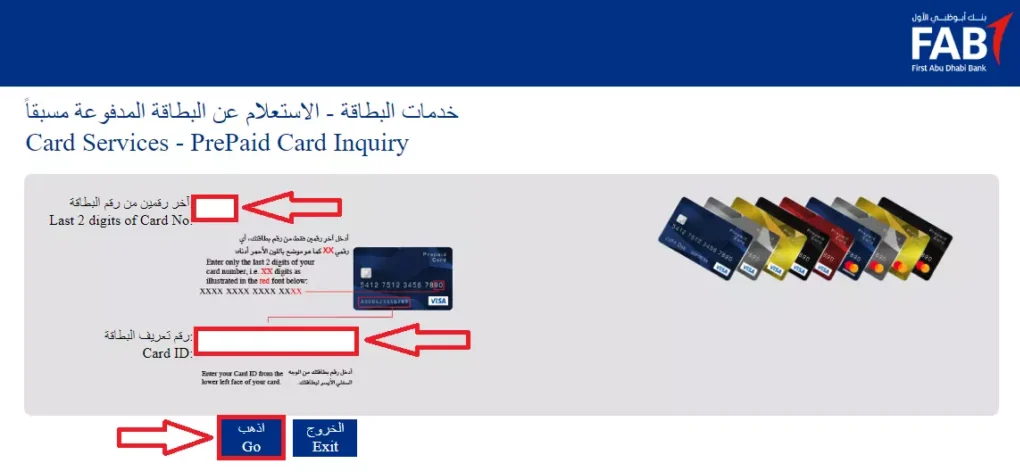
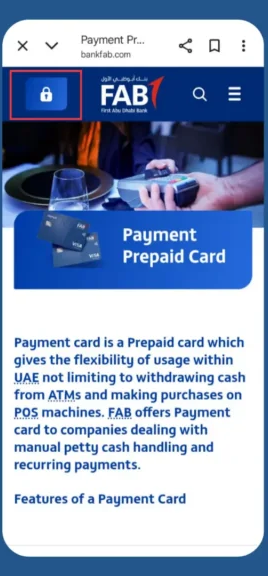
Visit the FAB Prepaid Card Inquiry Portal (Magnati PPC) using your browser.
Step 2: Enter Your Card Details
You will see three fields:
- Enter the last 4 digits of your card
- Enter your Card ID number (16 digits)
- Complete the Captcha to verify you’re human
Step 3: Click “Go”
Once you submit the details, the system will load your prepaid card dashboard.
Step 4: View Your Card Information
You will instantly see:
- Current balance
- Recent transactions (last 5–10 entries)
- Card status (active, expired, or blocked)
- Reload options
- If your card is reloadable (gift card, travel card, etc.), you’ll see direct links to Payit or FAB branch for adding money.
FAB Balance Check Through Mobile App
If you want the easiest and fastest way to check your FAB balance, the mobile app is the best option. Just follow these simple steps. Make sure you enter the same mobile number you used when opening your FAB account or receiving your card.
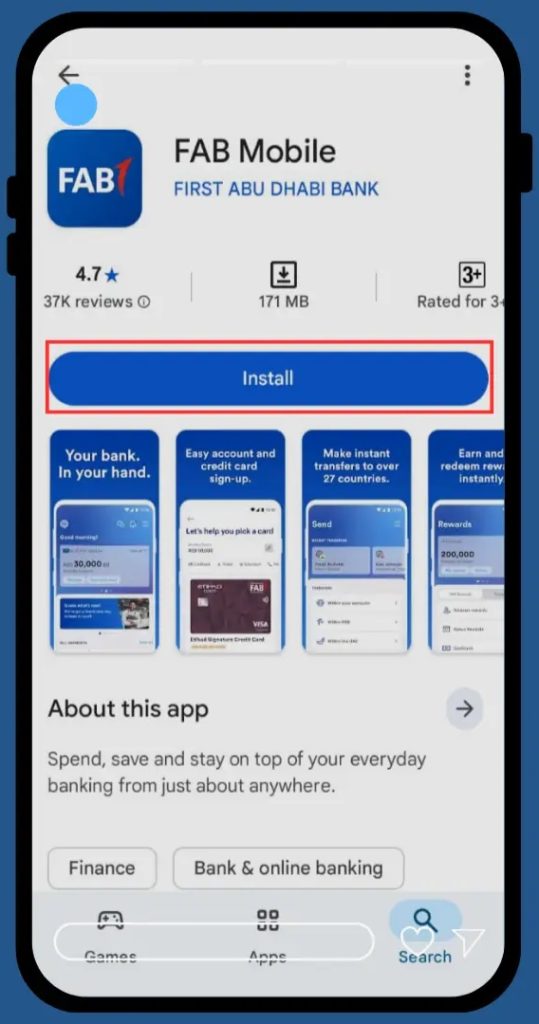
Step 1: Install the FAB Mobile App
- Go to the Google Play Store or Apple App Store.
- Search for FAB Mobile Banking App.
- Download and install the official app.
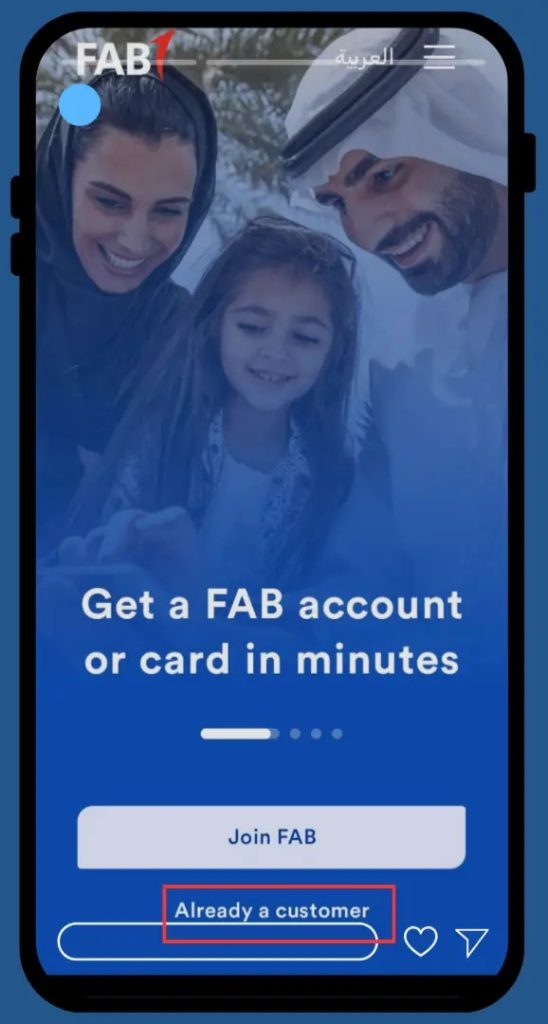
Step 2: Choose “Sign Up” or “Log In”
When you open the app, you will see two main options:
Log In
If you already use FAB Mobile Banking.
Sign Up / Register
If you are a new user.
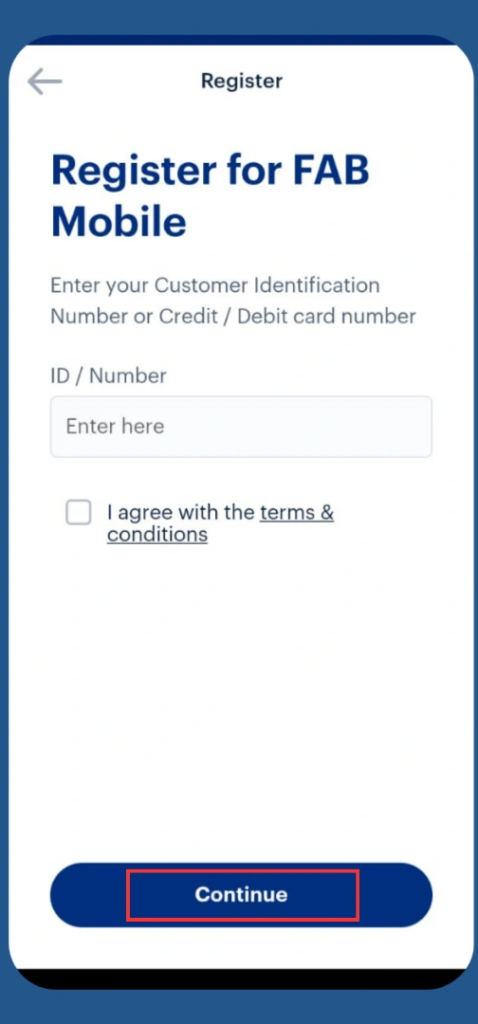
Step 3: Register Your Account with Your Mobile Number
- Tap Register.
- Enter your mobile number exactly as registered with FAB.
- Use the correct format:
- UAE numbers: 9715XXXXXXXX
- International: Add your country code (without 00).
Using a different number can cause verification problems.
Step 4: Verify With OTP (One-Time Password)
- FAB will send a 6-digit OTP to your mobile.
- Enter the code in the app.
- This confirms that you are registering the account.
Step 5: Provide Your FAB Card or Account Details
Enter one of the following:
- Your FAB bank account number, or
- Your Prepaid Card (PPC) number, or
- Your FAB credit card number
This helps the system link your mobile app to your real FAB account.
Step 6: Create Your Login Details
- Choose a username
- Create a strong password
These details will be used every time you log in.
Step 7: Log In to Your FAB Account
You can log in using:

- Your 16-digit FAB debit card number, or
- Your 16-digit credit card number, or
- Your FAB Customer ID
Step 8: Complete One-Time Security Checks
The app may ask for:
- Emirates ID scan (use phone camera)
- Face verification (follow on-screen steps)
This adds extra security to protect your account.
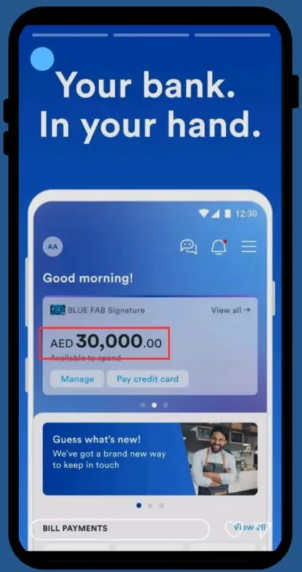
Step 9: See Your FAB Balance
You’ll now reach the Home Screen, where your FAB balance will appear instantly.
- Tap Accounts to view full details
- Check available balance, total balance, and recent transactions
Why This Method Is Best
- Instant balance
- Multiple accounts in one app
- Highest security
- Real-time transaction updates
- Free to use
- Works 24/7 worldwide
For everyday salary and account balance checks, this is the best choice.
FAB Balance Check Using Payit Wallet
If you like digital services or use a Ratibi/prepaid salary card, the Payit Wallet by FAB is one of the easiest ways to check your balance. The app is officially provided by FAB UAE and allows you to manage money, pay bills, and view your balance in seconds.
Before You Start
Make sure you have:
- Your Emirates ID
- A valid UAE mobile number for verification
- The official Payit app from Google Play or App Store
Step 1: Download the Payit App
- Open the Google Play Store or Apple App Store
- Search for “Payit by FAB”
- Download and install the official app
Tip: Only download the app powered by FAB to avoid fake apps.
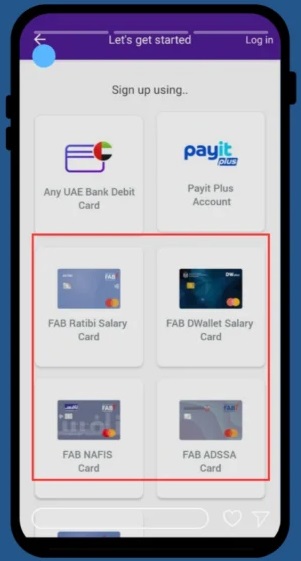
Step 2: Create Your Payit Account
- Open the app
- Tap “Get Started”
- Enter the required details
- Verify your mobile number
- Complete registration using your Emirates ID
Step 3: Select Your Card Type
If you are a salary card user:
- Tap “Ratibi Card Holders”
- Log in using your FAB card/account details
Step 4: Log In to Payit
- Enter your 4-digit PIN
- Or use fingerprint/face ID if enabled
This will take you to your Payit dashboard.
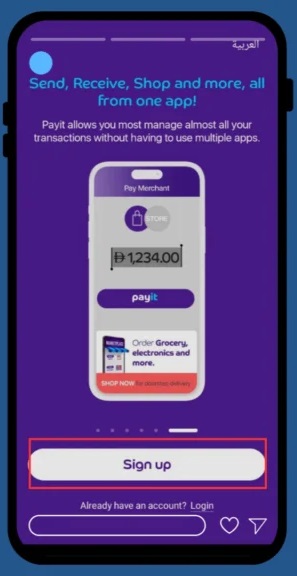
Step 5: Check Your FAB Balance
- Go to the Wallet Balance section
- Your current FAB balance will appear instantly
- You can also view recent transactions inside the app
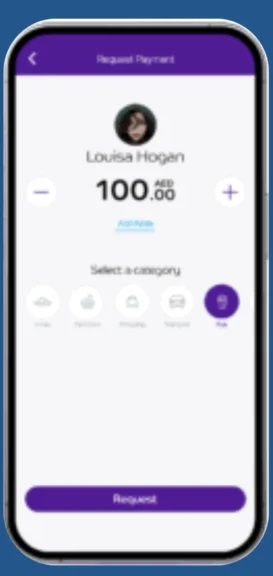
You Can Use Payit For
- Balance check
- Card linking
- Money transfers
- Paying bills
- Shopping
- Salary tracking
Common Payit Problems & Fixes
| Issue | Solution |
|---|---|
| Balance not showing | Refresh app / logout-login |
| Shows 0 balance | Clear cache, update app |
| Card not syncing | Unlink & re-link card |
| Still not working | Call Payit support |
Payit is a powerful tool for FAB card holders who prefer digital services.
FAB Balance Check Via SMS
If you prefer a quick, no-internet method, FAB SMS Banking is perfect. With just one text message, you can receive your account balance within seconds ideal for users who travel often or don’t always have access to mobile data.
Steps
Step 1: Activate SMS Banking
Make sure your mobile number is registered for FAB’s SMS Banking service.
If it’s not activated, contact FAB customer support or visit the nearest FAB branch to enable it.
Step 2: Send the Balance Request
Open your phone’s messaging app and send the SMS in this format to 2121:
BAL <space> Last 4 digits of your FAB account number
Example: BAL 1234
Step 3: Receive Your Balance Instantly
Within a few seconds, FAB will reply with:
- Your available balance
- Ledger balance
- Last transaction details
- Masked account number
Important Notes
- Must send from registered mobile number
- There should be a space between BAL and digits
- SMS charges come from the mobile network

FAB Balance Check Through Phone Banking (IVR + Human Agent)
If you don’t have a smartphone or internet, FAB phone banking is the easiest way to check your balance. It works on any phone, even old Nokia phones. You don’t need to download apps, and you can speak to a real human if you need help. The service is available 24/7 and supports both English and Arabic.
Steps to Check FAB Balance Using Phone Banking
Step 1: Contact FAB Customer Support
Choose the number based on your location:

- UAE Residents: 600 52 5500
- Foreign Users / Outside UAE: +971 2 681 1511
Step 2: Choose Your Language
The automated voice will ask you to select a language:
- Press 1 → English
- Press 2 → Arabic
Step 3: Select the Balance Inquiry Option
From the main menu:
- Go to Account Services
- Then choose Balance Inquiry
This will redirect you to the balance-check system.
Step 4: Provide Your Details
The system may ask for some information to verify your identity.
You do not need to provide all details every time only 2–3 items depending on security requirements.
Primary Information (One of the following):
- 16-digit FAB Account Number
- 16-digit FAB Debit Card Number
- 16-digit FAB Credit Card Number
- FAB Customer ID Number
Verification Details
- Full Name (as registered)
- Emirates ID Number
- Date of Birth (DD/MM/YYYY)
- Registered Mobile Number
Security Information
- 4-digit ATM PIN
- Registered Address (only if asked)
Step 5: Hear Your Balance
Once verified, the system will speak your:
- Available balance
- Total balance
- Last transaction
To speak with a human agent
- Press 0 during the call
- Agent will verify you and tell your balance
FAB Balance Check Through AI Virtual Agent
FAB has an advanced AI voice assistant built into customer care.
What You Can Say
- “Check my balance”
- “Show my last transactions”
- “Help me with my card”
AI will understand normal language, verify you, and give you the information.

FAB Balance Check Through WhatsApp
Many users believe they can check their FAB balance through WhatsApp because of rumors and misleading posts online. If you’re confused, you’re not alone this topic has created a lot of misunderstanding recently. Here is the clear and official truth, explained in simple steps.
Step 1: FAB Does NOT Offer WhatsApp Banking
FAB has never launched any official WhatsApp banking service.
This means:
- You cannot check your balance on WhatsApp
- You cannot transfer money through WhatsApp
- There is no official WhatsApp customer service for banking
- No WhatsApp number exists for FAB account or card enquiries
Step 2: Know the Only WhatsApp Number FAB Mentions
FAB mentions one WhatsApp number, but it is ONLY for reporting:
- Scam attempts
- Fraud messages
Reporting Number: +1 704 771 0476
This number does NOT provide banking services and will NOT show your balance.
Step 3: Be Aware of Fake “FAB WhatsApp Banking” Messages
If someone messages you saying:
- “Send your details for FAB balance check”
- “WhatsApp banking is now active”
- “Share OTP/card info for verification”
…it is 100% fake.
Never share:
- OTP
- Card number
- CVV
- Emirates ID
- Passwords
- Mobile banking PIN
Scammers use WhatsApp to trick users because people trust messaging platforms.
Step 4: Why This Confusion Exists
Misleading YouTube videos and outdated websites claim that FAB has WhatsApp banking.
But FAB’s official statement is very clear:
“No WhatsApp Banking Service FAB has not officially launched WhatsApp banking for customers.”
This is the latest and confirmed information from FAB.
FAB Balance Check Via ATM
Checking your First Abu Dhabi Bank (FAB) balance through an ATM is one of the quickest and most reliable offline methods in 2026. You don’t need internet or a smartphone just your FAB card and PIN.
Step 1: Find a Nearby FAB ATM
Use any of these quick ways to locate the closest machine:
- FAB Live Locator: Visit the official FAB website and open the ATM/Branch locator.
- Google Search: Type “FAB ATM near me” in Google Maps.
- FAB Mobile App: Tap “Locate Us” and filter ATMs nearest to your location.
Popular 24/7 FAB ATM Locations in the UAE
| City | ATM Location | Hours | Processing Time |
|---|---|---|---|
| Abu Dhabi | Khalifa Business Park, Al Qurm | 24/7 | Instant |
| Dubai | Dubai Mall, Lower Ground | 24/7 | Instant |
| Dubai | Dubai Marina Walk | 24/7 | Instant |
| Al Ain | Al Ain Mall | 24/7 | Instant |
| Sharjah | Sharjah City Centre | 24/7 | Instant |
| Ajman | Ajman City Centre | 24/7 | Instant |
| RAK | Al Naeem Mall | 24/7 | Instant |
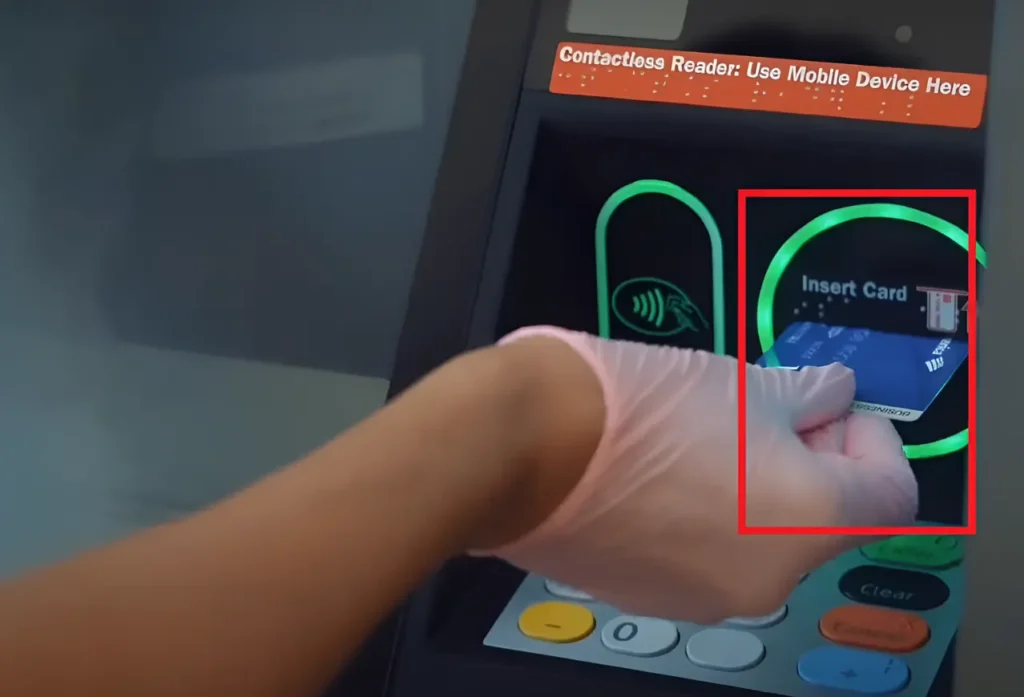
Step 2: Insert Your FAB Card
- Look for the card slot on the ATM (usually on the right side).
- Insert your card with the chip facing up and forward.
- Wait a moment for the ATM to read your card.
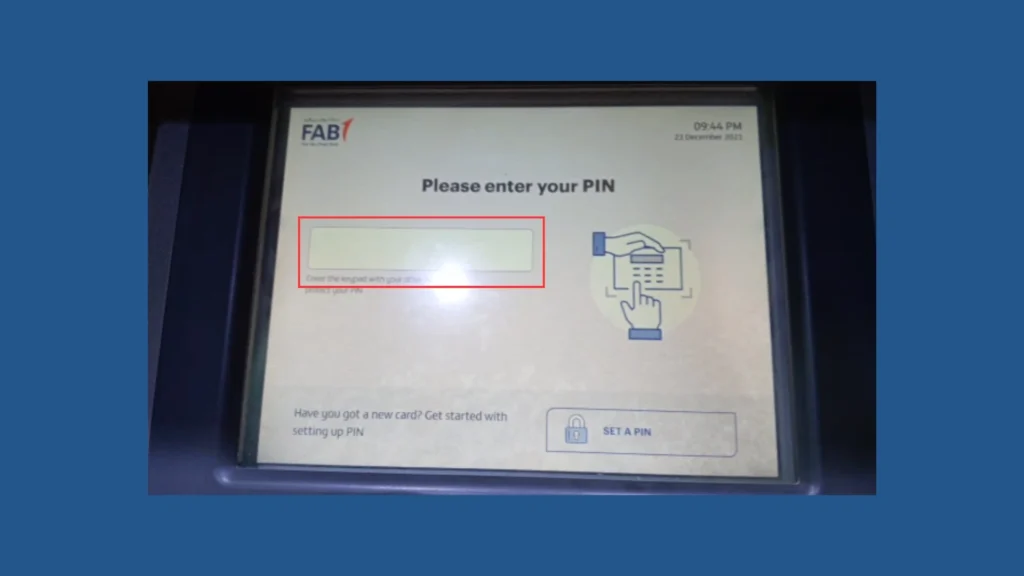
Step 3: Enter Your PIN
- The screen will show “Please enter your PIN.”
- Carefully type your 4-digit FAB PIN.
- Cover the keypad with your other hand for privacy.
- Press Enter (green button).
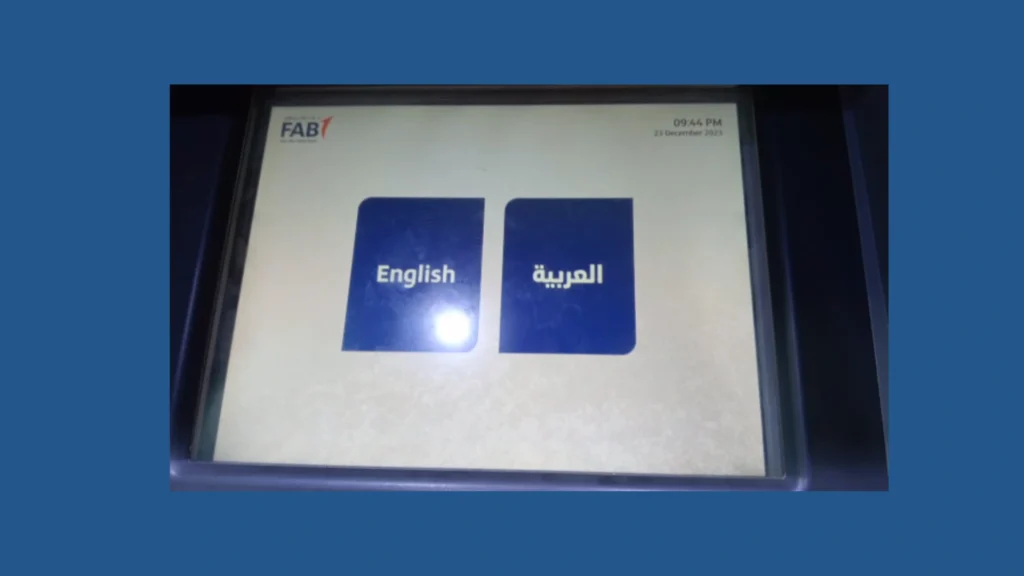
Step 4: Choose Your Language
Most ATMs offer two languages:
- English
- Arabic
Select the one you prefer to continue.

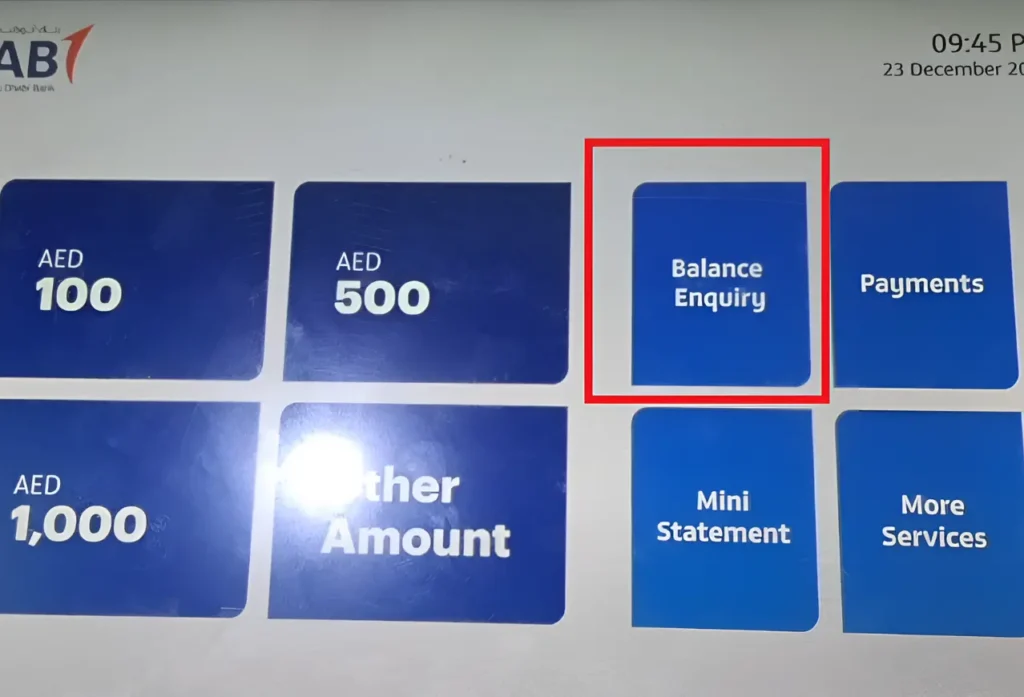
Step 5: Select “Balance Inquiry”
- From the main menu, tap “Balance Inquiry.”
- If listed with numbers, it may appear as Option 2.
Step 6: Select Your Account Type
If your card is linked to more than one account, choose:
- Current Account
- Savings Account
- Credit Card Account
Select the account you want to check.
Step 7: View Your Balance
The screen will show full details, including:
- Available Balance – money you can use right now
- Total Balance – includes pending transactions
- Last 4 digits of your account number
- Date and time of the inquiry
Step 8: Print a Receipt (Optional)
If you want a physical record:
- Tap “Yes – Print Receipt”
- Otherwise, select “No”
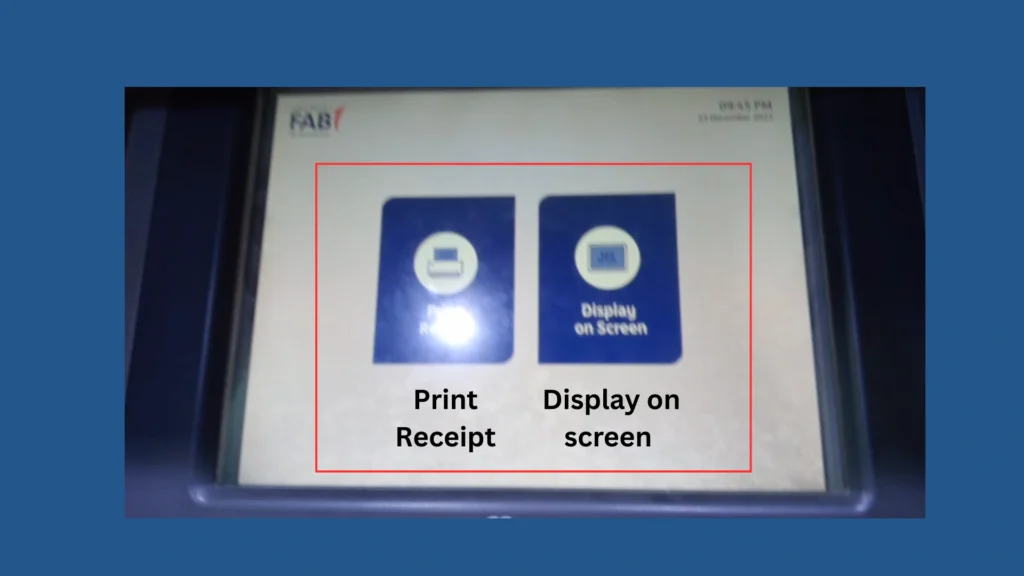
The receipt will show:
- Your available balance
- Total balance
- Date and time
- ATM location
Step 9: Complete the Process Safely
- Tap Exit or press the red cancel button.
- Wait for your card to be returned.
- Take your card and receipt immediately.
- Ensure the screen resets to the Welcome page before leaving.
FAB Balance Check at Branch
For people who prefer face-to-face service.
Steps
- Find nearest FAB branch
- Carry Emirates ID + Card
- Take queue number
- Meet teller
- Request “balance inquiry”
- Receive paper slip or verbal balance
Lulu FAB Balance Check
Lulu prepaid cards can be checked by:
- FAB ATM
- Magnati portal
- Payit
- Phone banking
POS machines sometimes show balance after a small test transaction.
Ratibi FAB Balance Check Online
Ratibi is FAB’s salary card designed for workers without traditional accounts.
You can check Ratibi card balance by:
Method A: Payit Wallet
- Download Payit app
- Register with Emirates ID
- Choose “Ratibi card holders”
- Link your Ratibi card
- Your balance appears instantly under “Wallet Balance”
Method B: PPC / Magnati Prepaid Card Portal
- Open the Magnati prepaid card inquiry page
- Enter:
- Last 4 digits of the card
- Full Card ID
- Captcha
- Click Go
- You will see:
- Current balance
- Last 5–10 transactions
- Card status
- Reload options
This method is simple and recommended for Ratibi users who don’t use Payit.
Comparing All FAB Balance Check Methods
| Method | Speed | Difficulty | Best For |
|---|---|---|---|
| FAB Mobile App | Very fast | Easy | Daily use |
| FAB Website | Fast | Medium | Desktop users |
| Magnati Portal | Fast | Easy | Prepaid cards |
| Payit | Fast | Easy | Ratibi users |
| SMS | Medium | Very easy | No internet |
| Phone Banking | Medium | Easy | Non-tech users |
| AI Agent | Medium | Easy | Voice lovers |
| ATM | Fast | Easy | Offline users |
| Branch | Slow | Very easy | In-person support |
How to Open a FAB Bank Account
Opening a FAB Bank account is easy, and you can choose the method that fits your needs. FAB offers different account types including salary, savings, and current accounts. Here is a simple guide to get started.
Step 1: Choose How You Want to Apply
You can open your FAB account through any one of these four methods:
- Visit a FAB Branch: Go to the nearest FAB branch, fill out the form, and submit your documents.
- Apply Online Through the FAB Website: Open the FAB website, choose “Open an Account,” fill in your details, and upload the required documents.
- Use the FAB Mobile App: Download the FAB Mobile App, enter your information, verify your identity, and submit your application.
- Call FAB Customer Service: Contact the FAB helpline and complete your application through a guided phone call.
Step 2: Prepare the Required Documents
To open a FAB account, you must verify your identity. Keep these documents ready:
- Emirates ID (original and valid)
- Proof of address
- Registered mobile number
- Salary details (for salary accounts)
Step 3: Wait for Account Approval
Once your application is reviewed and approved, FAB will activate your account.

Step 4: Receive Your FAB Debit Card
After activation, FAB will issue a debit card.
You can use it to:
- Check your balance
- Withdraw cash from ATMs
- Shop online or in stores
- Make everyday payments
Types of FAB Accounts
FAB offers three main types of accounts for different financial needs. Each account is designed to make banking easier, whether you want to save money, manage daily expenses, or receive your salary digitally. Here is a clear step-by-step breakdown:
1. Savings Accounts
A Savings Account helps you save and grow your money. When you deposit cash, FAB gives you interest, which increases your balance over time.
Types of FAB Savings Accounts
- Personal Savings Account – Ideal for everyday savers
- iSave Account – Higher interest rates for smart saving
- Elite Savings Account – Designed for high-value customers
- Personal Call Account – Flexible savings with easy access
Best For: Employees and individuals who want to build long-term savings.
2. Current Accounts
A Current Account is made for daily transactions. It is perfect for individuals and businesses who need fast access to money, regular transfers, and additional lifestyle benefits.
Types of FAB Current Accounts
- Personal Current Account – Simple account for daily use
- FAB One Account – Premium benefits for active users
- Elite Current Account – Exclusive rewards and services
- FAB Etihad Guest Account – Earn Etihad miles on spending
- FAB Etihad Guest Elite Account – Higher rewards and travel perks
Best For: People who need regular transfers, quick payments, and travel or reward benefits.
3. Digital Salary Account (Payit Plus)
The Digital Salary Account works like a wallet-based bank account. Everything is fully online, giving you complete control from your phone.
Key Benefits
- Your salary goes directly into your Payit wallet no bank account required.
- No minimum balance and no hidden charges.
- Free physical and virtual card for shopping and ATM withdrawals.
- Free local and international transfers.
- AED 50 bonus after 3 continuous salary deposits or AED 5,000 spend in 3 months.
- Great exchange rates for international transactions.
- Access to 100+ deals and discounts across UAE stores.
- Need cash? Send money and pick it up easily from MoneyGram worldwide.
Best For: Workers who want a simple, digital, no-paperwork salary account with global features.
How to Activate FAB Mobile Banking
To use FAB Mobile Banking, you need a valid FAB debit card. Once you have it, follow these easy steps:
Step 1: Download the App
Get the official FAB Mobile App from:
- Play Store (Android)
- App Store (iOS)
Step 2: Register Your Account
Open the app and tap “Register.”
You’ll need to enter:
- Your debit card number
- Card details
- Customer information
Step 3: Verify with OTP
FAB will send a One-Time Password (OTP) to your registered mobile or email.
Enter it to complete verification.
Step 4: Create Your Login Password
Set a secure 4–6 digit PIN or password to access the app.
After activation, you can:
- Check your FAB balance
- View transactions
- Transfer money
- Pay bills
- Manage your account anytime
FAB Account Minimum Balance Requirement
FAB’s minimum balance rules depend on your account type:
- Personal Savings Account: Must maintain AED 3,000. If the balance drops below this, FAB charges a AED 10 monthly fee.
- Elite Savings Account: No minimum balance requirement. Many users who only use the account for basic deposits/withdrawals fall under this category.
There is no minimum balance for regular basic FAB accounts.
FAB SWIFT Code (For International Transfers)
FAB Bank’s official SWIFT code is:
NBADAEAAXXX
This code is required whenever you send or receive international payments.
It ensures your money reaches the correct FAB branch securely.
SWIFT is a global financial network used by all major banks for international transfers.
FAB Balance Inquiry Problems & Quick Solutions
Even the best banking systems can face small issues. If your FAB balance check isn’t working, here are the most common problems and their easy fixes explained in simple steps so you can solve everything yourself.
1. Login Problems (App or Online Banking)
A. Wrong Username or Password
Follow these steps:
- Make sure Caps Lock is off and your email/number format is correct.
- Enter your details slowly and double-check each character.
- Tap Forgot Password to reset it through your registered mobile or email.
B. Account Locked
- If the message says “locked for X minutes,” wait for that time.
- Try logging in again after the timer ends.
- If still locked, tap Forgot PIN and reset it with the OTP.
- Not working? Call FAB support: 600 52 5500.
2. OTP Issues (One-Time Password Not Received)
- Make sure your registered mobile number is correct in Settings → Profile.
- Tap Resend OTP after waiting 60 seconds.
- Move to a better signal area or switch between Wi-Fi and mobile data.
Unregistered Mobile Number
- Go to any FAB ATM → Card → PIN → SMS Banking → Register.
- Enter your correct mobile number and set a 4-digit SMS PIN.
- Or visit a FAB branch with your Emirates ID to update your number.
3. ATM Problems
A. Balance Not Showing on Screen
- Tap Back and select Balance Inquiry again.
- Try another FAB ATM nearby.
- If still not working, tap on-screen Assistance to call FAB support.
B. Card Not Recognized
- Clean the chip or magnetic strip gently with a soft cloth.
- Insert the card slowly until you feel it click.
- If still rejected, try a different ATM or request a replacement card from a branch.
C. ATM Swallowed Your Card
- Note the ATM ID shown on the screen.
- Visit the nearest FAB branch linked to that ATM immediately.
- Show your Emirates ID and the ATM ID to retrieve your card.
4. SMS Banking Problems
A. No SMS Reply From FAB
- Send the message from your registered mobile number only.
- Use the correct format:
BAL 1234
(Replace 1234 with the last four digits of your account number.) - Wait 1–2 minutes and resend if required.
B. SMS Not Sending
- Check if you have enough mobile airtime/SMS credits.
- Make sure your network signal is strong.
- Try sending the SMS again.
5. Mobile App Issues
App Not Opening or Crashing
- Fully close the FAB Mobile App and reopen it.
- Restart your phone to refresh memory.
- Update the app or reinstall it from Play Store/App Store.
6. Online Banking (Website) Issues
Website Not Loading or Timing Out
- Switch to a faster or stable internet connection.
- Clear your browser cache and cookies.
- Try again after a few minutes the website may be under maintenance.
How to Download Your FAB Bank Statement Using the FAB Mobile App
Downloading your FAB bank statement takes less than a minute. Follow these simple steps to get a clean, official PDF that you can use for visas, income proof, or financial verification.
Step 1: Log In to the FAB Mobile App
Open the FAB app on your phone and sign in using:
- Your PIN, or
- Fingerprint / Face ID
This gives you secure access to your accounts.
Step 2: Select the Account You Want the Statement For
Tap the account you need the statement from
For example: salary account, savings account, or current account.
Step 3: Open “Statements & Documents”
Scroll down the account page until you see Statements & Documents,
then tap to open the menu.

Step 4: Choose Your Statement Timeframe
Select how many months you want to download:
- Last 3 Months: Best for visa checks or basic income proof
- Last 6 Months: Good for loan applications or detailed reviews
- Custom Range: Pick your own start and end dates using the calendar
Step 5: Generate Your PDF Statement
Tap Download or View PDF.
The app will create a clear statement showing:
- All transactions
- Opening & closing balances
- Any fees
- Account details
Step 6: Save or Share Your Statement
You can:
Save
Tap the download icon to store it in your phone’s Downloads folder.
Share
Tap the share icon to send the PDF to:
- Employers
- Embassies
- Banks
- Service providers
Step 7: Check the PDF Carefully
Make sure the statement includes:
- Your full name
- Correct account number
- All transactions
- Opening and closing balances
- FAB’s official logo
This ensures your document is valid and accepted everywhere.
Why Your FAB Statement Is Important
You may need your FAB bank statement for many reasons, including:
- Proving sufficient funds for international transfers
- Meeting visa or residency requirements
- Showing salary credits for income verification
- Fulfilling AML/KYC rules
- Loan or credit card applications
- Solving transaction disputes
- Providing proof to landlords, schools, or utilities
Keeping your last 3 to 6 months of statements saves time whenever documentation is needed.
How to Get a Salary Certificate from FAB
Getting a salary certificate from FAB is very easy, and the fastest method is through the FAB Mobile App. Make sure your internet connection is stable before you start.
Step 1: Log In to the FAB Mobile App
- Open the FAB Mobile App on your smartphone.
- Log in using your PIN, fingerprint, or Face ID.
- Ensure the app is updated to avoid errors.
Step 2: Go to the Services Menu
- Tap the menu icon (☰) in the top-left corner.
- Select “Accounts & Documents.”
- This section contains all downloadable account documents.
Step 3: Choose Salary Certificate
- Under Document Requests, tap “Salary Certificate.”
- This certificate shows your salary credits for a selected period.
Step 4: Select Account & Time Period
- Choose the account where your salary is deposited.
- Select the required timeframe:
- Last 3 Months – Best for visa processing or quick income proof.
- Last 6 Months – Useful for loans and financial checks.
- Custom Dates – Select your own start and end date if required by an employer or authority.
- Make sure the period includes all salary entries you want.
Step 5: Generate Your Certificate
- Tap “Generate Certificate.”
- The app will instantly create a PDF showing:
- Monthly salary deposits
- Your name
- Account number
- FAB official branding and footer
- No branch visit is needed — the PDF is ready in seconds.
Step 6: Download or Share
- Tap Download to save the PDF to your phone.
- Tap Share to send it directly via email or WhatsApp to:
- Employers
- Banks
- Embassies
- Rental agencies
This PDF is fully official and accepted across the UAE.
Step 7: Verify Your Certificate
Before sending it, open the PDF and confirm it shows:
- Your full name
- Account number
- Salary entries for the selected period
- Official FAB branding
This ensures no information is missing.
Step 8: Keep Copies Ready
- Save your certificate in your phone or cloud storage.
- Keeping 3–6 months of certificates ready helps with future loans, visas, or rental agreements.
- You can generate as many certificates as you want — the process is completely digital and secure.
What Each Document Shows
| Document | What It Includes | When It’s Needed |
|---|---|---|
| FAB Account Statement | All transactions, balances, fees | Visa applications, loans, financial reviews |
| FAB Salary Certificate | Official proof of salary deposits | Rental agreements, employer requests, embassy documentation |
Why You Should Check Your FAB Balance Regularly
- Detect fraud early
- Confirm salary deposit
- Avoid overdraft fees
- Spot duplicate charges
- Track spending habits
- Manage monthly budget
- Prepare for big bills
- Improve financial awareness
It is a simple habit that keeps your finances healthy.
Top Benefits of Checking Your FAB Balance Regularly
Keeping track of your FAB account balance might feel like a small habit, but it plays a huge role in keeping your money safe and your finances stress-free. The following are the biggest benefits you get when checking your FAB balance regularly:
Catch Suspicious Activity Early!
- What it means: A quick glance at your account can help you spot transactions you don’t recognize like strange subscriptions, unexpected withdrawals, or charges you never made.
- Why it matters: The sooner you notice unusual activity, the faster you can report it and prevent financial loss.
- Quick tip: If you ever see a charge you didn’t authorize, report it directly inside your banking app and contact FAB support immediately.
Avoided Overdraft Fees
- What it means: Regularly checking your available balance helps you control your daily spending.
- Why it matters: Accidental overdrafts and bounced payments can result in costly bank fees and unnecessary stress.
- Quick tip: Keep a small safety buffer (like $50–$100) in your account to avoid surprise overdrafts.
Ensure That Every Transaction is Correct
- What it means: When you check your balance often, you can quickly confirm that every deposit, withdrawal, and payment matches what you expected.
- Why it matters: Banks rarely make mistakes, but they do, and spotting mistakes early gives you more control.
- Quick tip: Keep receipts or notes for larger purchases so you can verify them easily.
Spot Duplicate or Wrong Charges
- What it means: Sometimes a transaction gets posted twice due to technical glitches or payment system errors. Regular checks help you catch duplicates early.
- Why it matters: You should never pay twice for the same purchase, and banks usually refund duplicate charges when reported on time.
- Quick tip: Look for identical amounts or the same merchant appearing twice on the same day.
Understand your spending habits,
- What it means: Your transaction history reveals where your money is being spent groceries, fuel, coffee, subscriptions, etc.
- Why it matters: When you understand your real spending patterns, budgeting becomes more realistic and easier.
- Quick tip: After a week or month, identify one spending habit you can reduce or adjust.
Simplify Account Reconciliation
- What it means: Reconciliation is simply matching your personal records (notes, budgeting apps, or checkbooks) with the bank’s transaction list.
- Why it matters: Doing this regularly helps you catch mistakes early and prevents confusion later.
- Quick tip: Reconcile weekly or at least every payday. It only takes a few minutes and keeps your accounts clean.
Protect Your Credit & Financial Reputation
- What it means: Keeping an eye on your balance ensures you have enough funds to pay bills on time.
- Why it matters: Timely payments keep your credit score strong, which helps you get better loans, lower interest rates, and a stronger financial standing.
- Quick tip: Set reminders or enable auto-pay for recurring bills so you never miss a payment.
Better Cash Flow Management
- Why it matters: Understanding timing like when salaries come in and when big bills are due helps prevent cash shortages and overdue payments.
- Quick tip: Maintain a simple calendar to record bill dates and salary days. Check your balance a few days before each major payment.
- What it means: Regular balance checks tell you exactly how much money is coming in and moving out.
Catch New Auto-Debits or Subscriptions Early
- What it means: Frequent checks help you notice new recurring charges or trial-based subscriptions that may have converted into paid plans.
- Why it matters: Cancelling early saves money and prevents small charges from stacking up.
- Quick tips: Once a month, scan your account for repeating charges and decide which ones you still need.
Plan Large Purchases With Confidence
- What it means: Knowing your true available balance helps you decide on the right time to book travel, pay rent, or make large one-time purchases.
- Why it matters: This prevents declining payments, overdrafts, and confusion caused by pending transactions.
- Quick tip: Always check your available balance before making big payments not just your ledger balance.
Maximize Interest, Rewards, and Account Benefits
- What it means: Some FAB accounts offer higher interest, fee waivers, or rewards if you maintain a certain minimum balance.
- Why it matters: Regular balance monitoring ensures you meet those conditions, helping you save more or earn extra perks.
- Quick tip: Mark your minimum balance requirements somewhere easy to see and check them weekly.
Keep Money Discussions Smooth (for Shared Accounts)
- What it Means: When partners share finances, balance and transparency prevent surprises.
- Why it matters: Clear communication avoids arguments and helps both partners make confident financial decisions.
- Quick tip: Have a weekly 2–5 minute check-in to review joint account activity and upcoming bills.
Benefits for Employees (FAB Account Users)
- No minimum balance requirement
- No traditional bank account is needed
- Complimentary accident insurance
- Usable worldwide
- 24/7 customer support
- Protected under WPS (Wage Protection System)
- SMS alerts for every transaction
- Easy access through the online portal
Benefits for Employers
- Automated payroll processing
- Online card and account management
- Salary payments via net banking
- Secure and compliant financial transactions
FAQs About FAB Balance Check
What is the easiest way to check FAB balance?
Ans: The FAB Mobile App fastest and most complete.
How to check Ratibi salary card balance online?
Ans: Use Payit or Magnati prepaid portal.
Can I check FAB balance through WhatsApp?
Ans: No. FAB has no WhatsApp banking.
How to check FAB prepaid card balance?
Ans: Use the Magnati PPC portal.
What is the best method for non-tech users?
Ans: Phone banking, ATM, or branch visit.
Conclusion
Checking your FAB balance is simple whether you use a salary account, a Ratibi card, or prepaid PPC/Magnati card. The FAB Mobile App gives the fastest real-time balance, while the website is ideal for desktop users. Ratibi and prepaid users can easily access money through the Magnati portal or the Payit wallet. If you prefer offline options, SMS, phone banking, ATM machines, and branch visits are always available. Each method fits a different user, helping you track salary deposits, avoid errors, and stay fully in control of your money.



About The Author