Salik Balance Check 2027: How to Check Salik Balance by Plate Number, Account Number, Mobile & SMS (A Complete Guide)
Salik Balance Check. If you drive in Dubai, checking your Salik balance on time is very significant. A single missed top-up can lead to fines starting at AED 50, and many drivers only realise it when the fine has already been added. Whether you travel daily, rent a car, or use Dubai’s toll gates occasionally, keeping your balance updated helps you avoid problems.
There are many easy ways to check your Salik balance in 2027 by plate number, account number and PIN, mobile number, tag number, SMS, RTA apps, call services and more.
This guide explains every method in basic steps, with solutions to common issues and smart tips to avoid fines, so your trips stay smooth and easy.
What Is Salik?
Salik is Dubai’s electronic toll system operated by RTA. It uses RFID tags placed on your car’s windshield. Whenever you pass a Salik gate, the system detects your tag and automatically deducts AED 4 from your prepaid Salik account.
Why You Must Check Your Salik Balance Regularly
Checking your Salik balance helps you avoid:
- AED 50 fine for the first unpaid toll trip
- AED 100 fine for the second trip
- Up to AED 400 per day fine for repeated violations
- Account suspension
- Delays during travel
- Trouble renewing registration if fines exist
Regular balance tracking keeps your driving smooth and stress-free.
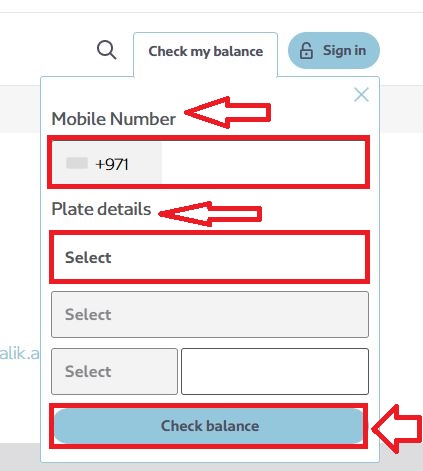
Salik Balance Check by Plate Number
This is the most popular method because you only need your vehicle plate details.
Steps:
- Go to www.salik.ae
- Click Check Balance under “Services”
- Enter:
- Plate number
- Plate category
- Emirate (Dubai, Sharjah, Abu Dhabi, etc.)
- Add the mobile number or account number linked to your Salik
- Click Submit
- Your balance will appear instantly
| Pros | Cons |
|---|---|
| Very easy | Requires the plate to be already linked to Salik |
| Free | |
| Works in all emirates |
RTA Salik Balance Check (Official RTA Website)
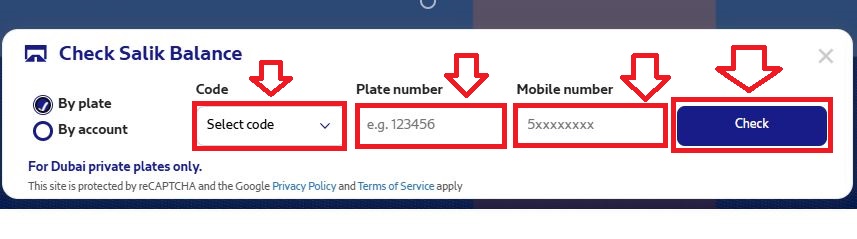
To check your Salik balance quickly, follow the simple steps below. These methods work for Dubai private plates only and give you instant balance updates.
1. Check the Salik Balance by Plate Number
Step 1: Visit the official RTA website.
Step 2: Open the Salik Balance Check page.
Step 3: Choose “By Plate” as your balance checking option.
Step 4: Enter the required details
- Plate code
- Plate Number
- Mobile Number linked to your Salik account
Step 5: Click Check to view your current balance instantly.
This method is fast and does not require login details.
2. Check the Salik Balance by Account Number
If you prefer using your Salik account login details, follow these steps:
Step 1: Visit the RTA website.
Step 2: Select the option “By Account”.
Step 3: Enter your:
- Account Number
- PIN Number
Step 4: Click Check to instantly see your Salik balance.

This method provides a more secure way to access your information.

Salik Balance Check Using RTA Dubai App
Follow some of these steps:
Steps:
- Install RTA Dubai App (iOS/Android)
- Log in using UAE Pass or mobile number
- Go to Salik Services
- Select Check Salik Balance
- Enter:
- Plate number
- Emirate
- Balance will appear
Extra Features
- Recharge
- Check fines
- Add vehicles
- Update information

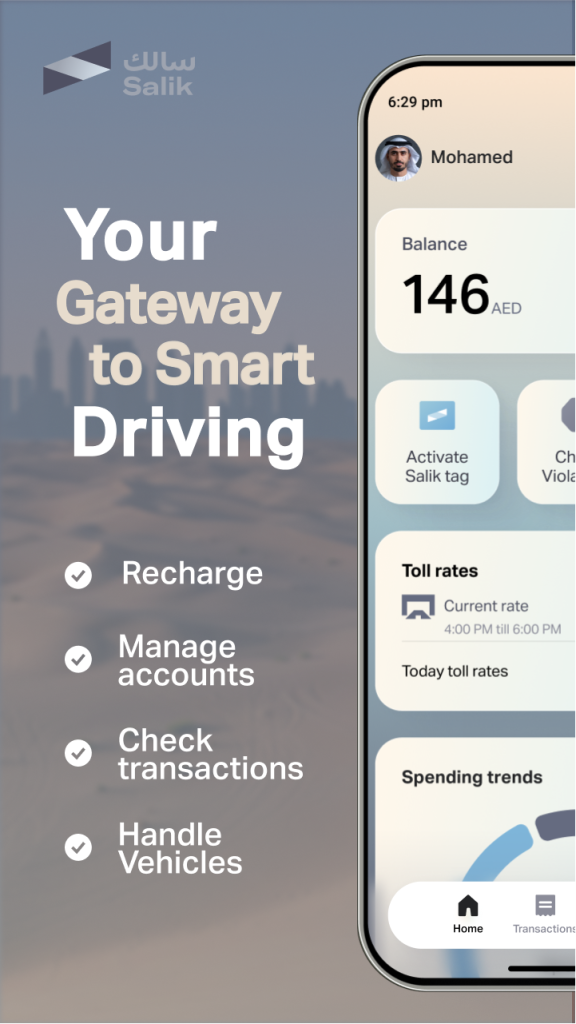
Salik Balance Check Using Dubai Drive App
This is another RTA app with a clean interface.
Steps:
- Download Dubai Drive App
- Log in via UAE Pass
- Go to Salik
- Select Balance
- Enter plate number
- View balance
Salik Balance Check Using Dubai Now App
The Dubai Now App integrates 120+ Dubai services.
Steps:
- Open Dubai Now App
- Sign in
- Go to Transport, Salik
- Enter:
- Salik account number
- PIN
- Balance appears instantly
Check Salik Balance Using Banks & Exchange Apps
Many UAE banks support Salik services:
- FAB
- ADCB
- Emirates NBD
- Mashreq
- Dubai Islamic Bank
- RAKBank
- Payit
- Etisalat Wallet
- Du Wallet
Steps:
- Open bank app
- Go to Payments / Salik
- Enter plate or account number
- See balance & recharge
Salik Balance Check by Mobile Number
If your mobile number is registered with Salik, you can use it to check your balance.
Methods that support mobile-number login:
- Salik Website
- RTA Dubai App
- Dubai Now App
- Dubai Drive App
- Salik Call Center
Steps:
- Enter Mobile Number
- Enter Plate Number OR Account Number
- Verify using OTP (if required)
- View Salik balance
Salik Balance Check by Tag Number
Your Salik tag (RFID sticker) also works for balance login.
Where you can use tag number:
- Salik Pay (Recharge without login)
- Salik Call Center Self-Service
- Smart Salik App
Steps:
- Open Smart Salik App
- Enter the Tag Number + Plate Details
- Tap Check Balance
Salik Balance Check by SMS
This method works even without internet.
SMS Format:
- Send SMS to 9393 in this format:
- Salik (space) Plate Number (space) Emirate Code
Example: Salik 12345 DXB

You will receive your balance within seconds.
| Pros | Cons |
|---|---|
| Works offline | Only shows basic balance |
| Fast | SMS fee ~ AED 0.30 |
Salik BalanceCheck by Call or Account Number & PIN
This method works when you remember your Salik account number and PIN.
Via Phone Call (24/7)
- Dial 800 SALIK (72545)
- Press 1 for Arabic or 2 for English
- Press 3 to log in using your account number + PIN
- Press 1 to hear your current Salik balance


This is a 24/7 service.
Online
- Visit www.salik.ae
- Click Login
- Enter your Account Number + PIN
- Go to My Account
- Select Check Balance
| Pros | Cons |
|---|---|
| Very accurate | You must know your PIN |
| Shows full account details |
Salik Balance Check Number UAE
For balance, complaints, fines, and all services:
- Local UAE Toll-Free: 800 SALIK (72545)
- International Users:
+971 4 2335000
+971 4 2335005 - Email: [email protected]
This helpline is available 24/7.
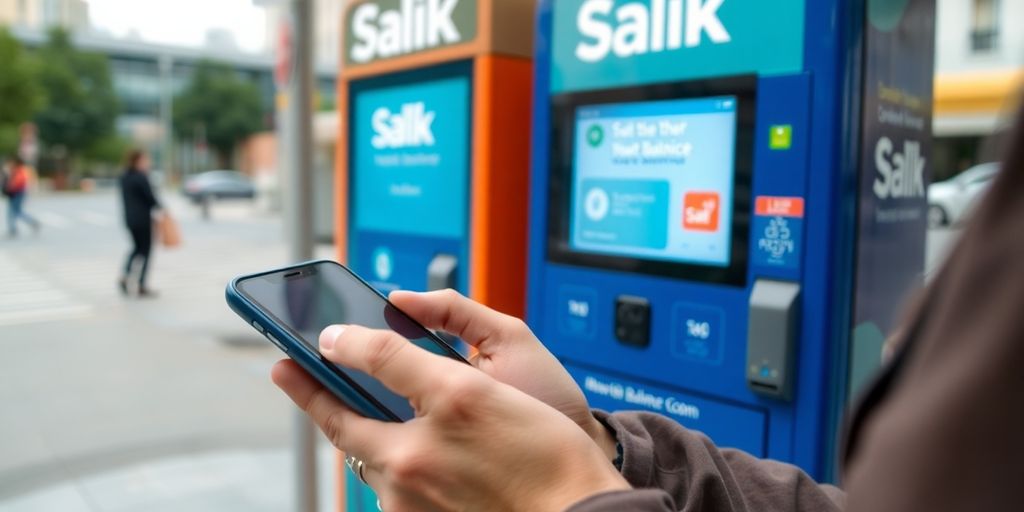
Check Salik Balance at Kiosks
You can check your balance using RTA kiosks found in:
- Malls
- Metro stations
- Customer happiness centers
Steps:
- Select Salik Services
- Tap Check Balance
- Enter Account Number + PIN
- View balance
Salik Balance Check Sharjah / Abu Dhabi
Dubai Salik is used in Dubai only, but users in Sharjah, Abu Dhabi, and other emirates who travel to Dubai can also check balance using:
- Salik Website
- RTA App
- Dubai Drive App
- Dubai Now App
- SMS Service
- Call Center
Your emirate does not matter Salik works nationwide.
Recharge Your Salik Account
Salik balances are important for smooth Dubai travel. Recharging your Salik account is now faster and easier than ever. Recharge online, through apps, via SMS, at kiosks, or even through banks.
Who Can Recharge a Salik Account?
Anyone who has a registered Salik account can recharge it. You don’t need any additional approval all UAE residents, companies, and frequent travelers can use this service.
Documents You Need (Only One Required)
To recharge, you only need one of the following:
- Salik Account Number + PIN Code
- Vehicle Plate Number + Mobile Number linked to Salik
- Vehicle Plate Number + Salik Tag Number
(This also works through Salik Call Center Self-Service)
That means you don’t need multiple documents just one is enough.
Service Fee & Processing Time
- Recharge Fee: No extra charges
- SMS Recharge Fee: 30 fils per message (charged by mobile operator)
- Processing Time: Instant balance updates immediately
This makes Salik one of the quickest toll systems in the region.
How to Recharge Your Salik Account
Below are the easiest ways to recharge your Salik account, whether you use the website, mobile apps, SMS, kiosks, or the Salik Call Center.
1. Recharge Through the Salik Website (With or Without Login)
A. Recharge Without Logging In
Perfect if you don’t remember your password.
- Visit Salik Website
- Open the Recharge Salik Account section
- Choose your recharge method
- Enter the required details (plate number, tag number, or account number)
- Enter the recharge amount
- Confirm payment
Your balance updates instantly.
B. Recharge After Logging In
Gives you full access to your account.
- Log in using username + password
- Go to Recharge Salik Account
- Select your recharge method
- Enter your details
- Confirm payment
Your new balance will appear immediately.

C. Recharge Another Person’s Account
You can recharge a friend or family member’s account.
Use any one of these:
- Account Number + PIN
- Mobile Number + Plate
- Plate Number + Tag Number
Enter their details → choose the recharge amount → confirm.
2. Recharge Through the Smart Salik App
The Smart Salik App is designed specifically for Salik users.
- Log in using username + PIN
- Tap Recharge
- Choose your recharge method
- Enter details and recharge amount
- Confirm payment
The balance updates instantly.
3. Recharge Through the RTA Dubai App
Many drivers prefer the RTA app because it connects all vehicle services in one place.
- Open RTA Dubai App
- Log in
- Select Salik
- Tap Recharge
- Enter account number/plate details
- Confirm recharge
4. Recharge Through the Dubai Now App
This app brings most Dubai government services into one platform.
- Log in to Dubai Now
- Select Salik
- Enter account number + PIN
- Choose recharge amount
- Complete payment
Perfect for users who already use Dubai Now for bills and payments.
5. Recharge Through the Careem App
Careem also supports Salik top-ups under the “Bills & Recharges” section.
- Open Careem App
- Go to Bills & Recharges
- Select Salik
- Enter your details
- Confirm your payment
This option is convenient for users who frequently use Careem for everyday services.
6. Recharge Through TAMM (Abu Dhabi Government App)
If you use TAMM in Abu Dhabi, you can also recharge Salik from there.
- Log in to TAMM
- Go to My Utilities
- Select Salik
- Enter your details
- Choose recharge amount
- Confirm payment
7. Recharge Through Self-Service Machines
RTA kiosks and Salik machines are available across Dubai.
- Enter Account Number + PIN
- Choose Recharge
- Select amount
- Confirm
Your balance updates immediately.
8. Recharge Through SMS (Very Useful Without Internet)
Send an SMS to 5959 using this format:
RRechargeCardNumberAccountNumber*PIN
Example:
R3456789123451234567890*1234
After sending the message, your balance is updated instantly.
9. Recharge Through Salik Call Center (Self-Service)
If you prefer a phone call, this method is perfect.
Recharge Without Login
- Call 800 SALIK (72545)
- Enter:
- Account Number + PIN OR
- Mobile Number + Plate Number OR
- Tag Number + Plate Number
- Enter recharge number
- Confirm
Recharge After Login
- Log in with Account Number + PIN
- Select Recharge
- Enter recharge details
- Confirm
10. Recharge Through Banks
Most UAE banks allow Salik top-ups through their mobile apps or online banking.
Requirements:
- Account Number + PIN or
- Mobile Number + Plate Details
Notes:
- Minimum recharge: AED 50
- Maximum recharge: AED 50,000
- Amount must be in multiples of 50 (50, 100, 150, etc.)
This is useful for drivers who prefer banking apps.
What You Receive After Recharge
After your recharge is successful, you will immediately receive:

- Updated Salik balance
- Payment confirmation (SMS, email, or app notification)
- A record of the transaction in your account history
How to Register and Activate a Salik Tag
When you buy a new Salik tag, you need to activate it so you can drive through Dubai’s toll gates easily. We need only a few minutes to complete the process, and you can do it online, through apps, or via phone.
Who Can Register a Salik Tag?
This service is open for everyone in the UAE, including:
- Individual vehicle owners
- Companies and businesses
- Government departments
If your vehicle is registered outside Dubai or even outside the UAE, you can still activate a Salik tag by providing your vehicle’s registration details.
Documents You Need Before Activation
Make sure you have these items ready:
- Salik Tag Number (printed on the tag)
- Activation Key
- Mobile Number (for all Salik notifications and OTPs)
- Vehicle Registration Card (Mulkiya)
- For Dubai vehicles → normal Mulkiya
- For other Emirates or international vehicles → export/registration details
This service is completely free, and activation takes around 15 minutes.
How to Register & Activate a Salik Tag
Below are the three official ways to activate your tag.
Choose the one that’s most convenient for you.
1. Activate Your Salik Tag Through the Salik Website or Smart Salik App
This is the fastest and most common method.
- Visit the Salik website or open the Smart Salik App.
- Go to “Tag Activation”.
- Enter the required details:
- Tag Number
- Activation Key
- Mobile Number
- Vehicle Information
- Submit the form.
Once the tag is activated, you can immediately log in and manage your account — update vehicles, recharge, or check balances.
2. Activate Through the RTA Dubai App
If you already use RTA services, this is a very convenient option.
- Open the RTA Dubai App.
- Log in using UAE Pass or your mobile number.
- Select “Salik Services” → “Tag Activation”.
- Enter the tag number, activation key, and vehicle details.
- Submit to activate.
After activation, you can make changes anytime from the app.
3. Activate Your Salik Tag by Calling Customer Support
Some users prefer speaking directly with an agent, especially if they face any issues.
- Call the Salik Call Center: 800-SALIK (72545)
- Choose your language.
- Follow the automated instructions.
- Provide:
- Tag Number
- Activation Key
- Vehicle Registration Details
The agent will activate your tag within a few minutes.
Average waiting time is around 10 minutes.
How Long Does Activation Take?
- Online & App Activation: Almost instantly
- Call Center Activation: Usually within 10 minutes
Once you receive the confirmation message, your Salik tag becomes active and ready to use.
What Happens After Activation?
After your tag is activated, you will:
- Receive your Salik Account Number
- Receive a PIN Code through SMS
- Be able to create your online Salik account
- Manage all vehicles under one account
- Check balance, recharge, and view transactions anytime
Your Salik tag stays valid permanently you do not need to renew it.
Best Ways to Check Salik Balance
| Method | Internet | Cost | Accuracy | Speed |
|---|---|---|---|---|
| Plate Number | Yes | Free | High | Fast |
| Account + PIN | No (via call) | Free | Very High | Fast |
| Mobile Number | Yes | Free | High | Fast |
| Tag Number | Yes | Free | Medium | Fast |
| SMS | No | AED 0.30 | Medium | Fast |
| RTA App | Yes | Free | High | Very Fast |
| Dubai Drive App | Yes | Free | High | Very Fast |
| Call Center | No | Call cost | Very High | Medium |
Tips to Avoid Salik Fines
- Enable Auto Recharge
- Set weekly reminders
- Use official apps only
- Update your mobile number
- Monitor toll trips
- Check vehicle ownership status
How to Check Your Salik Statement Online
If you want a clear view of every toll trip you made in Dubai, the best way is to check your Salik statement online. It shows your complete toll history gate names, timings, charges, and balance updates all in one place.
You can access your detailed statement either from:

- www.salik.rta.ae
- Smart Salik App (iOS & Android)
Steps to View Your Salik Statement Online
- Log in using your Salik Account Number and PIN.
- Open the My Transactions or Statement section.
- Select the date range you want to view.
- Download or view your full activity log.
Your Salik statement will show:
- Date and time of every toll trip
- Toll gate name (Al Mamzar, Al Maktoum Bridge, Al Ittihad Road, etc.)
- Amount deducted for each trip
- Updated Salik balance after each deduction
This feature helps you track expenses, understand travel patterns, and avoid fines by keeping your account updated.
Important Instructions Before, During & After Salik Recharge
Recharging your Salik account is simple, but a few important steps make the process safer and faster.
Before You Recharge
- Confirm your Salik account number and PIN to avoid errors.
- Decide your recharge method:
✔ App
✔ SMS
✔ Banks
✔ Kiosks
✔ Online recharge
✔ Salik Helpline - Prepare your payment method (credit card, cash, or recharge card).
During Recharge
- Enter the top-up amount accurately.
- Re-check your account number, PIN, or recharge card number before submitting.
- Take a screenshot or save the receipt for safety.
After Recharge
- Verify your updated balance via:
✔ Salik App
✔ Website
✔ SMS - Monitor your balance regularly to avoid low balance fines.
- If something looks incorrect, call 800-SALIK (72545) immediately.
Benefits of Managing Your Salik Account Online
Managing your Salik account online saves time and gives you complete control. You don’t need to visit any office or service center.
Why Online Management Is Better
- Recharge your Salik balance in just 2 minutes.
- Track every trip and charge with detailed statements.
- Receive notifications for low balance or failed deductions.
- Recharge without logging in if needed (via tag number or plate number).
- Keep your balance updated to avoid fines and delays.
Having an active balance gives you peace of mind every time you pass a toll gate — no stress, no penalties.
Common Salik Balance Issues & How to Fix Them
Here are the most common problems users face — and simple solutions for each:
| Issue | Solution |
|---|---|
| Balance not updated after recharge | Wait 10–15 minutes. If still not updated, check online or call 800-SALIK. |
| Incorrect plate number error | Recheck the plate number and emirate code. Try again. |
| Fines despite having balance | Ensure your vehicle is registered correctly. Clear pending fines from RTA. |
| SMS service not responding | Check SMS format, phone credit, and network. Try online alternatives. |
Tips to Manage Your Salik Account Smoothly
Below are some tips to follow
- Enable Auto-Recharge: Avoid low balance warnings and unexpected fines.
- Check your balance weekly: Especially if you travel through toll gates daily.
- Link all your vehicles: One Salik account can manage multiple plate numbers.
- Monitor your fines: Use RTA apps to check any pending Salik violations.
- Keep your mobile number updated: So you receive alerts and reminders.
FAQs About Salik Balance Check
Can I check Salik balance without login?
Ans: Yes, through Salik Pay, SMS, Call Center, and plate number method.
Is Salik used in Sharjah?
Ans: No, Salik gates are only in Dubai, but Sharjah drivers use it when entering Dubai.
How much is the Salik fine?
Ans: AED 50–400 depending on number of violations.
Can I check Salik balance by mobile number only?
Ans: Yes, if the number is linked to your account.
What is the fastest method?
Ans: “Salik Balance Check by Plate Number” is the quickest.
Conclusion
Checking your Salik Balance is one of the simplest ways to travel smoothly in Dubai. When your balance is updated, every toll gate feels stress-free, and you avoid the unexpected fines that many drivers get. Salik gives you multiple easy options: plate number, SMS, mobile app, or a quick call so you can check your balance anytime. Make it a habit to review and recharge before it drops. A few seconds of checking can protect you from delays, fines, and unwanted issues on the road.



About The Author