DEWA Bill Check In UAE 2026: A Complete Guide To View, Download PDF And Pay Online in Dubai Without Login
DEWA Bill Check. Dubai residents and businesses rely on the Dubai Electricity and Water Authority (DEWA) for essential utility services. From electricity to water, managing your DEWA account efficiently is crucial to avoiding late fees and tracking your consumption. Whether you want to check your DEWA bill without login, view your previous month’s bill, download a PDF copy, or make a quick payment online, DEWA offers multiple convenient solutions.
You can use the official website, DEWA Smart App, or the DubaiNow App to access and pay your bill anytime, anywhere. Even those who prefer payment by account number or DEWA bill payment without logging in can manage their bills easily. With options like DEWA bill quick pay and mobile payment apps, updating your account has never been easier.
In this guide, we’ll explore every way to check, view, download, and pay your DEWA bill, along with tips to reduce charges and ensure a smooth, stress-free experience for all Dubai residents.
What is DEWA?
DEWA stands for Dubai Electricity and Water Authority. It provides electricity and water services to both residential and commercial customers in Dubai. Every resident and business in Dubai will likely receive a DEWA bill, unless their employer or sponsor handles it.
Your DEWA bill is calculated based on your electricity and water consumption. It also includes:
- Slab Tariff: Charges increase with higher consumption.
- Fuel Surcharge: Adjusted based on fuel costs.
- Value Added Tax (VAT): Currently 5% applied on tariffs.
Checking your bill regularly ensures that you stay on top of your consumption, avoid penalties, and manage your expenses effectively.
Why Checking DEWA Bill Online is Important
With Dubai becoming more digital, checking your DEWA bill online is the fastest and easiest option. Here’s why:
- No need to visit the DEWA office.
- Instant access to current and previous bills.
- Easy bill payment using multiple methods.
- Download PDF copies for records.
- Track electricity and water consumption trends.
Now, let’s explore all the ways to check and pay your DEWA bill.
How to Check DEWA Bill Without Login
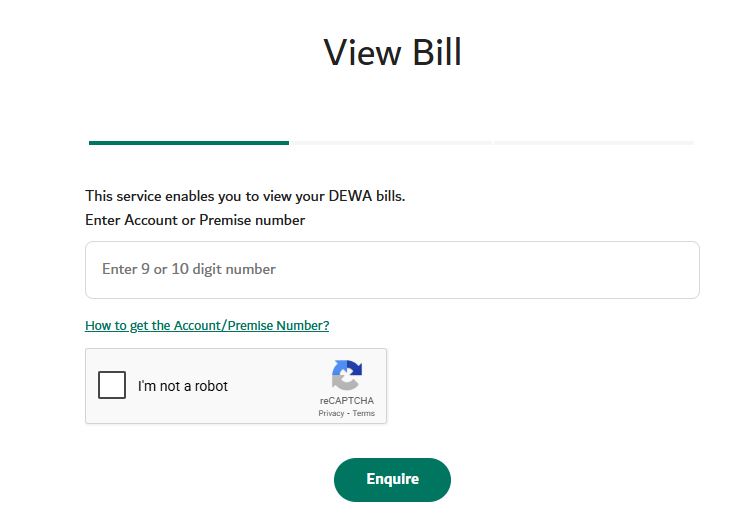
If you don’t have a DEWA account, don’t worry. DEWA allows you to check your bill without logging in using your account number or premise number.
Steps:
- Visit the official DEWA website.
- Go to the “Bill Inquiry” section.
- Enter your DEWA Account Number or Premise Number.
- Complete the CAPTCHA verification.
- Click on “Enquire”.
- Your current DEWA bill will appear on the screen.
This is perfect for those who want a quick view without creating an account.

Dubai DEWA Bill Check Online
Checking your DEWA bill online is straightforward and convenient. You can view, download, and pay your bill in just a few steps.
Using DEWA Website:
- Visit DEWA Official Website.
- Select “Consumer” and go to the Billing section.
- Click View Bill.
- Enter your account details.
- Select the billing month you want to view.
- Your bill will be displayed with a detailed breakdown of electricity, water, fuel surcharge, and VAT.
Using DEWA Smart App
The DEWA Smart App is perfect for mobile users. It provides instant access to current and previous bills, consumption tracking, and payment reminders.
Steps:
- Download the DEWA Smart App from the App Store or Google Play.
- Log in using your registered account.
- Tap on My Bills or Billing History.
- View current and past DEWA bills instantly.
Key Advantages:
- Access bill history anytime.
- Track electricity and water usage trends.
- Get push notifications for upcoming bills.
Using DubaiNow App
DubaiNow is a unified app for multiple government services, including DEWA.
Steps:
- Download DubaiNow App from Google Play or Apple Store.
- Log in using your UAE Pass or registered credentials.
- Navigate to Utilities > DEWA.
- Select View Bill to see your current charges.
This app is ideal for residents managing multiple government services from one platform.
How to Pay Your DEWA Bill Online
Paying your DEWA bill online is fast, safe, and convenient. You can choose multiple options:
- Credit or Debit Cards
- Bank Transfer
- Auto-Pay (Direct Debit)
- Digital Wallets like Apple Pay
After payment, you will receive a digital receipt via SMS or email.
Other Payment Methods:
- DEWA Smart App or Website
- Dubai Now App
- Banks: Emirates NBD, Dubai Islamic Bank, Mashreq
- Cash Deposit Machines (CDM)
- Partner Kiosks & Service Centers
Important: DEWA does not charge extra fees for official payment channels.

DEWA Bill Quick Pay
For those who want fast payment, DEWA provides Quick Pay options:
- Enter your account number on the DEWA website.
- Click Quick Pay.
- Select payment method.
- Complete the transaction in seconds.
This is ideal for residents who are short on time and don’t want to log in every time.
Download DEWA Bill PDF
To download your DEWA bill for records:
- Go to DEWA website or Smart App.
- Open the Billing section.
- Select the desired month.
- Click Download PDF.
This allows you to keep track of past bills and monitor your energy consumption trends.
How to Check Previous Month DEWA Bill
Sometimes, you need to check a previous month’s bill. DEWA makes it simple:
- Log in to DEWA website or app.
- Navigate to Billing History.
- Select the month you want to check.
- Download or view the bill breakdown.
You can even compare multiple months to track your consumption and manage costs better.
DEWA Bill Payment Without Login
Even without a DEWA account, you can pay your bill:
- Go to the DEWA Quick Pay page.
- Enter your account number.
- Choose your payment method.
- Confirm and complete the payment.
It’s secure and doesn’t require creating an account.

DEWA Bill Payment by Account Number
Paying by account number is very popular:
- Locate your DEWA account number.
- Go to the DEWA payment portal or app.
- Enter your account number.
- Choose payment method (card, bank transfer, or wallet).
- Confirm payment.
This method is quick and reliable, especially for tenants or residents managing multiple properties.
DEWA Registration: How to Start Service
Before getting electricity and water, you need to register with DEWA:
Who Needs to Register?
- New tenants or property owners in Dubai.
- Residents moving and transferring accounts.
- Anyone without an active DEWA account.
Steps for DEWA Registration:
- Prepare documents: Emirates ID, passport copy, Ejari contract or title deed.
- Apply online via DEWA website or Smart App.
- Authenticate using UAE Pass.
- Link your property meter with your account.
- Pay security deposit & activation fee:
- Apartment: AED 2,000
- Villa: AED 4,000
- Activation Fee: AED 130
- Activation is usually completed within 24 hours.
Tips to Reduce Your DEWA Bill
High DEWA bills are a common concern, but there are practical ways to reduce your electricity and water consumption:
- Use LED lights instead of traditional bulbs.
- Turn off appliances when not in use.
- Fix leaking taps immediately.
- Invest in energy-efficient appliances.
- Monitor consumption through the DEWA app.
- Limit AC usage during peak hours.
- Use programmable thermostats to regulate temperature.
Even small changes can result in significant monthly savings:
| Action | Potential Savings |
|---|---|
| Switching to LED lights | 10–15% |
| Reducing AC usage | 20–25% |
| Fixing water leaks | 5–10% |
Common Issues When Checking & Paying DEWA Bill
Even though DEWA services are user-friendly, you may face issues:
| Problem | Solution |
|---|---|
| Login not working | Reset password or verify mobile number |
| Bill not showing | Check billing period selection |
| App crashes | Update or reinstall the app |
| Payment failure | Try another payment method |
| Incorrect charges | Contact DEWA support |
DEWA Customer Care
DEWA offers excellent customer support:

- General & Billing Inquiries: 04-601-9999
- Emergencies / Technical Issues: 991
- Email Support: [email protected]
- Smart App Chatbot: Rammas AI assistant
Head Office: Zabeel East, Dubai
Working Hours: Sunday to Thursday, 7:30 AM – 3:00 PM
FAQs About DEWA Bill Check
How can I check my DEWA bill without logging in?
Ans: You can check your DEWA bill without an account by visiting the DEWA Bill Inquiry page. Enter your account number or premise number, complete the CAPTCHA, and click Enquire. Your bill details will be displayed instantly.
How do I check my Dubai DEWA bill online?
Ans: You can check your Dubai DEWA bill online using the official DEWA website, DEWA Smart App, or DubaiNow App. Simply log in with your account details, go to the Billing section, select your billing month, and view your bill.
Can I pay my DEWA bill without login?
Ans: Yes, DEWA allows you to pay your bill without logging in. Use the Quick Pay feature on the DEWA website, enter your account number, select a payment method, and confirm your payment. No account creation is required.
How can I download my DEWA bill PDF?
Ans: To download your DEWA bill PDF:
- Log in to DEWA website or Smart App.
- Go to the Billing section.
- Select the desired month.
- Click Download PDF.
You can save the bill for records or share it if needed.
How do I check my previous month’s DEWA bill?
Ans: Log in to your DEWA account on the website or Smart App, navigate to Billing History, select the previous month, and view or download the bill. This helps you compare usage trends.

What is DEWA Quick Pay?
Ans: DEWA Quick Pay allows residents to pay their bills instantly using their account number, without logging into the website. It’s fast, secure, and ideal for last-minute payments.
How can I pay my DEWA bill by account number?
Ans:
- Find your DEWA account number on any previous bill or document.
- Visit the DEWA payment portal or app.
- Enter your account number and select your payment method.
- Confirm the payment.
Your bill is paid instantly.
What documents are required to check my DEWA bill online?
Ans: To check your DEWA bill online, you may need:
- DEWA Account Number
- Premises Number
- Emirates ID
- Registered Mobile Number
Having these ready ensures a smooth process.
Can I pay my DEWA bill using a bank?
Ans: Yes, most major UAE banks, including Emirates NBD, Dubai Islamic Bank, and Mashreq, allow users to pay DEWA bills directly through their online banking portals or apps.
What happens if I pay my DEWA bill late?
Ans: Late payment may result in:
- Outstanding amount carried forward
- Late fees applied after the grace period
- Risk of service disconnection for multiple unpaid bills
- Reconnection fee if services are disconnected
To avoid penalties, enable auto-pay or set reminders before the due date.
Conclusion
In Dubai, managing your DEWA bill is convenient and easy. You can check your DEWA bill without logging in, view past bills, download PDFs, and pay using Quick Pay via the official DEWA website, Smart App, or DubaiNow App. With multiple payment options like cards, bank transfers, and digital wallets, you can stay on top of your bills. You can avoid penalties, track consumption, and use energy-saving tips to reduce charges.



About The Author