GDRFA Application Status Check 2027: A Complete Guide To Track GDRFA Visa Status by Passport And Application Number Online
GDRFA Application Status Check 2027. If you have applied for a Dubai visa and want to know its current status, checking your GDRFA application status is the easy way to stay updated about your Dubai visa without visiting an office. Whether you want to do a GDRFA status check with application number, check GDRFA visa status by passport number, or use Smart GDRFA application status tracking, the official GDRFA system provides multiple online options.
Applicants can perform a GDRFA application status inquiry through the official GDRFA application status link, mobile apps or authorized amer GDRFA application status centers.
In this complete guide, you will learn how to track GDRFA application status in detail, understand visa status meanings, processing time, common delays, and all available tracking methods comprehensively.
What Is GDRFA and Why Does It Matter?
GDRFA stands for General Directorate of Residency and Foreigners Affairs. It is a Dubai government authority that manages immigration, visas, and residency services within the emirate of Dubai.
Every Dubai visa application, whether it is for:
- Tourist visa
- Residence visa
- Work visa
- Family sponsorship
- Investor visa
- Golden visa
is processed and controlled by GDRFA Dubai. It is important to understand that each UAE emirate has its own immigration system.
- Dubai is handled by GDRFA
- Abu Dhabi, Sharjah, Ajman, Fujairah are managed by ICP (Federal Authority)
So, if your visa is for Dubai, your GDRFA application status check is the correct method.
Why Checking GDRFA Application Status Is Important
Checking your GDRFA status helps you:
- Know if your visa is approved or still under process
- Avoid unnecessary office visits
- Prepare documents on time
- Plan travel dates correctly
- Fix issues before rejection
Many delays happen because applicants do not track their status regularly.
GDRFA Application Status Check – Official Online Method
The GDRFA portal allows applicants to check their visa status online without visiting any office.
Step 1: Visit the Official GDRFA Website
Open your browser and visit the official GDRFA Dubai website.
Step 2: Open “Visa Status” or “Application Status”
On the homepage, look for:
- Visa Status
- Track Application
- Entry Permit Status
Step 3: Select Application Type
Choose the correct category:

- Entry Permit
- Residence Visa
- Visa File Number
Step 4: Enter Required Details
You may need to enter:
- Application Number or File Number
- Passport Number
- Passport Expiry Date
- Nationality
Step 5: Complete Security Check
Fill the CAPTCHA to confirm verification.
Step 6: Submit the Form
Click Search or Submit.
Step 7: View Your Application Status
Your GDRFA application status will appear as:
- Approved
- Under Process
- Rejected
GDRFA Application Status Link
The GDRFA system provides multiple search methods for different application types.
Step 1: Visit the Official GDRFA Website
Open the official GDRFA Dubai website using any web browser on your mobile phone or computer.
Step 2: Click on “Application Status”
On the homepage, find and click the Application Status or Track Application option to proceed.
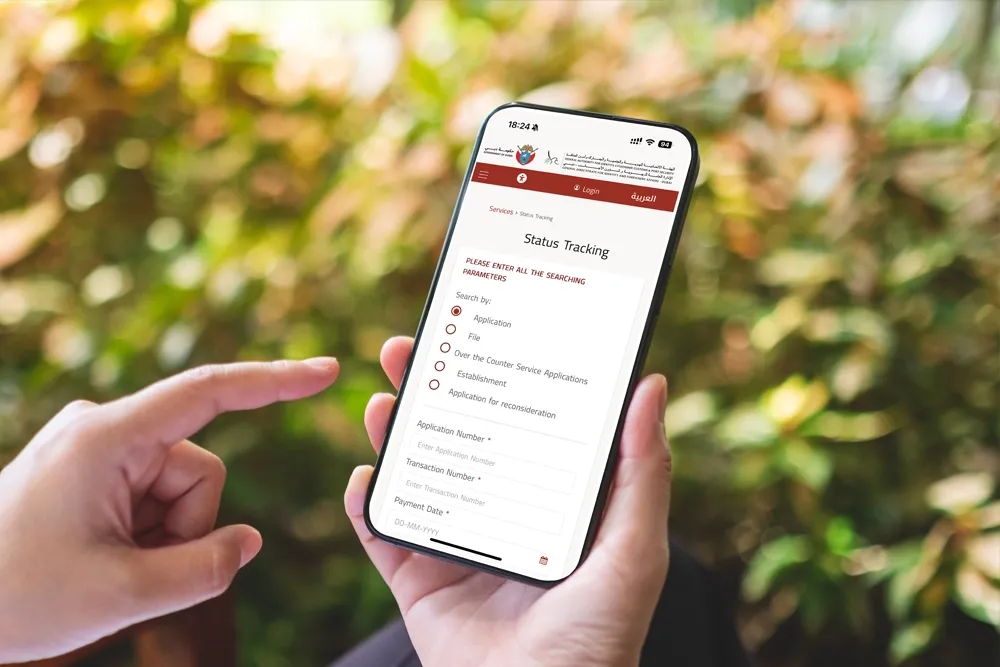
Step 3: Enter the Required Search Details
Make sure to enter all required information carefully to avoid errors. Select the correct category from the options below.
1. Application Status Check (Online Applications)
This option is suitable for applications submitted online or through authorized agents.
You need to enter:
- Application Number
- Transaction Number
- Payment Date
- CAPTCHA verification
After filling in all details, click the Search button to view your application status.
2. File Number Status Check
This option is mainly used for residence visa and sponsored applications.

You need to enter:
- First Name (in English)
- File Number
- Nationality
- Date of Birth
- CAPTCHA verification
Click the Search button to check the current status of your application.
3. Over the Counter Service Application Status
If your application was submitted through a service counter, you can track it using this option.
You need to enter:
- Application Number
- Registered Mobile Number
- CAPTCHA verification
Once done, click Search to view your application status.
4. Establishment Application Status
This option is for companies and establishments registered with GDRFA.
You need to enter:
- Establishment Number
- Establishment Expiry Date
- CAPTCHA verification
Click on Search to check the status of the submitted request.
5. Application for Reconsideration Status
If you have submitted a request for reconsideration after a visa rejection, use this option.
You need to enter:
- Passport Number
- Nationality
- Year of Birth
- CAPTCHA verification
Click the Search button to see the updated status of your reconsideration application.
Tip: Always reviewyour details before submitting the form. Incorrect or missing information may result in errors or no status being displayed.


GDRFA Visa Status by Passport Number
If you do not have your application number, you can still check your visa using your passport number.
How to Check GDRFA Visa Status by Passport Number
- Open GDRFA Visa Status Inquiry page
- Select Passport Information
- Enter:
- Passport Number
- Nationality
- Date of Birth
- Complete CAPTCHA
- Click Search
This method is very helpful for:
- Tourists
- Lost application slips
- Sponsored visas
Smart GDRFA Application Status Tracking
GDRFA offers smart digital services through mobile apps.
Available Apps:
- GDRFA Dubai App
- DubaiNow App
Features:
- Real-time updates
- UAE PASS login
- A responsive interface
- Faster tracking
This is ideal for people who prefer tracking on the go.
Amer GDRFA Application Status
Amer Centers are official service centers in Dubai that help applicants in person. If your status is pending or “Additional Documents Required,” visiting an Amer Center can help.
Steps for Amer application status:
- Visit any Amer Center in Dubai.
- Provide your application number and mobile number.
- Complete CAPTCHA and submit.
- Staff will provide your application status and guide you further.
Amer centers also handle document verification and complex cases.
If your status shows:
- Pending for long time
- Additional documents required
- System error
Amer Centers Help With:
- Document verification
- Status explanation
- Application submission
- GDRFA follow-ups
They are officially authorized by GDRFA.

How to GDRFA Application Status Terms
When checking your GDRFA status, you may see different terms.
- Approved: Your visa is accepted and ready for issuance.
- Under Process: Your application is being reviewed.
- Pending: Application received but not started yet.
- Rejected: Application did not meet requirements.
- Pending Additional Documents: You need to submit missing or corrected documents.
How Long Does GDRFA Application Processing Take?
Processing time depends on visa type.
| Visa Type | Processing Time |
|---|---|
| Tourist Visa | 48–72 hours |
| Work Visa | 3–7 working days |
| Residence Visa | 5–10 working days |
| Family Visa | Up to 10 working days |
| Investor / Golden Visa | 15–30 days |
Always start tracking 48 hours after submission.
Common Reasons for GDRFA Visa Delays or Rejection
Based on experience, common reasons include:
- Incorrect documents
- Mismatch in personal details
- Expired passport
- Overstay history
- Previous visa violations
- System delays or holidays
Over 20% rejections happen due to document issues.
Services Provided by GDRFA
Family Book Services
- Marriage updates
- Divorce records
- Newborn registration
- Replacement of lost book
Passport Services
- Lost passport recovery
- Newborn passport
- Passport renewal
Entry Permit Services
- Visit visa
- Long/short stay visa
- Visa extension
Residence Services
- New residency
- Renewal
- Cancellation
- Transfer
Border Control
- Entry and exit records
Establishment Support
- Company registration
- Electronic portals
- Sponsor services
Violation Control
- Overstay handling
- Legal compliance
Mobile Services
- Overstay inquiry
- Entry permit check
Jadeed SMS Services
- Visa expiry reminders
- Passport alerts
- Security messages
IVR Services
- Entry permit reports
- Residence violation reports
Barq Services
- Doorstep document handling
Distinguished Guest Services
- Fast-track entry
- Multiple visa use
- One-time payment
Takamoi
- Data verification with DHA
Smart Gate
- Automated immigration clearance
Tips For Smooth Application Tracking
Here are some tips:
- Double-check all information before submission.
- Upload clear, correct documents.
- Track regularly to avoid delays.
- Keep copies of receipts and submission forms.
- Contact GDRFA support if status is pending for a long time.
GDRFA Support Contact
If your application is stuck:
GDRFA Helpline
- UAE: 800 5111
- Outside UAE: +971 4 313 9999
Other Options:
- Live chat on website
- Mobile app support
- Amer Center visit
FAQs About GDRFA Application Status
How can I check my GDRFA application status online?
Ans: You can check your GDRFA application status by visiting the official GDRFA Dubai website. Open the Application Status section, enter your application number, passport details, complete the captcha, and click on search to view the status.
Can I check GDRFA visa status by passport number?
Ans: Yes, you can check your GDRFA visa status using your passport number. You need to enter your passport number, nationality, and date of birth on the GDRFA visa status inquiry page.
What details are required for GDRFA status check?

Ans: Depending on the option you choose, you may need: Application number. File number. Passport number. Nationality. Date of birth. Transaction number
What does “Under Process” mean in GDRFA application status?
Ans: “Under Process” means that your visa application is currently being reviewed by GDRFA. No action is required unless additional documents are requested.
What does “Pending Additional Documents” mean?
Ans: This status means that GDRFA requires more documents or corrections. You should submit the requested documents through an Amer Center or your visa sponsor as soon as possible.
How long does GDRFA visa processing take?
Ans: Processing time depends on visa type: Tourist visa: 2–3 days. Work or residence visa: 3–7 working days. Family visa: up to 10 working days. Golden visa: 15–30 days
Can I track GDRFA application status through mobile apps?
Ans: Yes, you can use the GDRFA Dubai App or DubaiNow App to track your application. These apps provide real-time updates and are easy to use.
What should I do if my GDRFA application is delayed?
Ans: If your application is delayed for more than the normal time, you should: Recheck your documents. Contact GDRFA customer support. Visit an Amer Center for assistance
Is Amer Center authorized to check GDRFA application status?
Ans: Yes, Amer Centers are officially authorized by GDRFA. They can help you track application status, submit documents, and resolve issues.
Conclusion
A GDRFA application status check is a convenient way to keep track of your Dubai visa application. By using an application number, file number, or passport number, applicants can easily track their visa online through the GDRFA website, mobile apps, or AMer Centers. Understanding status messages like approved, under process, rejected, or pending additional documents helps avoid delays and mistakes. Regular tracking, the correct documents, and official support channels ensure a smooth and stress-free Dubai visa process for all applicants.


About The Author