DARB Registration 2027: Complete Guide To Fines, Fees, Requirements And Toll Gates
DARB Registration 2027. DARB Registration is required for vehicle owners who drive through Abu Dhabi’s DARB toll gates. The system allows vehicle owners from Abu Dhabi and other Emirates to register their vehicles, manage toll payments, recharge their wallets, and check violations online.
If you are planning to drive into Abu Dhabi, understanding the DARB toll system can help you avoid unexpected fines. The good thing is that the whole process is online, and you can manage your DARB account through the official website or the DARB mobile application.
In this complete guide, we will explain DARB Registration, registration requirements, fees, toll charges, toll gate locations, how to register a vehicle, how to recharge your DARB wallet, exemptions, fines, and common questions.
What Is DARB Registration?
DARB is Abu Dhabi’s electronic road toll system. It was introduced to help manage traffic, reduce congestion, improve road use, and encourage people to consider public transport and other travel options.
The system works electronically. There is no need to stop at a toll booth or buy and install a separate toll tag on your car. When a vehicle passes through an active DARB toll gate, the system identifies the vehicle through its number plate and processes the toll according to the applicable rules.
DARB is managed and operated by Q Mobility. Vehicle owners can use the DARB website or mobile application to manage their accounts and vehicles.
Is DARB Registration Mandatory?
Yes. Vehicle owners whose vehicles are registered in Abu Dhabi or another UAE Emirate must register their vehicles in the DARB system if they use the DARB toll gates.
According to Q Mobility, users who pass through DARB toll gates without prior registration are given a 10-working-day registration grace period from the date of crossing. If the vehicle is still not registered after this period, a violation can be issued.
This means you should not wait until you receive a fine. If you know that you will use roads with DARB toll gates, it is better to complete your registration in advance.
Who Should Register?
DARB registration can apply to:
- Abu Dhabi vehicle owners
- Dubai vehicle owners
- Vehicle owners from other Emirates
- Private vehicle owners
- Company and establishment vehicle owners
- People who regularly commute to Abu Dhabi
- Drivers who frequently use roads covered by DARB toll gates
Even if your vehicle is registered in Dubai or another Emirate, you may still need to register it in DARB before using the toll roads.
DARB Registration Fee in Abu Dhabi
The DARB vehicle registration fee is AED 100 per vehicle. The official Q Mobility FAQ explains that this AED 100 consists of:
| Fee | Amount |
|---|---|
| DARB registration fee | AED 50 |
| Initial wallet balance | AED 50 |
| Total | AED 100 |
The AED 50 wallet amount is placed in the user’s financial wallet and can be used for toll transactions. This is an important point because some people think the full AED 100 is simply a registration charge. In fact, part of the amount becomes available as wallet balance.
DARB Registration Requirements
Before creating or managing your DARB account, you should have the required information ready. According to Q Mobility, the main requirements include:
- Traffic file number/code
- Emirates ID of the account holder
- Active email address
- Mobile number linked to the traffic file
The traffic file number can normally be found on the vehicle registration information. Q Mobility states that it contains 10 numbers in many cases, while Dubai drivers may have an 8-number traffic code.
What If My Mobile Number Is Not Showing?
Sometimes the registered mobile number may not appear when you try to create your account.
If this happens, Q Mobility advises users to contact the customer service centre at 8003009 and speak with the system administrator so the contact details can be registered.
Documents Required for DARB Registration
The DARB vehicle registration service itself can be completed digitally. The main information needed to create and verify your account includes your Emirates ID, traffic file information, email address, and registered mobile number.
For many users, the system can retrieve vehicle information through its connection with the unified traffic system.

This makes the process easier because you do not necessarily need to manually enter every vehicle detail. However, it is always a good idea to keep the following information available:
- Emirates ID
- Vehicle registration details
- Traffic file number
- Registered mobile number
- Active email address
- Payment card for wallet recharge
Keeping these details ready can make the registration process faster.
How to Log In to DARB
- Open the official DARB platform.
- Choose the login option to access your account dashboard.
- You can sign in using UAE PASS, which provides a secure digital identity for UAE citizens, residents, and visitors.
- If you prefer the regular login method, enter your registered email address, ID number, or password as requested.
- Complete the CAPTCHA verification.
- Click the Login button to enter your DARB control panel.
Once logged in, you can access the available DARB services and manage your registered vehicle information.
How to Register a Vehicle in DARB
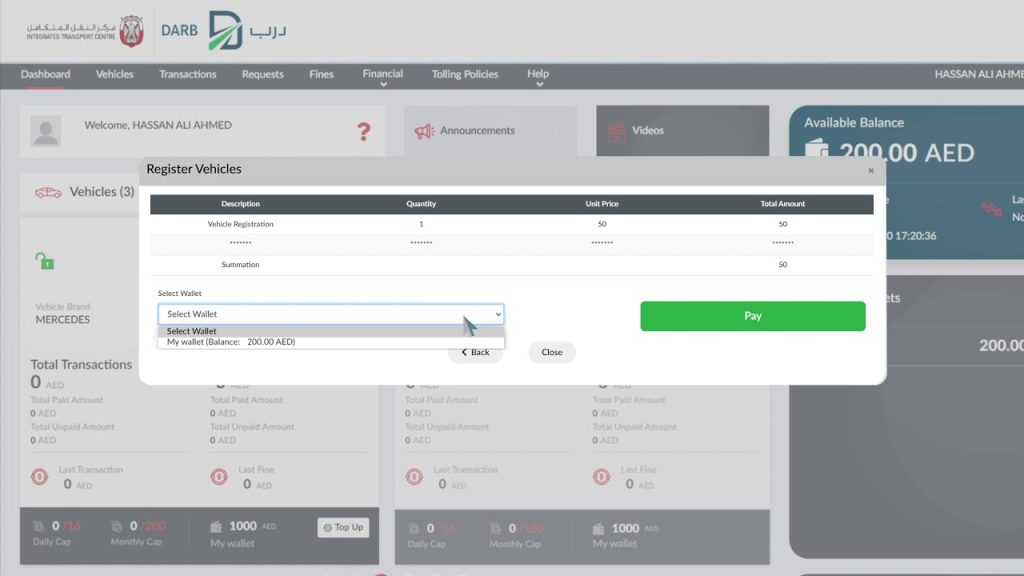
Follow these simple steps to complete your vehicle registration:
Step 1: Sign In with UAE PASS
- Open the DARB platform and log in using your UAE PASS credentials to access the registration service.
Step 2: Submit Your Registration Request
- Enter or confirm the required information and submit your vehicle registration application through the online system.
Step 3: Pay the Required Fee
- Complete the payment of AED 100 using the available online payment option.
Step 4: Confirm Your Registration
- After the application and payment are successfully processed, your vehicle will be registered in the DARB toll system.
Once the registration is completed, you can manage your vehicle and related toll services through your DARB account.
How to Reset Your DARB Password
Forgot your DARB account password? You can reset it online without creating a new account. The process is simple and only takes a few steps.
Steps to Reset Your Password
- Go to the DARB login page.
- Click on the “Forgot Password” option.
- Enter the required details, such as your registered email address, Emirates ID, or traffic file number.
- The system will verify your account information.
- A password-reset link or instructions will be sent to your registered email address and mobile number.
- Follow the instructions and create a new password for your DARB account.
- Return to the login page and sign in using your updated password.
Make sure that your email address and mobile number are active and correctly linked to your DARB account. This will help you complete the password recovery process without unnecessary delays.
How to Close Your DARB Account
If you no longer need your DARB account, you can request its closure directly through your account settings. Before closing the account, make sure you understand what will happen to your registered vehicles and any remaining wallet balance.
Steps to Close a DARB Account
Follow these steps to submit your account closure request:
- Sign in to your DARB account using your registered login details.
- Open the My Profile section from your account dashboard.
- Select Settings to view your account options.
- Choose Close Account.
- If your DARB wallet has a remaining balance, enter your bank account details, including your IBAN, so the balance can be refunded.
- Enter the reason for closing your account.
- Review the information you have provided and submit the account closure request.
Important Things to Know Before Closing Your Account
Closing your DARB account has some important effects that you should know about:
- All vehicles linked to the account will automatically be changed to unregistered status.
- You will not be able to create another DARB account until the remaining wallet amount has been refunded to your bank account.
- If your account has a wallet balance, you must provide valid bank account and IBAN details to receive the refund.
- The refund process may take up to 45 working days to complete.
For this reason, check your registered vehicles and wallet balance carefully before submitting the account closure request.
DARB Toll Charges in Abu Dhabi
For the main DARB toll gates, the charge is AED 4 per vehicle per crossing during applicable peak hours.
The current peak periods listed by Abu Dhabi Mobility and Q Mobility are:

| Period | Time | Toll |
| Morning | 7:00 AM – 9:00 AM | AED 4 per crossing |
| Evening | 3:00 PM – 7:00 PM | AED 4 per crossing |
| Sunday | No toll deduction | Free |
| Official holidays | No toll deduction | Free |
These timings apply to the main DARB toll gates.
Important Update About DARB Toll Gates
DARB has expanded beyond the original four-gate system. As of 2027, the main DARB toll gates include:
- Sas Al Nakhl
- Al Maqta’
- Rabdan
- Al Saadiyat
- Al Qurm
- Ghantout
The Al Qurm and Ghantout toll gates were added in 2027 and started operating on May 4, 2027. Unlike the original gates, these two gates operate 24 hours a day, seven days a week, with an AED 4 toll per crossing. Therefore, drivers should not rely on old information that lists only four DARB gates.
Where Are the DARB Toll Gates Located?
The current system covers several important road locations.
1. Sas Al Nakhl Toll Gate
Sas Al Nakhl is one of the established DARB toll gate locations in Abu Dhabi.
2. Al Maqta’ Toll Gate
Al Maqta’ is another major toll gate and is part of the original DARB network.
3. Rabdan Toll Gate
Rabdan is also included in the main DARB tolling network.
4. Al Saadiyat Toll Gate
Al Saadiyat is another active DARB toll gate.
5. Al Qurm Toll Gate
Al Qurm was added to the system in 2027.
It is located on Wahat Al Karama Street at the entrance and exit of Sheikh Zayed Street. Alternative routes include Sheikh Rashid bin Saeed Street and Al Khaleej Al Arabi Street.
6. Ghantout Toll Gate
Ghantout is the second new toll gate added in 2027.
It is located on Sheikh Maktoum bin Rashid Street in Ghantout. Drivers can use Sheikh Mohammed bin Rashid Al Maktoum Street as an alternative route.
How to Recharge Your DARB Wallet
Your DARB wallet is important because toll charges can be deducted from the available balance. You can recharge the wallet online through your DARB account.
Basic Wallet Recharge Process
- Log in to your DARB account.
- Open the dashboard.
- Find the wallet section.
- Select the Top-up option.
- Enter the amount you want to add.
- Complete the payment.
- Check the updated wallet balance.
Q Mobility also states that users can recharge their wallet from the vehicle page or profile page.
DARB Fines and Penalties in Abu Dhabi
Here are the main DARB fines you should know about.
1. Fine for an Unregistered Vehicle
If you pass through a DARB toll gate with an unregistered vehicle, you are given a 10-working-day grace period from the date of the toll gate crossing to complete the registration.
If the vehicle is still not registered after this period, fines can be issued as follows:
| Violation | Fine |
|---|---|
| First violation | AED 100 |
| Second violation | AED 200 |
| Third and subsequent violations | AED 400 |
It is better to register your vehicle as soon as possible rather than waiting until the grace period ends.

2. Insufficient Wallet Balance Fine
Drivers of vehicles registered outside Abu Dhabi may receive a fine if their DARB wallet does not have enough money to cover the toll charge.
A five-working-day grace period is provided to add sufficient funds to the wallet. If the balance is still insufficient after this period, a fine of:
- AED 50 per transaction
may be applied.
Keeping your DARB wallet topped up can help you avoid this additional cost.
3. License Plate Manipulation Fine
Trying to change, hide, or manipulate a vehicle’s license plate to avoid paying DARB toll charges is a serious violation. The penalty for manipulating a vehicle’s license plate for this purpose is:
- AED 10,000
4. Damage to Toll Equipment Fine
Damaging DARB’s electronic payment equipment or toll gate facilities is also subject to a heavy penalty. The fine for damaging electronic payment machines or toll gate equipment is:
- AED 10,000
5. Maximum and Accumulated Fines
DARB also has limits on the total amount of fines that can be accumulated. Under the applicable Traffic Tariff Law and related regulations:
- The fine imposed on a vehicle owner for a violation committed by the driver must not exceed AED 10,000 per owner, where applicable.
- The total fines accumulated for violations involving a single vehicle cannot exceed AED 25,000 during the year starting from the date of the first violation.
How To Avoid DARB Fines
You can reduce the risk of receiving DARB penalties by following a few simple steps:
- Register your vehicle with DARB before using toll roads.
- Do not wait until the registration grace period is about to expire.
- Keep enough money in your DARB wallet.
- Check your account and vehicle status regularly.
- Never attempt to hide or manipulate your license plate.
- Avoid damaging toll gates or electronic payment equipment.
- Check your DARB account regularly for outstanding violations.
Following these basic rules can help you use Abu Dhabi’s toll roads without unnecessary fines or payment problems.
DARB Toll Exemptions
Not every vehicle has to pay DARB toll charges. There are automatically exempt vehicles and vehicles that can receive an exemption after submitting a request.
Automatically Exempt Vehicles
The official DARB information lists several categories that are automatically exempt, including:
- Ambulances
- Armed Forces vehicles with the required identification
- Civil Defence vehicles
- Public transport buses
- Motorcycles
- Authorized Abu Dhabi public taxis
- Authorized school buses
- Passenger buses with capacity of 26 passengers or more
- Abu Dhabi Police vehicles
- Ministry of Interior vehicles
- Other UAE local police vehicles
- Trailer vehicles
These categories do not normally require an exemption request when the vehicle qualifies under the applicable rules.
Who Can Apply for a DARB Exemption?
Some categories can apply for an exemption through the DARB platform. These include:
- People of Determination
- Families with limited income
- Senior UAE citizens
- Retired UAE citizens
The exemption is generally limited to one vehicle per category/request, subject to the applicable rules.
How to Apply for a DARB Exemption
If you believe you qualify for an exemption, you can apply online.
Steps
- Log in to your DARB account.
- Open the requests section.
- Select the DARB exemption option.
- Choose the relevant exemption category.
- Enter the requested information.
- Upload supporting documents if required.
- Submit the request.
- Wait for the request to be processed.
Registration is still required even if your vehicle belongs to an exempt category.
How to Check DARB Violations
You can manage your DARB violations online through your account. The general process is:
- Open the DARB website or application.
- Log in to your account.
- Open the relevant vehicle information.
- Check outstanding violations.
- Review the violation details.
- Complete the payment if required.
Q Mobility also provides a dedicated DARB service for toll fine payments and a separate service for submitting a grievance against a DARB fine.

How to Submit a DARB Fine Grievance
Sometimes a driver may believe that a toll violation was issued because of an incorrect vehicle record, payment issue, technical problem, or another valid reason.
In such cases, DARB provides a grievance/request process. You can:
- Log in to your DARB account.
- Open the Requests section.
- Select the relevant complaint or grievance option.
- Choose the fine or transaction.
- Provide the requested information.
- Submit your request.
Q Mobility confirms that users can submit grievances for toll fines, transactions, or technical issues through the platform.
Common Mistakes to Avoid During DARB Registration
Many DARB problems can be avoided by checking your account carefully.
1. Using an Old Mobile Number
- Your mobile number should be connected to your traffic file.
2. Ignoring the Registration Grace Period
- If you pass through a DARB gate without registration, do not assume you can leave it for weeks.
- You have a 10-working-day registration period after the crossing.
3. Keeping an Empty Wallet
- For applicable vehicles, insufficient wallet balance can result in a fine after the relevant grace period.
4. Creating Multiple Accounts
- If you own vehicles connected to different traffic codes, you generally do not need multiple DARB accounts. You can add another traffic code to your existing account if you own it.
5. Relying on Old DARB Information
- DARB has changed over time, including the addition of new toll gates in 2027.
Always check the current official DARB/Q Mobility information before relying on old articles or social media posts.
Tips to Manage Your DARB Account Easily
Here are some simple tips that can save you time and money:
- Register your vehicle before travelling through DARB gates.
- Keep your Emirates ID information updated.
- Make sure your mobile number is linked to your traffic file.
- Use an active email address.
- Check your wallet balance regularly.
- Recharge your wallet before long trips.
- Review your toll transactions.
- Check for outstanding violations.
- Apply for an exemption if you are eligible.
- Keep company vehicle information updated.
- Use the official DARB website or app.
- Avoid relying on unofficial registration websites.
DARB Registration: Quick Summary
Here is a quick look at the most important information:
| Information | Details |
| System | DARB Abu Dhabi Road Toll System |
| Operator | Q Mobility |
| Registration | Required for vehicles using DARB toll gates |
| Registration cost | AED 100 per vehicle |
| Registration fee portion | AED 50 |
| Initial wallet balance | AED 50 |
| Main toll charge | AED 4 per crossing |
| Main peak period | 7:00 AM – 9:00 AM |
| Main evening period | 3:00 PM – 7:00 PM |
| Sundays | No toll deduction |
| Official holidays | No toll deduction |
| New Al Qurm & Ghantout gates | 24/7 |
| Unregistered vehicle fine | AED 100, AED 200, then AED 400 |
| Insufficient balance fine | AED 50 per applicable transaction |
| Customer service | 8003009 |
| Official website | darb.qmobility.ae |
FAQs About DARB Registration
Is DARB registration mandatory?
Ans: Yes. Vehicle owners using DARB toll gates must register their vehicles in the system. Users who pass through without registration receive a 10-working-day grace period before an applicable violation can be issued.
How much does DARB registration cost?
Ans: The registration fee is AED 100 per vehicle. AED 50 is the registration fee and AED 50 is added to the user’s financial wallet.
Can I register a Dubai vehicle in DARB?
Ans: Yes. Vehicles registered in Dubai and other Emirates can be registered in the Abu Dhabi DARB system.
Do I need a DARB tag on my windshield?
Ans: No. DARB identifies vehicles using their number plates. Q Mobility states that users do not need to purchase an external tag.
How much is the DARB toll?
Ans: The main DARB toll gates charge AED 4 per crossing during the applicable peak periods.

What are the DARB peak hours?
Ans: For the main DARB toll gates, the current peak periods are 7:00 AM to 9:00 AM and 3:00 PM to 7:00 PM. Sundays and official holidays are free of toll deductions.
Are all DARB gates active only during peak hours?
Ans: No. The newer Al Qurm and Ghantout toll gates operate 24 hours a day, seven days a week.
What is the fine for an unregistered vehicle?
Ans: After the 10-working-day registration grace period, the fine structure is AED 100 for the first violation day, AED 200 for the second, and AED 400 for the third and later violation days.
What happens if my DARB wallet has insufficient balance?
Ans: For applicable vehicles registered outside Abu Dhabi, an AED 50 fine can apply per transaction if the wallet is not recharged within the five-working-day grace period.
Can I apply for a DARB exemption?
Ans: Yes. Eligible categories include People of Determination, families with limited income, senior UAE citizens, and retired UAE citizens. Certain vehicles are also automatically exempt.
Do exempt vehicles need DARB registration?
Ans: Yes. Being eligible for an exemption does not remove the registration requirement.
Can I manage DARB through a mobile phone?
Ans: Yes. Q Mobility provides a DARB mobile application for account and vehicle management.
What is the DARB customer service number?
Ans: You can contact Q Mobility customer service at 8003009 for DARB-related assistance.
Conclusion
DARB Registration is an important step for anyone who drives through Abu Dhabi’s toll roads. The process is online, and vehicle owners from Abu Dhabi as well as other Emirates can register their vehicles through the official DARB platform.


About The Author