NOL Card Balance Check UAE 2027: A Complete RTA NOL Card Balance Check With Number, Online, Metro Methods And App Guide
NOL Card Balance Check. If you live in Dubai or travel daily using the Metro, Tram, or Bus, your NOL card is not just a travel card. It is your daily travel wallet. A low balance at the wrong time can stop your journey, delay your work, or cause unnecessary stress at the station gate. That is why checking your NOL card balance regularly is not optional anymore.
In 2027, Dubai RTA offers multiple smart and easy ways to check nol card balance online, on mobile, through apps, by scanning, and even at Metro stations. It can also waste time when you are in a rush. That is why I recommend one simple habit. Check your nol card balance before every trip.
In this detailed guide, I will cover every trusted method that people use in Dubai in 2027. I will also explain how to check your nol card balance history, how scan based checking works, and how to check balance on mobile.
What Is a Nol Card in Dubai
A nol card is a smart card that you tap to pay for RTA services. It is widely used for daily travel in Dubai. You can use it for:
- Dubai Metro
- Dubai Tram
- Public buses
- Marine transport
- Many RTA paid parking locations
RTA describes nol as a smart payment option for public transport and more.
Why You Should Check Nol Card Balance Often
I write finance content, so I look at travel like a budget item. When you track small daily spending, you control your monthly costs better. Nol balance checking helps in two ways:
- You avoid getting blocked at the gate.
- You stay ready for sudden trips.
RTA also advises keeping a minimum balance for travel. Many Dubai guides quote AED 7.50 as the minimum to start a trip smoothly.
First Thing: Find Your Nol Card Number
Most balance check methods need your nol tag ID.
Where is the nol tag ID?
- Usually printed on the back of the card
- Enter it exactly as shown
- Keep it saved in your phone notes
People often call this “nol card balance check with number”. In Dubai, that number usually means your nol tag ID.
Best Ways to Check Nol Card Balance in 2027
Here are the most used methods in Dubai:
- RTA website balance check
- nol Pay app balance check
- RTA Dubai app balance check
- Metro station ticket vending machines
- Ticket office or customer service
- Low balance alerts and smart features
Let’s go step by step.
RTA Nol Card Balance Check Online (Official Website)
This is the easiest method if you have internet. It works on any phone, laptop, or tablet.
RTA has an official “Check nol Balance” service page.
Steps: Dubai RTA nol card balance check online

- Open the official RTA website.
- Go to nol services or smart services.
- Tap Check nol Balance.
- Enter your nol tag ID.
- Press Search.
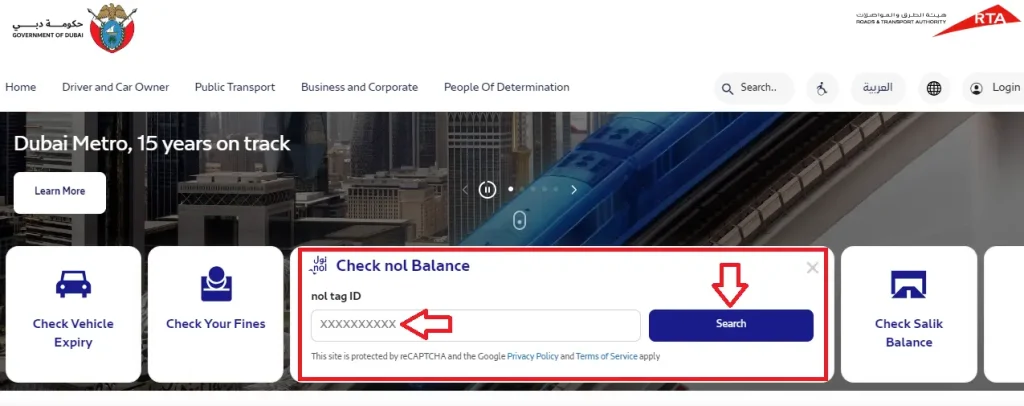
- You will see your balance and related details.
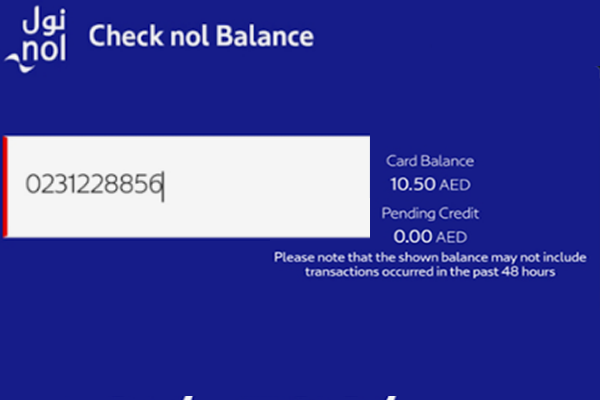
What you may see on the result screen
- Current balance
- Card status
- Expiry details
- Pending credit amount (sometimes)
Pending Credit Explained
Many people top up online and then panic because the money does not show instantly. This is common.
Some top ups need time and activation. You may need to tap your card at a Metro gate or a supported reader to activate the top up.
Dubai guides and RTA related sources mention processing time for online top up and the need to validate or activate value on physical cards.
Nol Card Balance Check App
People search “nol card balance check app” because they want quick checking on the go. In Dubai, two official apps matter most:
- nol Pay
- RTA Dubai app
The best choice depends on what you want.
- If you want scan style checking and NFC, use nol Pay.
- If you want general RTA services in one app, use RTA Dubai app.
Option A: Nol Pay App Balance Check
RTA lists nol Pay as an official app that supports top up and balance checking.
What nol Pay can do
- Check balance
- Top up nol card
- Buy travel pass in some cases
- Manage card using NFC on supported phones.
NOL Card Balance Check with Number
Checking your NOL card balance using the card number is simple and takes less than a minute if you follow the right steps. This method works best when you have internet access and your NOL card with you.
Step 1: Open the official RTA website on your mobile or computer.
Step 2: Find and click on the option labeled “Check NOL Balance.”
Step 3: Enter the 10-digit NOL Tag ID printed on the back of your card.
Step 4: Click the “Search” button to continue.
Step 5: Your screen will show the available balance, pending credit, and card expiry details.
Important Tip: If you see pending credit, activate it by tapping your card at a Metro gate, bus top-up machine, or RTA parking meter.

Checking via Call Center
You can also check your NOL card balance by calling the RTA Call Center.
- Dial 800 90 90 from your phone.
- Choose the relevant option for NOL card services.
- Share your NOL card details with the support agent.
- The agent will tell you your current balance instantly.
NOL Card Balance Check via SMS
If you do not have internet access, the SMS method is a simple way to check your NOL card balance using your mobile phone.
- Step 1: Open Messages: Open the SMS or messaging app on your phone.
- Step 2: Enter Your NOL Card Number: Type your NOL card tag ID in the message. This is the number printed on your card.
- Step 3: Send to 511: Send the message to 511 to register your number with the RTA system.
- Step 4: Wait for Confirmation: You will receive a reply confirming that your mobile number is registered.
- Step 5: Check Balance Anytime: Whenever you want to know your balance, send BAL to 511. You will receive an SMS showing your current NOL card balance.
Nol Card Balance Check Scan (UAE)
Many users type “nol card balance check scan in UAE”. In real life, “scan” usually means NFC tap reading.
What you need for scan check
- A phone that supports NFC
- nol Pay app installed
- Your physical nol card
RTA’s nol Pay page highlights NFC features and instant services.
Steps: Nol card balance check scan using NFC
- Turn on NFC in your phone settings.
- Open the nol Pay app.
- Choose the balance or card info option.
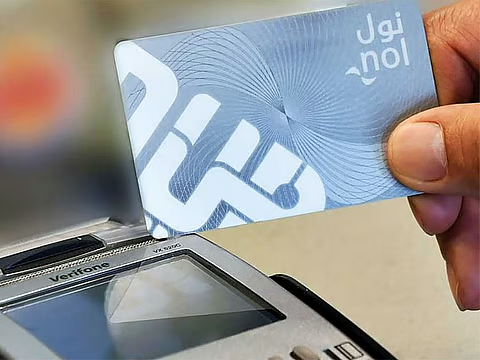
- Put your nol card at the back of your phone.
- Hold it steady until the scan completes.
- Your balance will show on screen.
Gulf News also described this scan style checking through nol Pay with the card placed behind the phone.
If your phone has no NFC: Use the RTA website method. Or use Metro station machines.
Metro Nol Card Balance Check (At Stations)
If you are already at a Metro station, you can check balance without internet. This is one of the most reliable ways.
Where to check
- Ticket vending machines
- Nol card readers
- Gate screens (sometimes show remaining balance after tapping)
Steps: Check balance at ticket vending machine
- Go to the ticket vending machine.
- Tap or place your nol card on the reader area.
- Balance will show instantly.
- If balance is low, top up on the same machine.
This method is widely used because it avoids number typing mistakes.
RTA Nol Card Balance Check History (Transaction History)
Balance tells you how much money is left. History tells you where the money went.
This is useful if:

- You travel daily and want weekly totals
- You think you were charged wrong
- You want to track top ups and fares
- You want proof for personal budgeting
RTA provides a service where you can view transaction history, and it mentions one month of history in the service details.
Steps: Nol card balance check history online
- Open RTA nol related services.
- Find the option for transaction history.
- Enter your nol card details as asked.
- Complete any verification step.
- View your history.
What your history usually shows
- Trip charges
- Top up entries
- Dates and times
- Station or route related info (if shown)
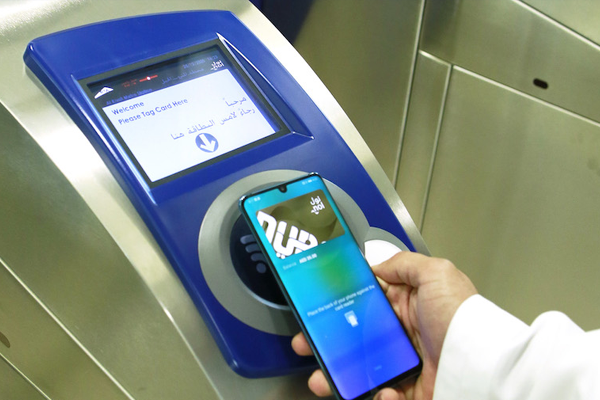
RTA Nol Card Balance Check History in the RTA App
Tracking your NOL card spending helps you travel smarter and avoid balance issues. The RTA app makes it easy to view your balance history in just a few taps. Follow these simple steps.
- Step 1: Install the RTA App: Download and install the official RTA app from the App Store or Google Play Store.
- Step 2: Sign In to Your Account: Open the app and log in. If you are new, create an account using your NOL card details.
- Step 3: Open My Account: After login, go to the My Account section from the main menu.
- Step 4: Select NOL Card Services: Choose the option related to NOL Card Balance or NOL Services.
- Step 5: View Transaction History: Tap on Transaction History or Balance History to see past activity.
- Step 6: Choose a Date Range: Select the time period you want to review, such as weekly or monthly records.
- Step 7: Review Your Usage: Check all top-ups and fare deductions listed clearly with dates.
- Step 8: Save for Records: If available, download or save the history for personal tracking.
- Step 9: Log Out Securely: Always log out after use, especially on shared devices.
Low Balance Alerts and Smart Features
Dubai keeps improving travel tech. Recently, Gulf News reported that commuters can get SMS alerts when nol balance is low.
This is helpful because you do not have to remember checking daily. You get notified before your balance hits zero.
Also, Samsung Gulf shared details about using nol through Samsung Wallet on supported devices. This is more about tapping to pay, but it shows the direction Dubai is moving in.
How to Check NOL Card Balance in Mobile
If you want the simplest answer, here it is.
Best mobile method without NFC
- Use the RTA website on your phone browser.
Best mobile method with NFC
- Use nol Pay app and scan your card.
How to Top Up Nol Card After Balance Check
Checking balance is step one. Top up is step two. RTA offers nol services for top up and related options.
Top up options in Dubai
- Metro station ticket vending machines
- Ticket office counters
- Online top up on RTA site
- nol Pay app top up via NFC
Important note about online top up
Sometimes you must activate the value by tapping at a gate or reader after online payment.
Types of Nol Cards in Dubai
Dubai has different nol card types for different needs. Most people know these:
- Red Ticket
- Silver Card
- Gold Card
- Blue Card (personalised)
RTA’s nol pages explain registration and personalised card protection features, which are linked to some card types.
Which one is best
- For most daily users, Silver is common.
- For premium cabin travel, Gold is used.
- For protection and special groups, Blue is useful.
Recharge NOL Card Online
Recharging your NOL card online is quick and safe if you use official RTA platforms. You can do it from your mobile or computer without visiting a station.

Follow these easy steps:
- Open the RTA Dubai website or download the RTA Dubai / S’hail app on Android or iOS.
- Continue as a guest by entering your NOL Tag ID, or log in to select your card from the list.
- Enter a valid email address to receive payment confirmation.
- Choose the top-up amount and pay using a debit or credit card.
- Wait for processing. This may take 45 minutes to 4 hours.
- Activate the balance by tapping your NOL card at a Metro gate, parking machine, solar top-up machine, or through the nol Pay app.
This method keeps your travel smooth and avoids last-minute balance issues.
Recharge NOL Card via Nol Pay App
You can recharge your NOL card quickly using the official Nol Pay application. The process is simple and works for both virtual and physical cards.
For Virtual NOL Cards
- Download and open the Nol Pay app on your phone.
- Sign up or log in using your RTA Account Number or UAE Pass.
- On the home screen, tap Top Up.
- Select the amount you want to add.
- Pay using your credit or debit card.
- The balance updates instantly for virtual cards.
For Physical NOL Cards
- Open the Nol Pay app and sign in.
- Tap Top Up from the main menu.
- Place your NOL card on the back of your phone. NFC will read it.
- Choose the top-up amount.
- Complete payment using a credit or debit card.
- Tap the card again to confirm. The balance is now added.
Recharge Using Mahboub Chatbot (RTA)
Mahboub is RTA’s smart chatbot that helps with quick services.
- Open Mahboub on the RTA website, RTA app, S’hail app, or Dubai Drive app.
- Type “Top up Nol card” and press enter.
- Enter your NOL tag ID.
- Select the top-up amount (AED 30 to AED 150).
- Choose Pay using DubaiPay.
- Complete payment and activate the balance by tapping your card at a Metro gate, parking machine, solar top-up machine, or via the Nol Pay app.
Where to Buy a Nol Card in Dubai
You can usually buy nol cards from:
- A NOL card is essential for using Dubai Metro, buses, trams, and other RTA transport services.
- Residents and tourists can easily buy a NOL card across Dubai without any hassle.
- NOL cards are available at metro stations, bus stations, ticket offices, and authorized sales agents.
- Simply visit a NOL card counter, choose your card type, and complete the purchase.
- You can later check your NOL card balance online, via app, or at ticket vending machines.
RTA’s nol pages guide users toward nol services through official channels.
What Is the Price of a NOL Card in Dubai?
• The cost of a NOL card depends on the card type you choose.
• A Silver NOL card costs AED 25 and includes AED 19 balance.
• A Gold NOL card also costs AED 25 with AED 19 balance, but trips cost double for Gold Class travel.
• A Blue NOL card costs AED 70 and comes with AED 20 balance and added security features.
• A Red NOL card costs AED 2 and is a paper ticket suitable for single or short trips.
What Is the Price of a NOL Card in Dubai?
• The cost of a NOL card depends on the card type you choose.
• A Silver NOL card costs AED 25 and includes AED 19 balance.
• A Gold NOL card also costs AED 25 with AED 19 balance, but trips cost double for Gold Class travel.
• A Blue NOL card costs AED 70 and comes with AED 20 balance and added security features.
• A Red NOL card costs AED 2 and is a paper ticket suitable for single or short trips.
Nol Card Refund and Renewal Basics
Sometimes your card expires. Sometimes you want to stop using it. In these cases, people ask about refunds and renewal.
Here is the simple approach:
- Visit an official RTA customer happiness center
- Ask for balance transfer, renewal, or refund steps
- Bring your card and ID if needed
Keep in mind that rules can depend on card type and status.
Common Problems and Easy Fixes
1) I entered the number but it says invalid
- Recheck digits.
- Use Metro machine tap method instead.
2) Balance is topped up but not showing
- Wait a bit if it was an online top up.
- Activate by tapping at a Metro gate or reader.
3) My phone cannot scan the card
- Your phone may not have NFC.
- Use RTA website instead.
4) My balance drops too fast
- Check transaction history for trips and charges.
- If you still feel it is wrong, contact RTA support.
Can Two People Use One NOL Card?
• No, one NOL card can only be used by one person at a time.
• Each traveler must have their own NOL card for entry and exit.
• Balance transfer between cards can be done at authorized outlets.
Which NOL Card Is Best for Tourists?
• The Silver NOL card is the best option for most tourists.
• It provides access to all transport modes at standard fares.
• Recharging is easy through the RTA website, app, or machines.
• It is ideal for sightseeing and short stays in Dubai.
Other Types of NOL Cards
• The Red NOL card is a paper ticket for occasional or short trips.
• The Blue NOL card is a personalized card with balance protection.
• Blue cards are available for students, senior citizens, and people of determination.
• Personalized cards help recover balance if the card is lost.

Benefits of Using Nol Cards
- No need to carry cash for buses, Metro, or other RTA transport services.
- Quick single-tap payment makes daily travel fast and stress free.
- Different Nol card types are available to suit residents, tourists, and frequent travelers.
- Nol Blue card gives 50% fare discounts to students and senior citizens, while people of determination can travel free on buses and Metro.
- Nol card fares are cheaper than buying single tickets, helping you save money.
- Balance checks and recharges can be done online anytime, with in-person support also available at RTA servi
Tips
I always focus on safe Tips.
- Use only official RTA pages and apps
- Do not share your nol tag ID publicly
- Do not trust random websites that ask for more details
- Avoid entering UAE Pass login on unknown pages
- Use official stores for app downloads
RTA lists nol Pay as an official app and provides official nol services pages, which is why I keep recommending those.
What you need to know
- RTA website is the fastest way to check nol balance online.
- nol Pay is best for NFC scan based checking and instant actions.
- Metro station machines are best when you have no internet.
- RTA transaction history service can show one month of history.
- Low balance alerts are being used in Dubai, so you can stay updated.
FAQs
How can I check nol card balance with number?
Ans: Use the RTA “Check nol Balance” service and enter your nol tag ID.
How do I check nol card balance in mobile?
Use the RTA website on your phone, or use nol Pay app with NFC scan.
Can I check nol card balance by scanning?
Ans: Yes, if your phone supports NFC. Open nol Pay and place the card behind your phone until it reads.
How can I check nol card transaction history?
Ans: Use the RTA transaction history service. It mentions one month of history in service details.
Why does my top up not show instantly?
Ans: Online top ups may need time and activation by tapping at a gate or reader.
Conclusion
The NOL card is a key part of daily travel in Dubai, covering the Metro, buses, trams, and parking. Keeping track of your balance helps you avoid delays and travel issues. You can check your NOL card balance online through the RTA website, on mobile using the NOL Pay app, by scanning with NFC, or at Metro station machines. You can also review the transaction history and plan top-ups in advance. Regular balance checks and official RTA platforms ensure smooth, safe, and stress-free journeys across Dubai.



About The Author