Ratibi Card Salary Check Online 2027: A Complete Guide To FAB, NBAD Ratibi Balance Check, App, Number And Prepaid Salary Inquiry
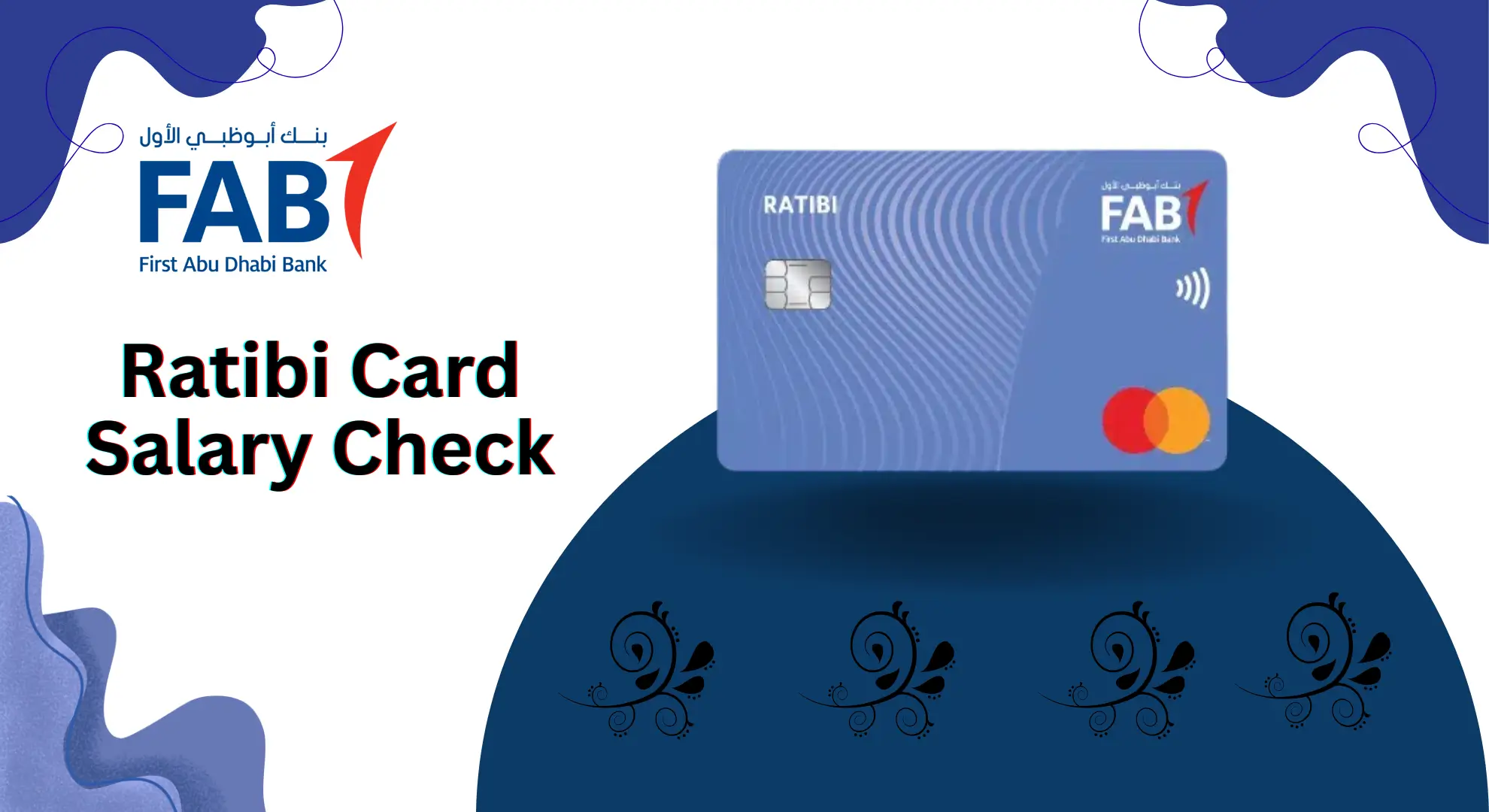
Ratibi Card Salary Check. When you’re working in the UAE, your biggest worries every month are the same: “Has my salary come in yet?” and “How much balance do I have on my card?” Getting to the ATM again and again or asking someone else to check for you becomes tiring really fast.
That’s why the Ratibi Card has become such an easy solution for so many workers. You don’t even need a bank account, and checking your salary balance takes only a few seconds.
In this guide, I’m explaining everything clearly whether you want to check your salary using your phone, the app, an ATM, or even SMS. Every method is explained clearly so you can use whatever works best for you.
All Methods for Ratibi Card Salary Check
You can check your salary and card balance using many methods. Below is an overview:
| Method | Internet Needed | Cost | Speed |
|---|---|---|---|
| FAB website (online portal) | Yes | Free | Very fast |
| Mobile app (Ratibi card salary check app) | Yes | Free | Very fast |
| ATM machines | No | Free at FAB ATMs | Fast |
| SMS / Text message | No (only mobile network) | Standard SMS charge | Fast |
| WhatsApp banking (where available) | Yes | Free | Fast |
| POS machines at shops | No | Free | Fast |
| Customer care call centre | No | Call charges | Medium |
| Email / alerts | Yes | Usually free | Automatic |
| Branch visit | No | Free | Slowest |
Now let’s see each method in detail so you can choose the one that suits you.
Ratibi Card Balance Check via PPC Inquiry (Magnati)
If you want to see your Ratibi card balance quickly, just follow these easy steps:
1. Open the Balance Check Page
Go to the official Magnati PPC Inquiry link: https://ppc.magnati.com/ppc-inquiry
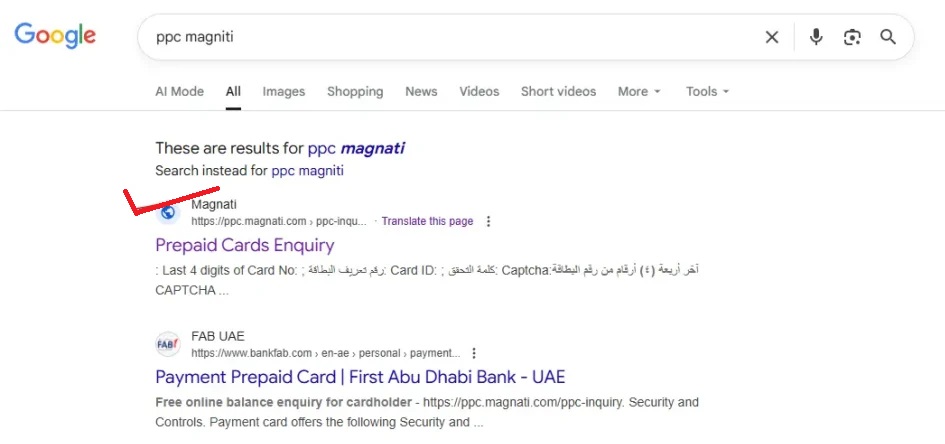
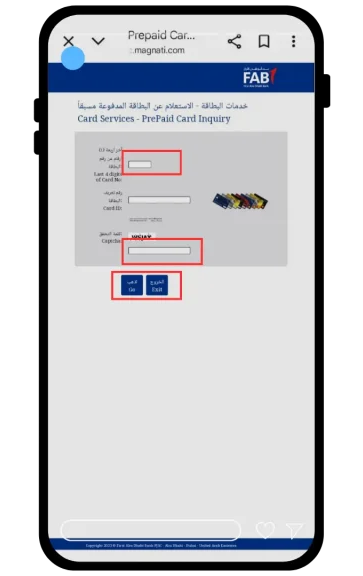
2. Enter Your Card Details
You will see two boxes on the screen.
- In the first box, type the last 2 digits of your Ratibi card number.
- In the second box, enter your Card ID (printed on the front or back of your card).
Type both details carefully.
3. Click the Button
Tap on “Go” or “Submit.”
4. Wait a Moment
In a few seconds — your current balance and recent transactions will appear instantly.
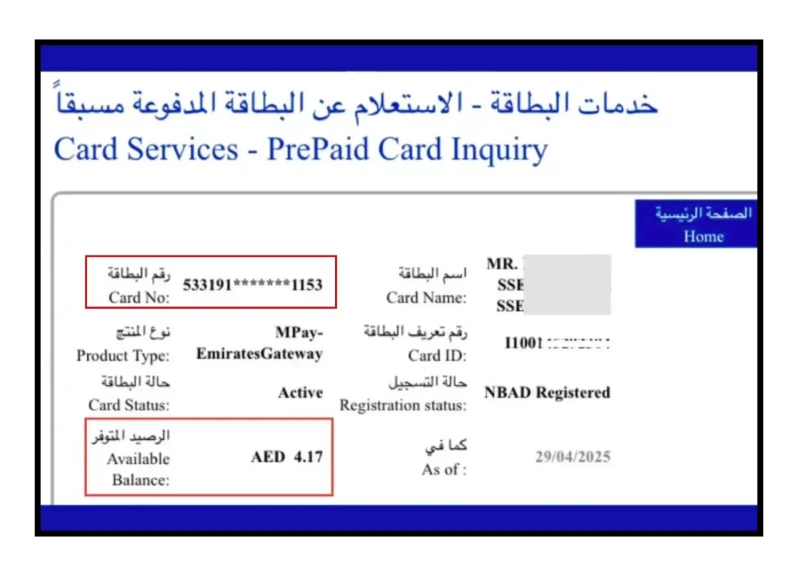
will appear on the screen.
How to Do Ratibi Card Salary Check Online (FAB Website)
One of the easiest and most common options is to use the FAB online portal for prepaid cards. This is what most people mean by Ratibi card salary check online.
1. Go to the official FAB website: Open your browser and visit: www.bankfab.com
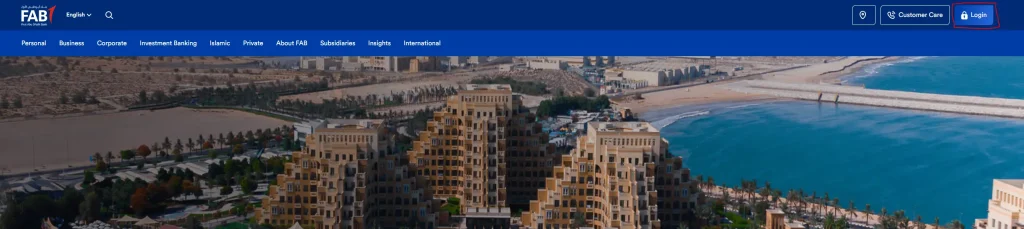
2. Click the Login button: On the top right corner of the website, you’ll see a Login button.
Click on it to see more options.
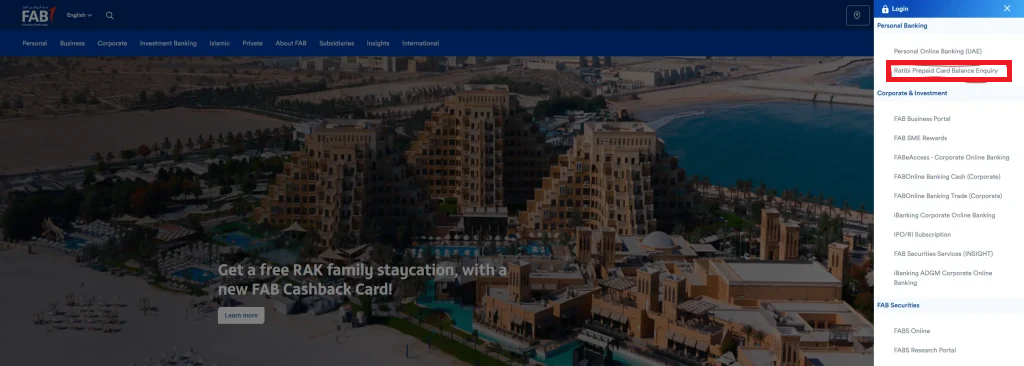
3. Choose Ratibi Prepaid Card Balance Enquiry: Under the Personal Banking section, you will find “Ratibi Prepaid Card Balance Enquiry”. Click on it.

4. Enter your card details: Now the page will ask for two things:
- The last 4 digits of your Ratibi card
- Your Card ID (written on the bottom left of your card)
5. Complete the captcha: Type the small human verification code shown on the screen.
6. Check your balance: Click Go or submit button.
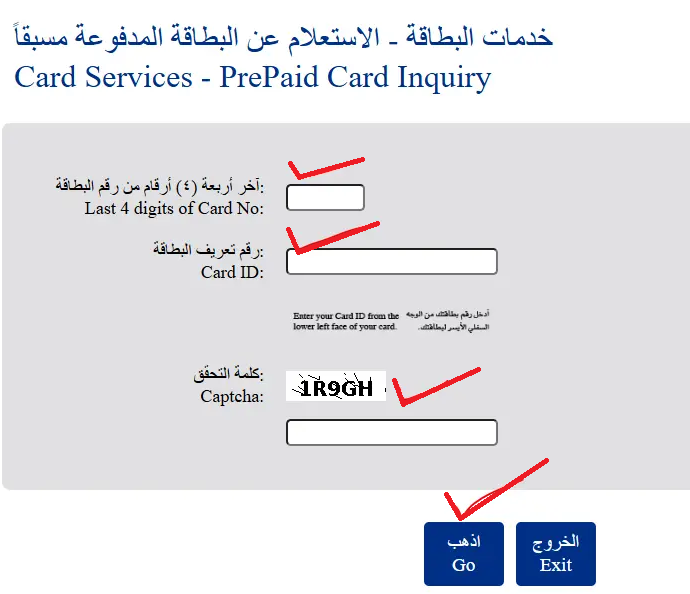
Within a few seconds, you will see your current Ratibi card salary balance.
How to Check Your Ratibi Card Balance Using the FAB Mobile App
If you want the easiest way to check your Ratibi card balance, the FAB mobile app is the best option. It takes only a few minutes to set up, and after that, you can see your balance anytime with one tap. Here’s how you can do it:
- Download the official FAB Mobile App: Go to your phone’s store: Apple App Store, Google Play Store, or Huawei App Gallery — and search for FAB Mobile. Make sure it’s the official app.
- Install the app: Once you download it, install the app on your phone like any normal app.
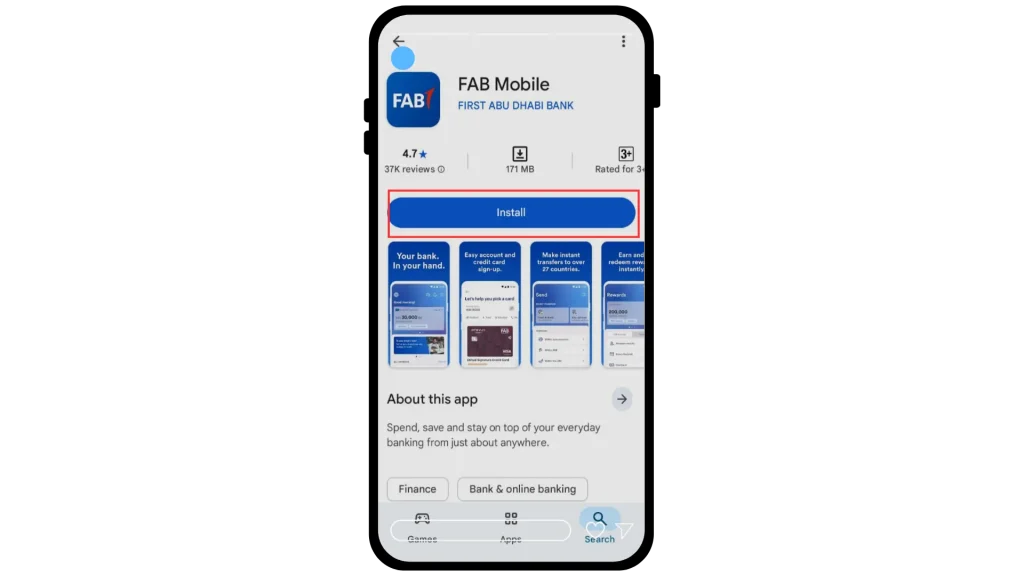
- Log in using your Customer ID and password: Open the app and enter your FAB Customer ID and your app password. If it’s your first time, the app will guide you on how to set up everything.
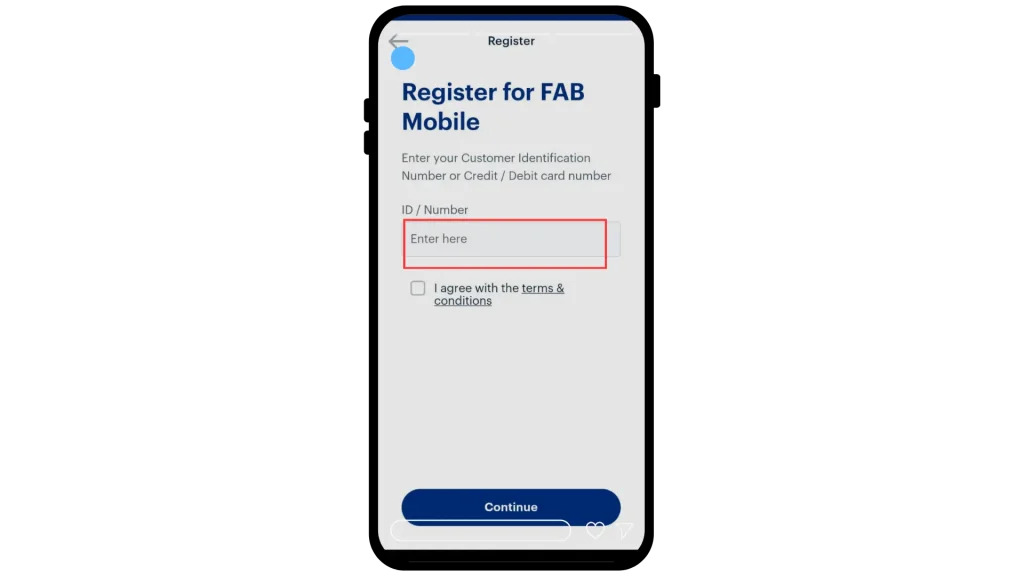
- Complete OTP verification: You will receive a code (OTP) on your registered mobile number. Enter the code to verify that it’s really you.
- Enable fingerprint if you want: The app may ask if you want to use your fingerprint or Face ID for faster login. You can turn this on for quick access.
- Open the Cards section: On the home screen, look at the bottom menu. You will see an option called “Cards”.
- Select your Ratibi card: Tap “Cards” → then choose Prepaid Cards. Here you will find your Ratibi salary card. Tap it once to see your balance, salary deposits, and all recent transactions.
Explore extra features
- The app doesn’t just show your balance.
- You can also:
- Transfer money
- Pay bills
- Manage card settings
- View statements
- Check your last transactions
Ratibi Card Salary Check Online by Payit APP
If you want an easy way to see your Ratibi card salary, the Payit app is one of the fastest options. It works on any smartphone, and the steps are very simple. Just follow the guide below.
Step 1: Install the Payit App
Download the Payit app from the official link: Official Payit
This is the safest link, so make sure you install the app from there only.
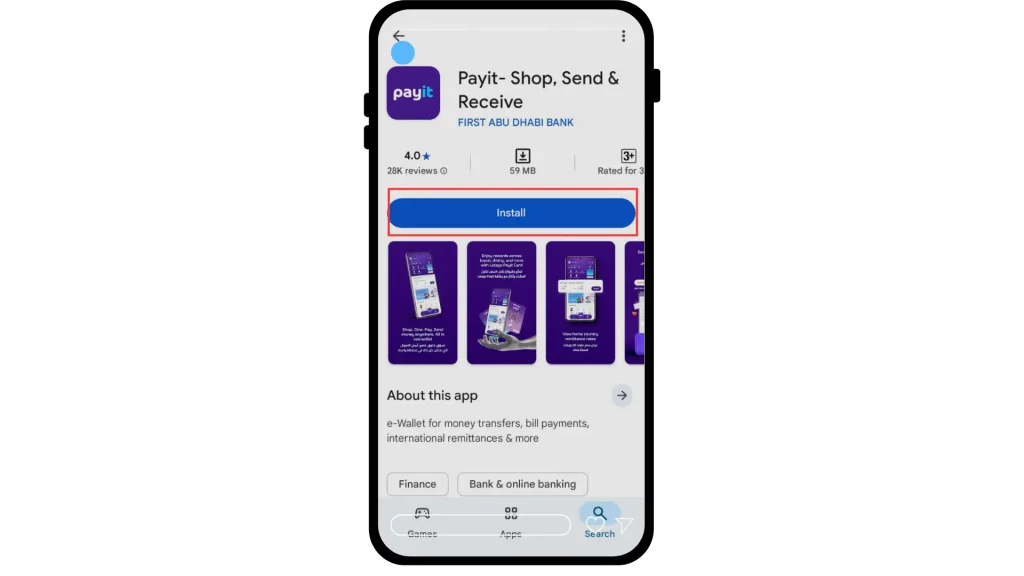
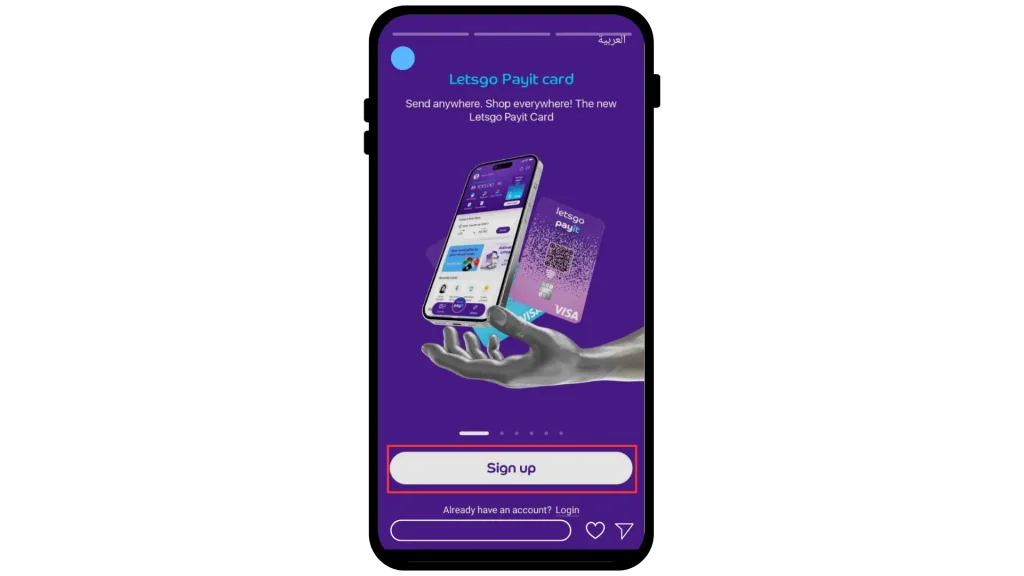
Step 2: Open the App
After installation, open the app.
On the first screen, you will see the option “Sign Up with Ratibi Card.”
Tap on it.
Step 3: Sign Up With Your Ratibi Card
Now enter the required details to create your Payit account.
This step connects your Ratibi salary card with the app.
Step 4: Log In With Your Mobile Number
Once sign-up is complete, log in using your mobile number.
Enter the Payit PIN you created during registration.

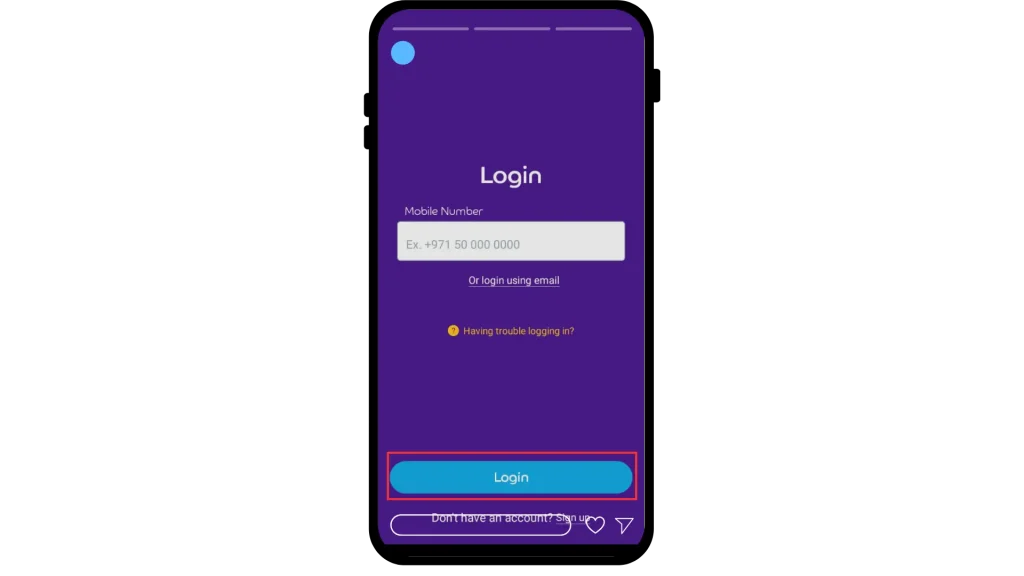
The app will send you an OTP on your phone.
Enter the OTP to complete verification.
Step 5: View Your Ratibi Card Balance
After logging in, your Ratibi card balance will show right on the home screen.
If you want more details, tap “View Card” under the card image.
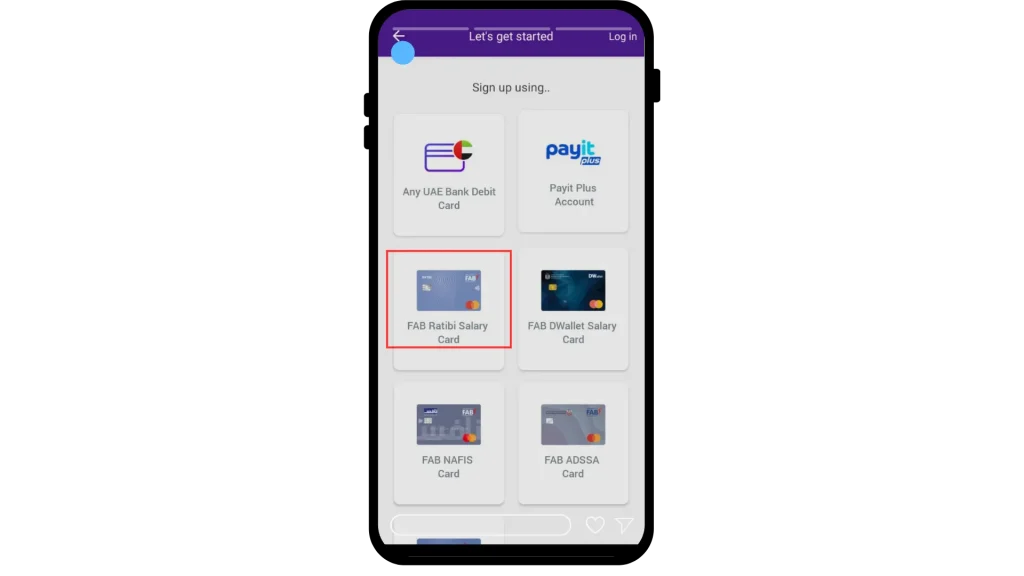
Step 6: Select Your FAB Ratibi Card
You can choose your FAB Ratibi card inside the app to see the latest salary, transactions, and card info.
Ratibi Card Salary Check Number (WhatsApp & Customer Care)
When people search for Ratibi card salary check number, they usually want the phone number or WhatsApp number to contact FAB.
Customer Care Call Centre
You can call FAB’s customer care for:
- Balance information
- Card problems
- Lost / stolen card reporting
- Transaction disputes
Typical steps:
- Call the official FAB helpline (inside UAE or international number)
- Select your language using IVR
- Choose the option related to cards / prepaid cards
- Authenticate yourself with card details or Emirates ID
- Ask the agent for Ratibi salary card balance
WhatsApp Banking (Where Available)
In some periods, FAB has also offered WhatsApp banking for simple services like balance inquiries. A typical flow is:
- Save the official FAB WhatsApp number (from FAB website)
- Send a “Hi” message
- Verify your number with OTP (One Time Password)
- Type “Balance” or choose the balance option
- Receive your card balance in seconds
Limit Notice
WhatsApp sessions usually last between 15 and 30 minutes. If you want to check your balance again, you will have to go through the whole verification process again. People prefer Payit or the official online portals because they stay logged in longer and are easier to use.
Ratibi Card Salary Check at ATM Machines
If you don’t have internet access, you can still check your card at FAB ATMs or partner ATMs.
- Find the nearest FAB ATM
- Insert your Ratibi salary card
- Enter your 4-digit PIN
- Choose Balance Inquiry or similar option from the menu
- Your balance will show on screen; you can also print a receipt
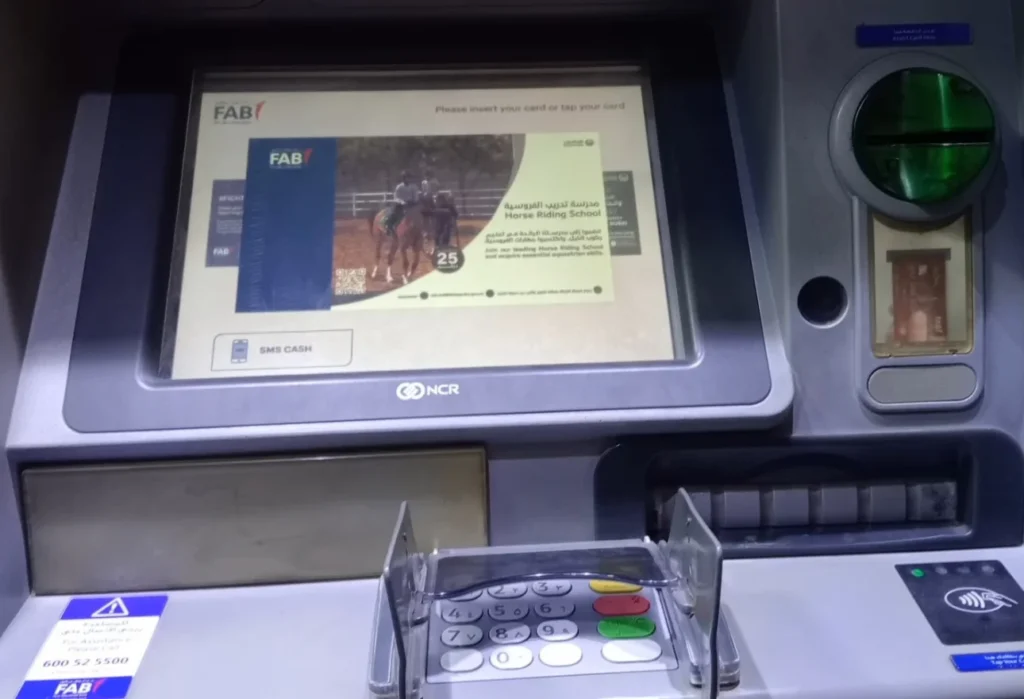
This is a good option for workers who only use simple phones and do not have access to apps or Wi-Fi. It is a classic form of Ratibi card salary check prepaid method.
Ratibi Card Salary Check by SMS
In some cases, FAB allows salary card holders to check their balance through SMS banking. This is useful if you have a basic phone without internet.
Note: The exact format may change with time, so always confirm with FAB or your employer.
- Register your mobile number for SMS banking through FAB branch or customer service
- Send a text in the format:
BAL [space] last 4 digits of your card
- Send the SMS to the official FAB short code (for example, 2121 or another number given by the bank)
- You will receive an SMS with your current balance
This simple method is why many workers prefer SMS for Ratibi card salary check in remote areas where internet is weak.
Checking Balance via POS Machines in Shops
Some POS machines in supermarkets or shops allow customers to do a balance inquiry before making a purchase.
- Ask the cashier if balance inquiry is available
- Insert or tap your Ratibi card in the POS terminal
- Select Balance Inquiry on the screen
- Enter your PIN
- Your balance will appear on the POS screen or on a printed slip
This is a helpful method if you want to know how much money is available before paying for your shopping.

Email Alerts & Online Statements
Another easy way to keep track of your money is to use email alerts and online statements.
- You can ask FAB to send an email alert when your salary is credited
- Monthly e-statements can show:
- Salary deposits
- ATM withdrawals
- POS transactions
- Fees and charges
This way you do not need to do a manual Ratibi card salary check online every time. The system will update you automatically.
How to Downlad Ratibi Card Salary Check App?
If you want a quick way to check your salary and keep an eye on your Ratibi card, the Ratibi Card Salary Check App is the easiest option. You don’t need to go to an ATM every time. Just download the app on your phone and check your balance anytime you want.
Step 1: Open the Google Play Store if you use Android, or the Apple App Store if you use an iPhone.
Step 2: In the search box, type “Ratibi Card Salary Check” or “FAB Ratibi”.
Step 3: Look for the official app from First Abu Dhabi Bank (FAB). Make sure it has the FAB logo so you know it’s the real one.
Step 4: Tap Install (Android) or Get (iPhone), then wait for the download to finish.
Step 5: Open the app after it installs. Log in using your Ratibi card number or registered mobile number.
Once everything is set up, you can:
- Check your salary balance
- See your last transactions
- View salary deposit dates
- Manage your card settings
Everything is simple, and you can do it anytime without depending on an ATM or a branch.
What Is a Ratibi Salary Card?
The Ratibi card is a prepaid salary card introduced to support the UAE’s Wage Protection System (WPS). It is especially designed for workers who:
- Earn up to AED 5,000 per month (limit may vary with time)
- Do not have a personal bank account
- Work for a company that pays salaries through FAB
Instead of paying cash or opening a full bank account for each worker, the company sends salaries directly to each employee’s Ratibi card.
Key Features of Ratibi Card
- No bank account required – Salary goes directly to the card
- Prepaid card – You can only spend what is loaded (no overdraft)
- Works on Visa / Mastercard networks – Can be used globally
- ATM withdrawals – Take cash from FAB ATMs and partner networks
- POS payments – Pay in supermarkets, shops, petrol stations, etc.
- Online payments – Use it for online shopping (where allowed)
- SMS alerts – Get a message when salary is credited
- PIN protection – Secure 4-digit PIN for ATM and POS
Because it is part of the UAE’s Wage Protection System (WPS), it also helps employers follow UAE labour laws by paying salaries electronically and on time.
FAB & NBAD: What’s the Difference?
Many workers still search for NBAD Ratibi card salary check because they remember the old name of the bank. Here is the simple story:
- NBAD (National Bank of Abu Dhabi) and FGB (First Gulf Bank) merged
- After the merger, the new bank is called FAB (First Abu Dhabi Bank)
- All NBAD salary cards and NBAD balance inquiry services are now handled by FAB
So, whenever you see:
- NBAD Ratibi card
- NBAD salary card
- NBAD balance check
You can understand that it is now part of FAB bank Ratibi card salary check services. The system is the same, only the name of the bank has changed.
Benefits of Ratibi Salary Card (Employee Side)
The Ratibi card gives many advantages to workers, especially those in low and medium income segments.
Main Benefits
- No need for a bank account – Perfect for workers who only want an easy salary solution
- Fast salary access – Salary is credited electronically, usually on the same day employer processes it
- Global acceptance – Use anywhere Visa or Mastercard is accepted
- Safe and secure – No need to carry large amounts of cash
- ATM and POS access – Withdraw cash, pay bills, buy groceries, and more
- Online payments – Book tickets, recharge phones, and pay online (if enabled)
- Free SMS alerts – Know immediately when your salary arrives
- Insurance benefits – In many cases, accident insurance and hospitalization coverage are included
- Compliance with WPS – Protects your right to get your salary on time
For many workers, this card is their first step into formal financial services in the UAE.
Benefits of Ratibi Card for Employers
Employers also receive strong benefits when using Ratibi for payroll:
- Easy payroll management – Upload salary file and distribute to all employees at once
- Lower cash handling – No need to withdraw cash and pay staff manually
- WPS compliant – Meets UAE Wage Protection System requirements
- Real-time control – Manage employee cards through online corporate banking
- Less risk – Reduced risk of theft or salary loss during manual distribution
- Better record keeping – Digital records make audits and reports easier
Because of these advantages, many companies in construction, cleaning, retail, security, and other sectors now use Ratibi cards as their main salary tool.
Eligibility for Ratibi Card
To be eligible for a Ratibi salary card, some basic conditions usually apply.
Employee Requirements
- Must be legally employed in the UAE
- Must have a valid Emirates ID
- Must be paid salary through a company registered with FAB
- Typically for salaries of AED 5,000 or less per month
- Must complete KYC (Know Your Customer) requirements
Employer Requirements
- Must have an active corporate account with FAB
- Must be registered with the Wage Protection System (WPS)
- Must apply for the Ratibi cards on behalf of their employees
- Must pay any setup or monthly card fees as agreed with FAB
The employee usually does not apply directly for the card. The company HR or payroll department coordinates with FAB.
Documents Required
Below the documents of Ratibi Card
Employer Documents
- Trade license / corporate registration
- Board resolution or power of attorney
- Last three months’ corporate bank statements
- FATCA/CRS self-certification (if needed)
- Employer Application Form
- Employee Excel sheet
Employee Documents
- Emirates ID copy (front & back)
- Residency visa page copy
- Labor card from MOHRE
- Completed FAB KYC form
Fees & Charges on Ratibi Salary Card
While the Ratibi card is low-cost, there are still some fees to understand.
Note: Exact amounts can change with time, so always confirm with FAB.
Common examples:

- New card issuance – Often paid by employer
- Monthly maintenance fee – Small fee, usually charged to the employer
- Card replacement (lost / stolen) – Normally paid by employee
- Card renewal – Sometimes paid by employer
- ATM withdrawals – Free at FAB ATMs; other banks’ ATMs may charge
- Failed transaction fee – Small charge if transaction fails due to insufficient balance
- Cash deposit at ATM – Sometimes comes with a small fee
Knowing these charges helps you avoid surprises when using your Ratibi card.
How to Apply for a Ratibi Salary Card
Getting a Ratibi card is mostly handled by your employer, so you don’t have to do anything complicated. If you earn AED 5,000 or less, your company can register you for the Ratibi system.
Here’s how it works in simple words:
- Your employer signs up with FAB for the Ratibi payroll service.
- They send the bank all required documents, like your Emirates ID, visa copy, and labour card.
- Once FAB approves everything, your salary will start going straight to your Ratibi card every month through the WPS system.
- You don’t need to touch cash or visit the bank.
- When the card arrives, you can start using it right away at ATMs, shops, and online (if allowed).
It’s a smooth, automatic setup where you get your salary safely without doing any paperwork.
FAB Ratibi Card Activation
Activating the Ratibi salary card takes just a few minutes on your phone. Follow these simple steps:
- Download the FAB Mobile App from the App Store or Google Play.
- Open the app and log in. If you’re new, create an account first.
- Go to the Cards or Account Services section.
- Find your Ratibi card in the list.
- Tap Activate.
- Enter the required details such as:
- Card number or last 4 digits
- Card expiry date
- Card ID
- Emirates ID or registered mobile number (if the app asks)
- Create your 4-digit PIN.
- Confirm activation and wait a moment. You’ll get an SMS or app message saying your card is now active.
Once activated, your card is ready to use at ATMs, shops, and POS machines.
How to Get Your Ratibi Card Statement
You can check your Ratibi card statement in three easy ways. Choose the one that’s most comfortable for you.
Using the Magnati PPC Inquiry Portal
This method works on any phone or computer:
- Go to: https://ppc.magnati.com/ppc-inquiry
- Enter:
- The last 2 digits of your Ratibi card number
- Your Card ID (printed on your card)
- Tap Go / Submit.
- You’ll instantly see:
- Your balance
- Your last few transactions
- You can print this page if you need a mini statement.
This is a quick option if you don’t want to log into the FAB app.
Through the FAB Mobile App
If you prefer using your phone, this option is perfect:
- Open the FAB Mobile App and log in.
- Go to the Cards section.
- Select your Ratibi card.
- Tap Transactions or Statement.
- You can see all your salary deposits and spending in one place.
There is also an option to download or email the statement directly from the app.
Using an FAB ATM or Branch
If you don’t want to use your phone or internet:
- Insert your card into any FAB ATM.
- Choose Mini Statement.
- View your recent transactions or print them.
Or you can visit any FAB branch and ask the customer service desk for a printed statement.
Common Problems and How to Fix Them
Even with a good system, cardholders sometimes face issues. Below are some frequent problems and simple fixes.
1. Salary Not Showing in Balance
Problem: Salary is not visible on your card even after payday.
Possible Reasons & Fixes:
- Employer has not yet processed the WPS salary file Confirm with HR
- Bank processing delay Wait 24–48 hours
- Card blocked or inactive Call customer care for status
2. Wrong Balance on Screen
Problem: The balance shown online or at ATM does not match your expectation.
Fix:
- Check if there are pending transactions (hotel hold, fuel pump, etc.)
- Review last 10 transactions using online portal or ATM
- If you see unknown transactions, report them immediately to FAB
3. SMS or WhatsApp Balance Check Not Working
Problem: No reply to your SMS or WhatsApp inquiry.
Fix:
- Make sure your mobile number is registered with the bank
- Check SMS format and short code
- Try another method (ATM, app, or website)
- Call customer support if problem continues
4. Card Declined at ATM or POS
Problem: You have money, but ATM or shop declines the transaction.
Fix:
- Check if you reached daily withdrawal or purchase limit
- Confirm that your card is enabled for POS or online use
- Try another ATM or machine in case of local technical issue
- Contact FAB to check if there is any block or restriction on your card
5. Card Lost or Stolen
If your Ratibi card is lost:
- Call FAB customer care immediately
- Ask to block the card
- Inform your employer / HR
- Request card replacement as per bank process
Acting fast can protect your salary from misuse.

Tips for Using Ratibi Salary Card
Whenever you do a FAB bank Ratibi card salary check, always keep your security in mind.
- Never share your PIN, Card ID, or OTP with anyone
- Do not click on suspicious links or fake websites claiming to be FAB
- Always check that website starts with https:// and the domain belongs to FAB
- Avoid using public Wi-Fi for balance checks whenever possible
- Cover the keypad at ATMs and POS while entering your PIN
- Turn on SMS or app notifications so you quickly see any strange transaction
- Regularly review your transaction history and report anything suspicious
These small habits can save you from big financial problems.
Customer Support & Helpline Numbers
You can reach Ratibi customer support through the FAB helpline, email, or by visiting any nearby branch. There is also the Magnati portal and the FAB website, where you can find help 24/7 whenever you need it.
Below are the main contact numbers you can use:
- Inside the UAE (FAB / Ratibi / Prepaid): 600 52 5500
- Outside the UAE / International Calls: +971 2 681 1511
- Prepaid & Magnati Support (UAE): 600 52 2298
- Magnati Contact Center: 600 525 002
These helplines are useful for:
- Balance problems
- Salary not showing
- Card blocked or not working
- Lost or stolen cards
- ATM issues
- General questions about Ratibi or prepaid cards
Whenever you face a problem, just call one of these numbers.
FAQs About Ratibi Card Salary Check
What is a Ratibi salary card?
It is a prepaid salary card from FAB used mainly for employees earning up to a certain income level. Salary is credited directly to the card, and you can use it at ATMs, shops, and online.
How can I check my Ratibi salary card balance quickly?
The fastest way is usually through the FAB website or mobile app. You enter your card details and see your balance within seconds.
Is NBAD Ratibi card still valid?
Yes. NBAD merged into FAB, so NBAD Ratibi cards now work under FAB’s system. All NBAD Ratibi card salary check services are handled by FAB platforms.
Do I need a bank account to get a Ratibi card?
No. That is the main advantage. Your employer can arrange a Ratibi card for you even if you do not have any normal bank account in the UAE.
Can I use Ratibi card outside the UAE?
Yes, in many cases you can use it internationally wherever Visa or Mastercard is accepted. However, international usage may involve extra charges, so always check the fee schedule.
What should I do if my salary does not arrive on my Ratibi card?
First, speak to your HR or payroll department to confirm the payment date. If they have already sent it, wait a short time, then contact FAB customer support if it still does not show.
Is Ratibi card safe to use online?
Yes, if used carefully. Only use trusted websites, never share your card details with others, and enable alerts so you can track every transaction.
Conclusion
The Ratibi salary card system, first launched under NBAD and now managed by FAB, gives workers in the UAE a safe and flexible way to receive their pay. Through Ratibi card salary check online, the Fab Ratibi card salary check app, ATMs, SMS, WhatsApp, and other tools, you always have control over your salary and spending.

About The Author