DHA Login Complete Guide 2026: DHA DataFlow, Sheryan, Hasana, Salem And Employee Login Explained
DHA Login. The Dubai Health Authority (DHA) provides multiple online login systems to manage healthcare services in Dubai. These digital portals help doctors, nurses, healthcare professionals, medical facilities, and DHA employees access important services in a secure and organized way. Many users search for terms like DHA DataFlow login, Sheryan DHA login, DHA login email, Hasana DHA login, DHA employee login, and Salem DHA login, but often feel confused about which portal to use.
Each DHA system has a specific purpose, such as document verification, professional licensing, employee services, wellness programs, and public health monitoring. Understanding how these portals work is essential to avoid delays and errors.
This guide explains all DHA login systems in simple words, helping users access the right platform easily and complete their tasks smoothly.
Dubai Health Authority (DHA)
The Dubai Health Authority (DHA) was created in June 2007 under Law No. 13, issued by His Highness Sheikh Mohammed bin Rashid Al Maktoum, Vice President and Prime Minister of the UAE and Ruler of Dubai.
DHA is the main healthcare authority in Dubai.
What DHA Is Responsible For
DHA works to:
- Set healthcare rules and policies
- License healthcare professionals
- Monitor hospitals and clinics
- Protect public health
- Improve quality of life
The Director General of DHA is Dr. Alawi Alsheikh-Ali.
DHA Vision – Why Digital Login Systems Exist
Dubai wants a smart, fast, and transparent healthcare system. Under the leadership of Sheikh Hamdan bin Mohammed bin Rashid Al Maktoum, DHA focuses on:
- Healthy life expectancy
- Future-ready healthcare
- Innovation and digital services
- Community well-being
Online portals like DHA login systems are a core part of this vision.
Why There Are Multiple DHA Login Portals
Many users think DHA has “too many logins”. In reality, each portal has a clear purpose. Different users = Different systems.
This keeps:
- Data secure
- Processes fast
- Errors low
- Services organized
Now let’s explain each DHA login system properly.

DHA DataFlow Login
What Is DHA DataFlow?
DHA DataFlow is a document verification system.
It checks:
- Educational degrees
- Professional licenses
- Work experience
- Certificates
This verification is mandatory before getting a DHA license.
Who Must Use DHA DataFlow Login?
You need DataFlow if you are:
- Doctor
- Nurse
- Dentist
- Pharmacist
- Medical technician
- Healthcare professional
DHA DataFlow Login Process
- Open DHA DataFlow official portal
- Enter registered email address
- Enter password
- Click Login
After login, you can:
- Upload documents
- Track application status
- See verification results
DHA DataFlow Common Errors & Solutions
Problem: Forgot password
Solution: Use “Forgot Password” with registered email
Problem: Status pending too long
Solution: Wait for source verification (this is normal)
Problem: Document rejected
Solution: Upload clear, official, and readable documents
Sheryan DHA Login – Licensing Made Digital
What Is Sheryan DHA?
Sheryan DHA is the main licensing portal.
If DataFlow verifies your documents,
Sheryan handles:
- License issuance
- License renewal
- Facility licensing
Who Uses Sheryan DHA Login?
- Healthcare professionals
- Clinics and hospitals
- Medical centers
- Healthcare companies
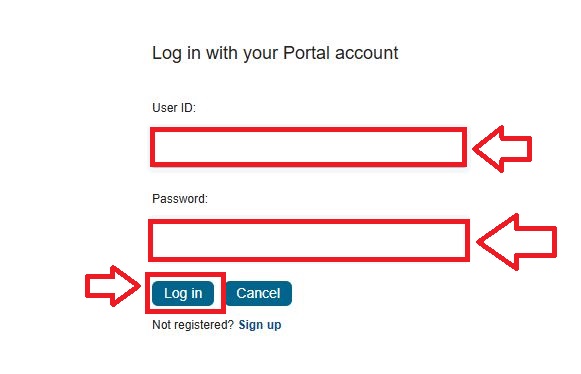
Sheryan DHA Login
- Open Sheryan DHA portal
- Click Login with Portal Account
- Enter User ID
- Enter Password
- Click Login

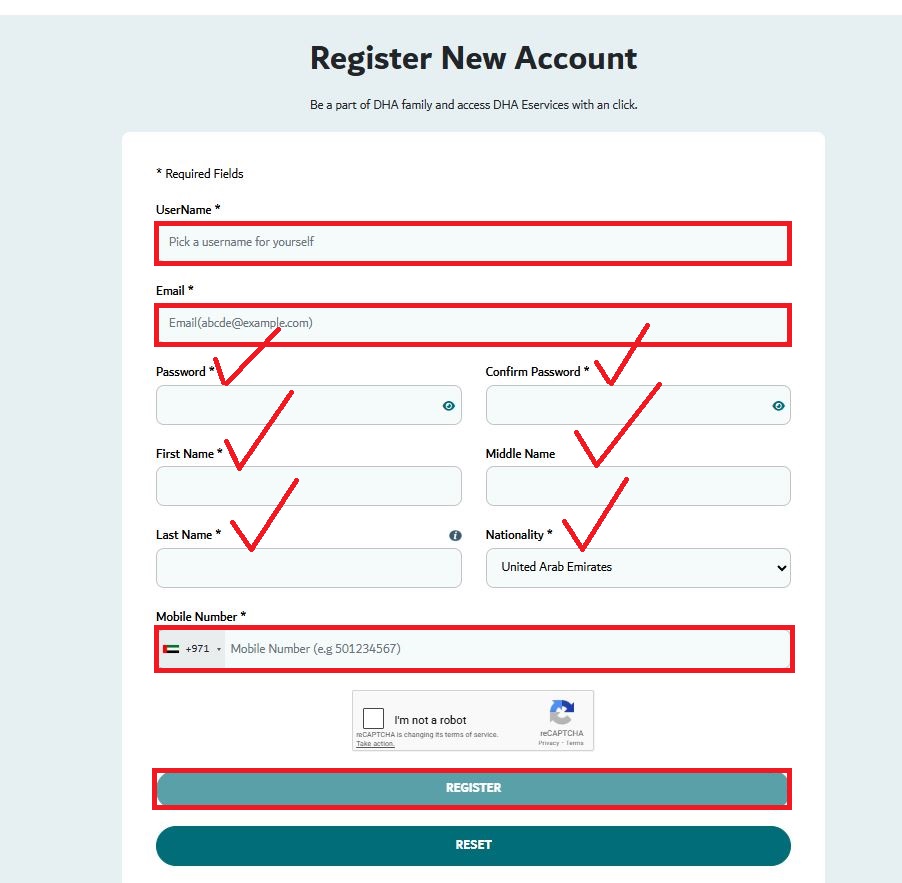
Sheryan DHA New Account Registration
To register:
- Choose a unique username
- Enter valid email
- Create password & confirm
- Enter first and last name
- Select nationality
- Enter UAE mobile number
- Complete captcha
- Click Register
After registration, you can access DHA eServices.
DHA Login Email – Small Thing, Big Impact
From my blogging experience, I can say one thing clearly:
- Your DHA login email controls your entire process.
Why DHA Login Email Is Critical
DHA sends:
- Verification emails
- Password reset links
- License updates
- System notifications
Personal Advice:
- Use personal email (not shared)
- Do not change email during application
- Check spam folder daily
- Save DHA emails
Ignoring emails causes delays and mistakes.
Hasana DHA Login – Employee Wellness Platform
What Is Hasana DHA?
Hasana DHA supports:
- Employee well-being
- Health programs
- Engagement initiatives
It reflects DHA’s belief that healthy staff create a strong healthcare system.
Who Can Access Hasana DHA Login?
- DHA employees
- Approved healthcare staff
- Selected partners
Login requires official credentials.
DHA Employee Login
Purpose of DHA Employee Login
This portal is only for DHA staff.
Employees can:
- Access HR services
- Apply for leave
- Check work schedules
- View announcements
Common DHA Employee Login Issues
- Password expired
- Account locked
- System maintenance
Solution: Contact DHA HR or IT support.

Salem DHA Login – Smart Health Intelligence
What Is Salem DHA?
Salem DHA is a smart digital health platform.
It helps DHA in:
- Disease tracking
- Public health monitoring
- Emergency planning
- Health data analysis
Who Uses Salem DHA Login?
- Government health officials
- Authorized healthcare facilities
- Public health experts
This platform supports future healthcare planning.
Security, Captcha & Login Safety (Often Missed)
DHA login systems include:
- Captcha verification
- Secure passwords
- Email authentication
These steps protect:
- Personal data
- Medical records
- System misuse
Never share:
- Passwords
- OTP codes
- Login links
Important Prometric Exam Warning
DHA officially warns:
Prometric does NOT sell exam practice tests.
Any site selling “official DHA or Prometric content” is illegal.
Report such cases at: [email protected]
DHA Official Contact Information
Phone: 800 342
Email: [email protected]

Office Hours:
- Monday–Thursday: 7:30 AM – 3:30 PM
- Friday: 7:30 AM – 12:00 PM
- Saturday & Sunday: Closed
FAQs About DHA Login
What is DHA login?
Ans: DHA login is an online access system provided by the Dubai Health Authority. It allows users to use DHA digital services like licensing, verification, and employee services.
How many DHA login portals are there?
Ans: DHA has multiple portals, including:
- DHA DataFlow login
- Sheryan DHA login
- Hasana DHA login
- DHA employee login
- Salem DHA login
Each portal is made for a specific purpose.
What is DHA DataFlow login used for?
Ans: DHA DataFlow login is used to verify educational degrees, professional licenses, and work experience of healthcare professionals.
Who needs DHA DataFlow login?
Ans: Doctors, nurses, dentists, pharmacists, and other healthcare professionals applying for a DHA license must use DHA DataFlow login.
What is Sheryan DHA login?
Ans: Sheryan DHA login is the main licensing portal of DHA. It is used to apply for, renew, and manage healthcare professional and facility licenses.
Can I use the same account for DataFlow and Sheryan DHA?

Ans: No. DHA DataFlow and Sheryan DHA are separate systems, but they are connected during the licensing process.
Why is DHA login email important?
Ans: Your DHA login email is used for verification, password reset, application updates, and official DHA communication.
What should I do if I forget my DHA login password?
Ans: Click on the “Forgot Password” option on the login page and reset your password using your registered email.
What is Hasana DHA login?
Ans: Hasana DHA login is an internal platform focused on employee wellness, health programs, and engagement activities for DHA staff.
Who can access Hasana DHA login?
Ans: Only DHA employees and approved healthcare staff can access Hasana DHA login using official credentials.
What is DHA employee login used for?
Ans: DHA employee login allows DHA staff to access HR services, leave management, schedules, and internal announcements.
What is Salem DHA login?
Ans: Salem DHA login is a smart public health platform used for disease monitoring, health reporting, and emergency preparedness.
Conclusion
The DHA login system is a complete digital network designed to support Dubai’s healthcare services efficiently. Each portal serves a specific role, from DHA Dataflow for credential verification to Sheryan for licensing, along with employee, wellness, and public health platforms like Hasana and Salem. Using the correct login, maintaining an active email, and following security steps ensure smooth access to services while supporting Dubai’s vision for a strong, future-ready healthcare system.



About The Author