Hafilat Balance Check Abu Dhabi 2027: How to Check Hafilat Card Balance Online, SMS Number 3009, App And Bus Reader Guide
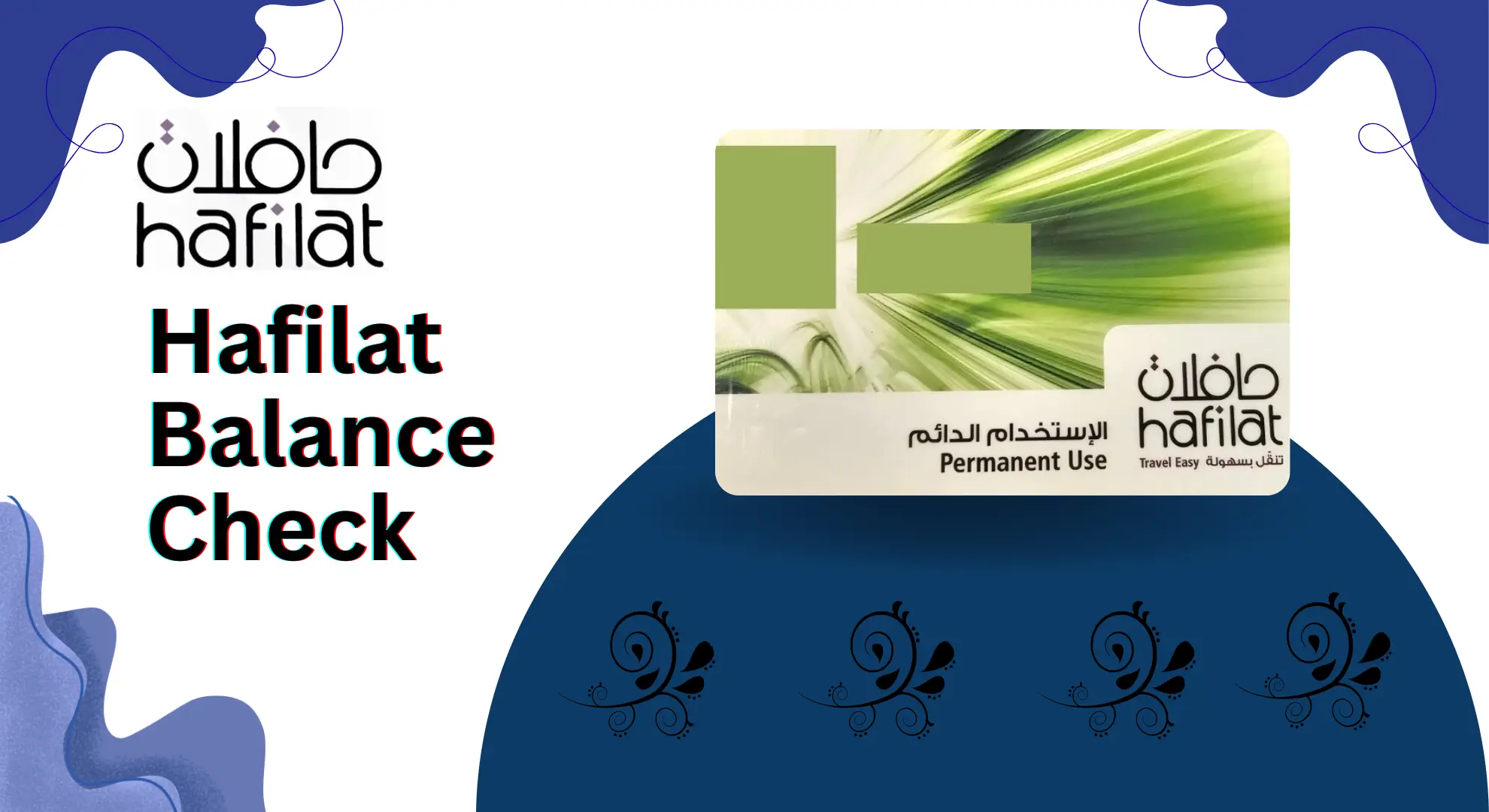
Hafilat Balance Check Abu Dhabi 2027. Public transport in Abu Dhabi works smoothly only when your Hafilat card has enough balance. Many people face delays and stress because they forget to check their balance before boarding a bus. That is why understanding the Hafilat balance check process is now essential for residents, students, tourists, and daily commuters across the UAE.
This complete guide explains how to check your Hafilat balance online in Abu Dhabi, through the Hafilat balance check number by SMS, using the Darb mobile app, at ticket vending machines, and directly on a bus card reader. It also covers all recharge methods, including online and offline options, recharge timing, common delays, card types, and available passes.
What is a Hafilat Card in Abu Dhabi?
A Hafilat Card is Abu Dhabi’s official smart payment card used for public bus travel across the emirate. It allows passengers to pay fares cash-free by simply tapping the card when boarding and exiting the bus. The system automatically calculates the fare based on distance and deducts it from the card balance.
The Hafilat card is managed by Abu Dhabi’s transport authority and supports pay-as-you-go travel, weekly and monthly passes, and special discounted cards for students, senior citizens, and people of determination. It makes bus travel faster, more organized, and easier for residents, workers, and visitors in Abu Dhabi.
Why You Should Check Your Hafilat Balance Regularly
People usually check balance only after a problem happens. That is the wrong time. Your balance check should be a small habit.
It helps you:
- avoid being stopped at the bus door
- plan recharges before your next ride
- keep enough balance for emergency travel
- manage family cards if you handle more than one card
All Hafilat Balance Check Methods
You can check your Hafilat balance in five main ways:
- Online on the official Hafilat portal (Darb website)
- SMS balance check (BAL to 3009)
- Darb app balance check (mobile app)
- Ticket Vending Machines (TVM) at stations
- On the bus validator screen when you tap
Now let’s break each method down with simple steps.
How to Check Hafilat Balance Online (Official Method)
Checking your Hafilat balance online is quick and does not require any technical skills. You can do it from your mobile or computer in just a few minutes by using the official Hafilat website.
Step 1: Open the Official Hafilat Website
Go to the official Hafilat online services page using your browser. Always use the official website to avoid errors or fake platforms.
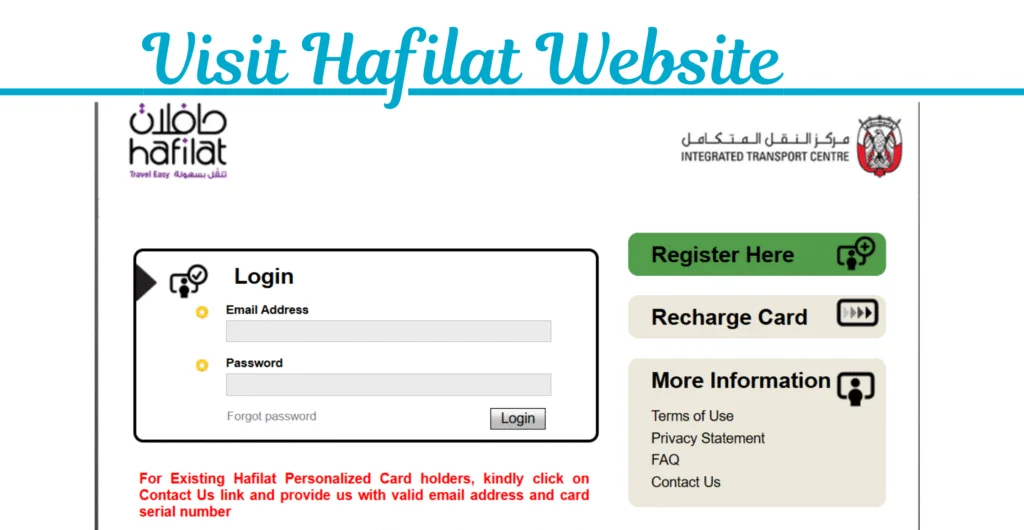
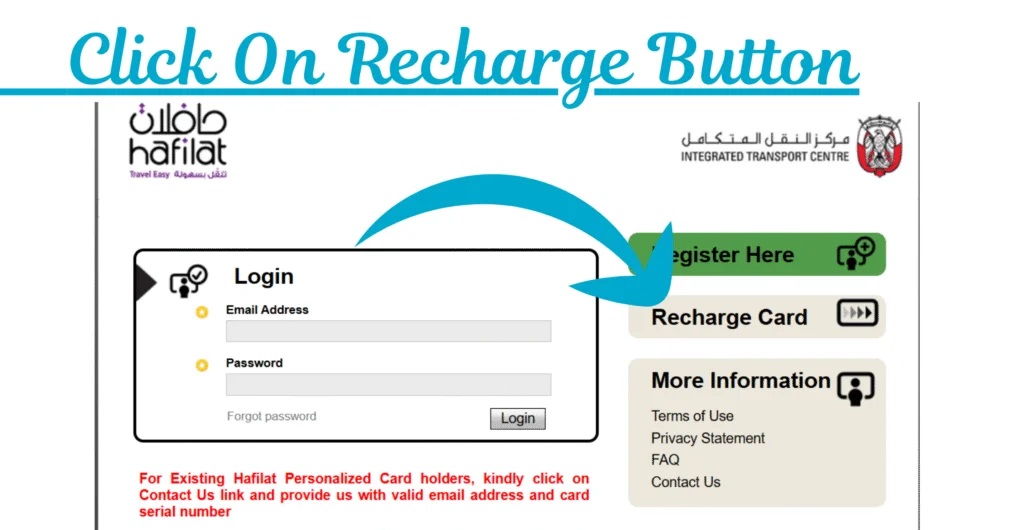
Step 2: Select “Recharge Card”
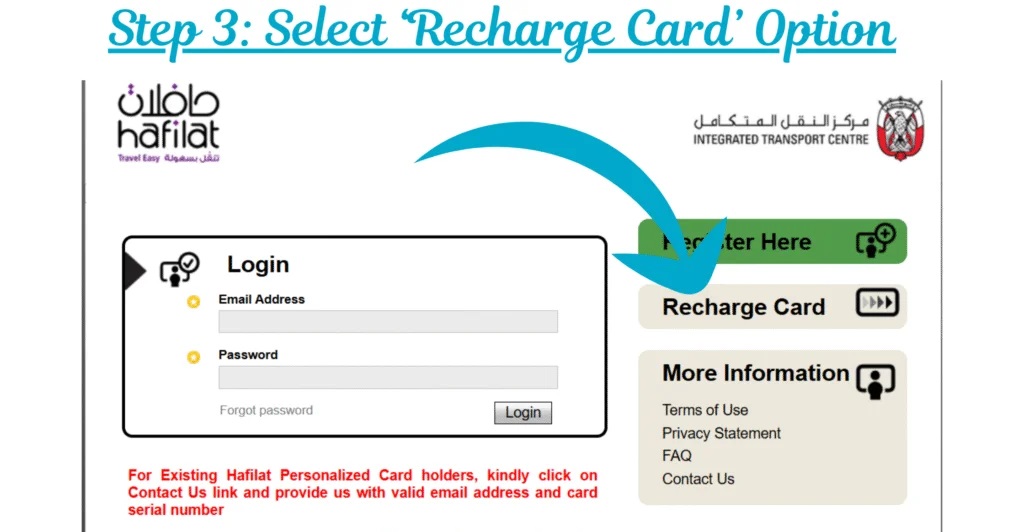
On the homepage, click on the Recharge Card option. You do not need to log in or create an account just to check your balance. This option works for both new and existing users.
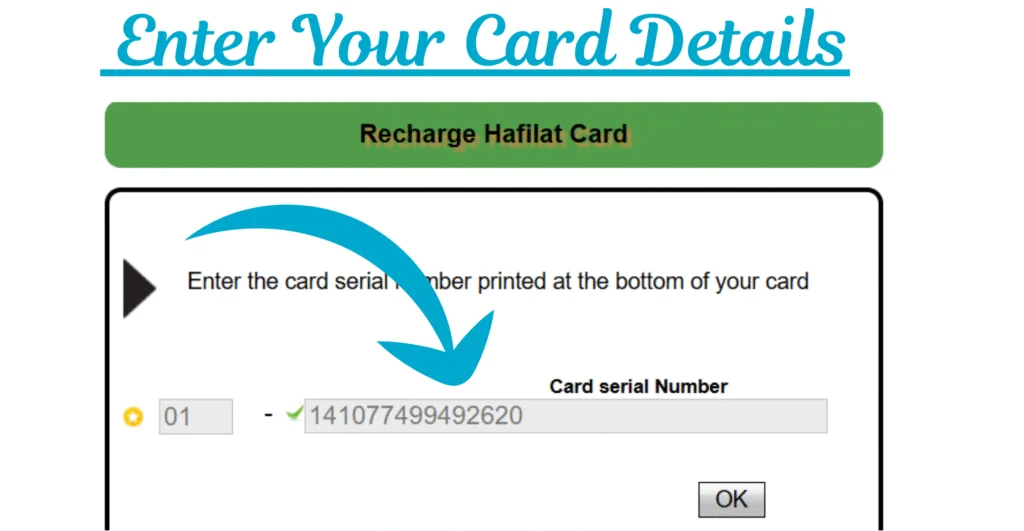
Step 3: Enter Your Hafilat Card Number
You will be taken to the balance and recharge page. Carefully enter your card serial number exactly as printed on your Hafilat card.
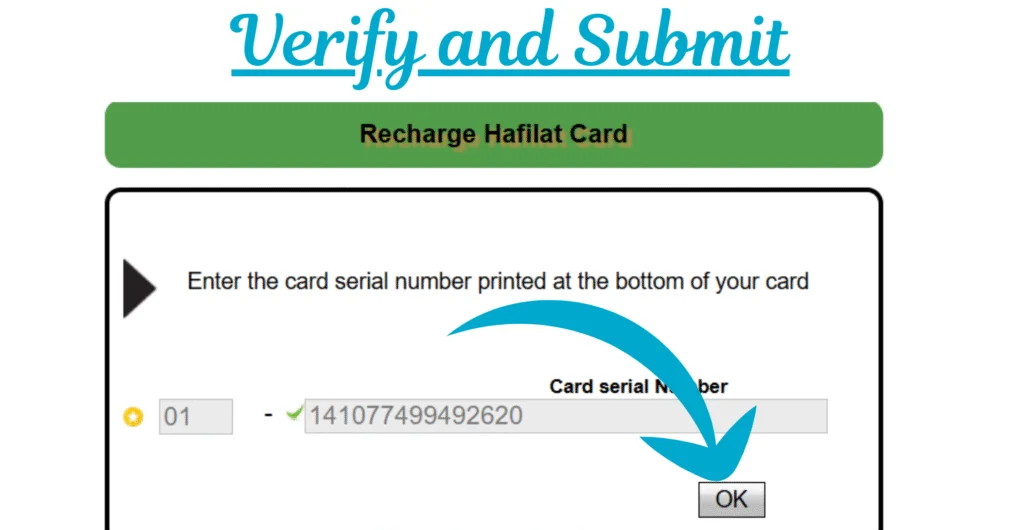
Step 4: Confirm and Submit
After entering the card details, click the OK or Submit button to proceed.
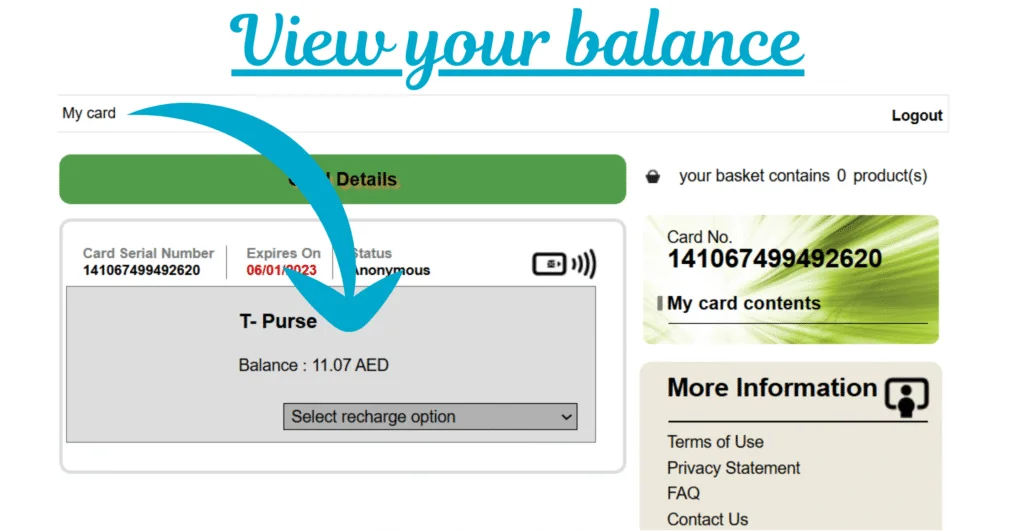
Step 5: Check Your Available Balance
Your current Hafilat balance will appear instantly on the screen. If the balance is low, you can recharge the card immediately from the same page without going anywhere else.

Advantages of Checking Hafilat Balance Online
Here are the main benefits of using the online balance check method:
- You can check your balance anytime using a mobile phone, tablet, or computer.
- Since most people carry a mobile phone, this service is available 24/7.
- There is no need to visit a bus station, machine, or service center.
- The online balance check is completely free. You do not pay any charges.
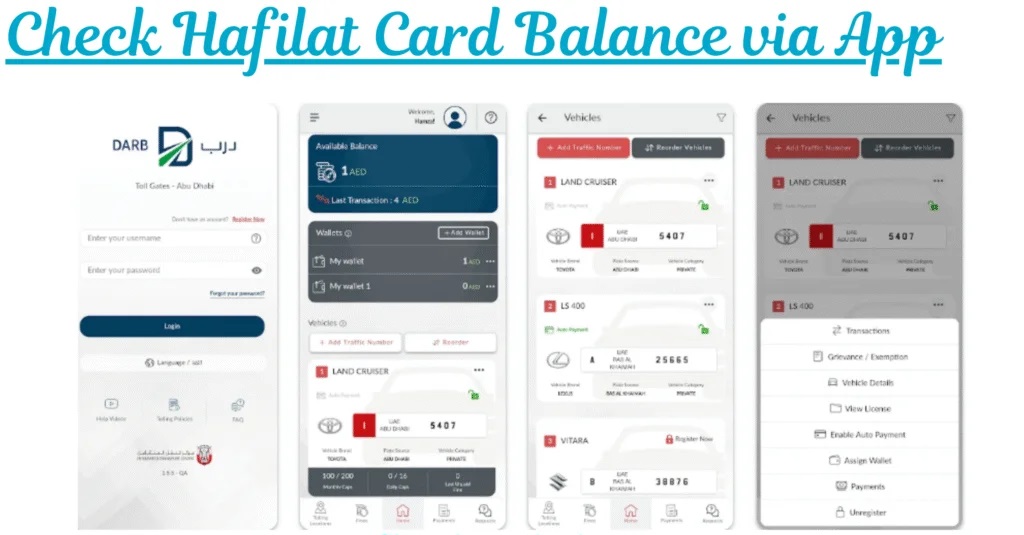
How to Check Hafilat Card Balance via App
Checking your Hafilat card balance through the mobile app is one of the fastest and safest ways. It works well for daily commuters and for families who manage more than one card.
Step 1: Download the App
Download the Darb App from the Google Play Store (Android) or Apple App Store (iPhone).
Make sure you install the official app only.
Step 2: Register or Log In
- New users need to create an account using basic details.
- Existing users can log in directly.
Step 3: Add Your Hafilat Card
Enter your Hafilat card number to link it with your account. This step is done once only.
Step 4: Go to the Balance Section
Open “My Cards” or “Balance” from the main menu inside the app.
Step 5: Check Your Balance
Your available balance will appear on the screen. If the balance is low, you can recharge your Hafilat card directly from the app.
Why Using the App Is a Smart Choice
- Balance updates appear quickly
- Low-balance alerts help avoid last-minute issues
- Easy online recharge option
- One app can manage multiple cards
Hafilat Balance Check Number SMS UAE (BAL to 3009)
If you do not want to open an app or website, the SMS method is very useful.
Hafilat balance check number UAE (SMS)
- Type:
BAL+ space + your Hafilat card number - Send to: 3009 Burj Diary+1
Example:BAL 1234567890123456
You will get an automated reply showing your balance.
When SMS is best
This works great when:
- your mobile data is off
- the internet is slow
- you need a quick check while walking to the stop
Hafilat Balance Check at Ticket Vending Machines (TVM)
TVMs are available at bus stations and many bus stops. They are reliable because they are part of the official system.
- Tap or insert your Hafilat card on the machine
- Choose Balance Inquiry
- View the current balance
- Recharge instantly if needed
The official Abu Dhabi Mobility page also states that balance on the card reflects immediately when you recharge at sales and recharge machines (TVM).
Checking Hafilat Balance Offline (No Internet Needed)
If you do not want to use the internet or a mobile app, you can still check your Hafilat balance offline. Abu Dhabi offers simple offline options that work fast and are easy to use.
1) Check Balance at Bus Stations
Most major bus stations in Abu Dhabi have Hafilat balance inquiry or recharge machines.
- Go to the Hafilat machine at the station.
- Tap or insert your Hafilat card.
- Select the Balance Check option.
- Your remaining balance appears on the screen.
This method is reliable and takes only a few seconds. A very small service fee may apply at some locations.
2) Check Balance on the Bus Reader
You can also see your balance directly when boarding a bus.
How it works:
- Tap your Hafilat card on the bus validator.
- The screen usually shows your current balance along with the tap confirmation.
This is useful for a quick check, but it is best used as a last-minute option.
3) Check Balance at Authorized Retail Outlets
Some authorized Hafilat retailers and recharge shops can check your balance for you.
- Visit an approved Hafilat seller or recharge outlet.
- Hand over your Hafilat card.
- Ask for a balance check.
This service may include a small charge, but it helps if you are near a shop and not a station.

Hafilat Recharge Guide (Online and Offline)
Keeping your Hafilat card topped up is very important if you use Abu Dhabi buses. A low balance can stop your trip at the bus door. Recharging is easy, and you can do it online in just a few minutes.
Why Should You Recharge Your Hafilat Card?
Recharging on time helps you:
- stay stress-free during daily or emergency travel
- avoid travel interruptions due to low balance
- travel smoothly without delays
- save time by recharging online instead of standing at machines
How to Recharge Hafilat Card Online (Step by Step)
Online recharge is the most convenient method. You can do it from your phone or computer.
Step 1: Visit the Official Hafilat Website or App
Open the official Hafilat recharge website in your browser. You can also use the official Hafilat/Darb mobile app on Android or iOS.
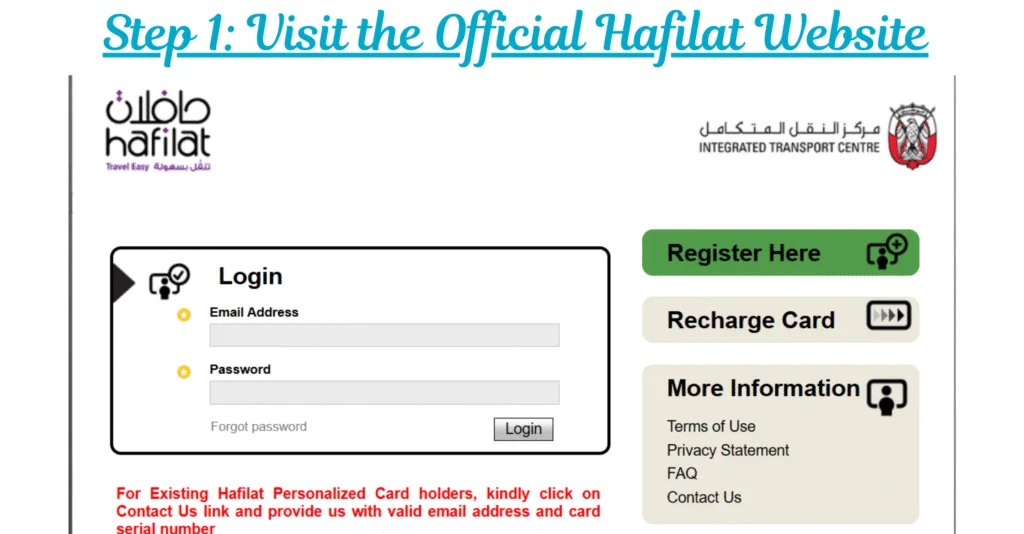
Step 2: Log In or Register
- If you already have an account, simply log in.
- New users need to create an account by entering basic details and card information.
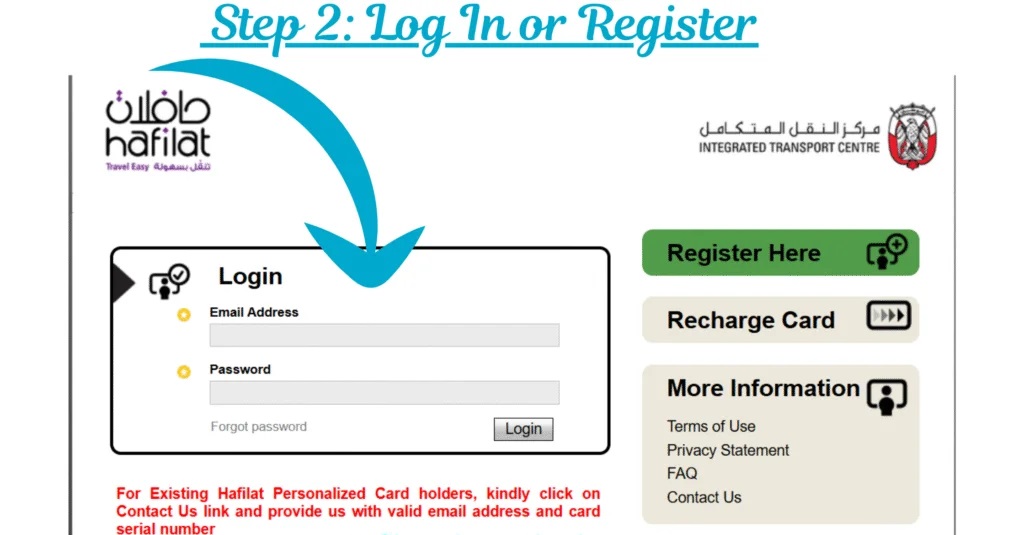
Step 3: Select the “Recharge Card” Option
After logging in, look for the Hafilat Card Recharge section and click on it.
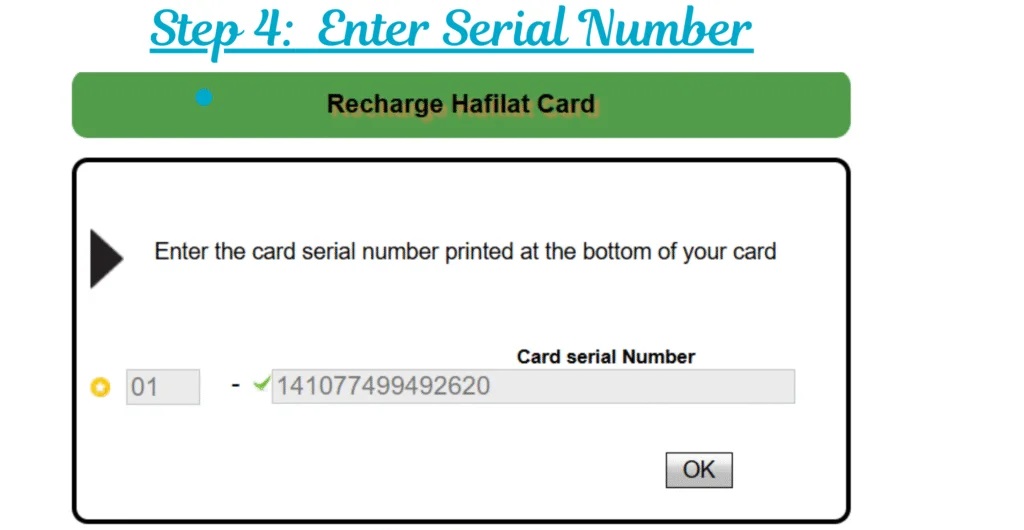
Step 4: Enter Your Card Serial Number
- Carefully enter the 16-digit serial number printed on your Hafilat card.
- Double-check the number before moving forward.
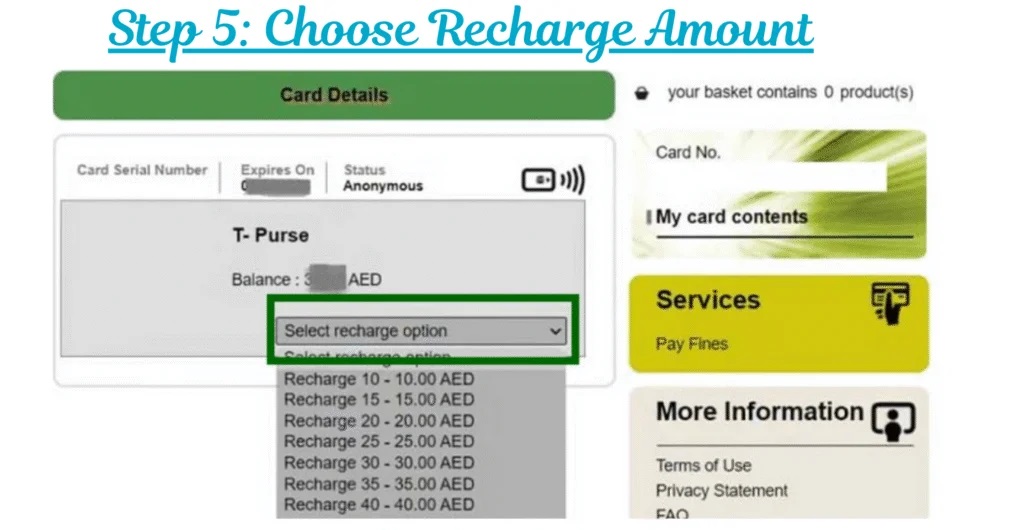
Step 5: Choose Recharge Amount
Select the amount you want to add.
Common options include AED 20, AED 50, or AED 100.
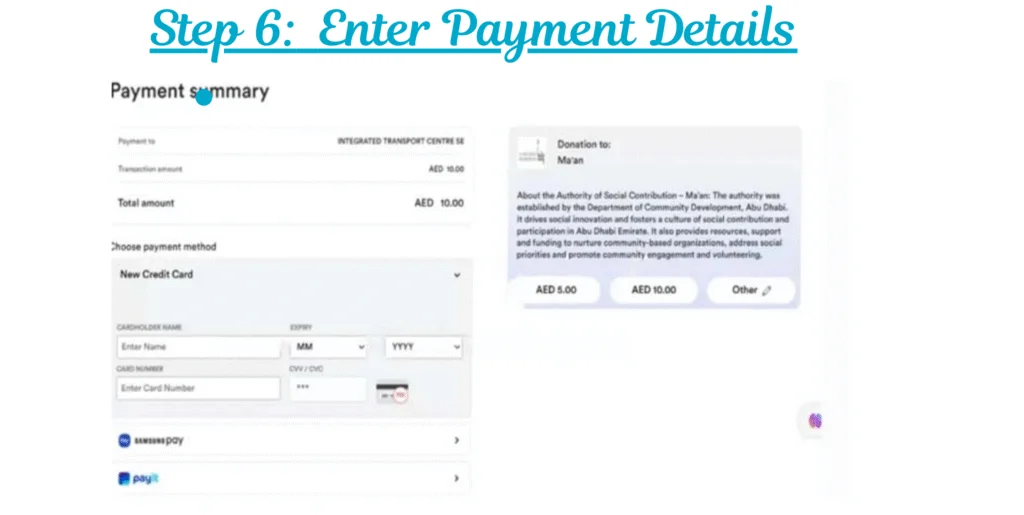
Step 6: Make the Payment
Choose a payment method such as:
- debit card
- credit card
- Apple Pay
- Google Pay
Enter your payment details and confirm securely.
Step 7: Get Confirmation
Once payment is successful:
- you will receive a confirmation message
- your balance usually updates within a few minutes
If the balance does not show immediately, tap your card on a bus or recharge machine to sync it.
Recharge at Customer Happiness Offices
Good for:
- card issues
- special category cards
- pass activation questions
Purchase locations and services are listed under Abu Dhabi Mobility pages, including Customer Happiness Offices and airport office options.

Offline Hafilat Recharge Options in Abu Dhabi
If you do not want to recharge your Hafilat card online or through an app, offline recharge options are easily available across Abu Dhabi. These methods are reliable and useful when your balance is low and you need an instant top-up.
1. Recharge at Hafilat Ticket Vending Machines (TVM)
Ticket Vending Machines are the fastest and most trusted offline option.
Steps to recharge at TVM:
- Visit a bus station or major transport hub.
- Locate a Hafilat Ticket Vending Machine.
- Tap or insert your Hafilat card.
- Select the recharge option.
- Choose the amount and complete payment.
Your balance updates immediately, making this option ideal for urgent travel.
2. Recharge at Authorized Retail Stores
Many approved supermarkets and convenience stores provide Hafilat recharge services.
Steps to recharge at a retailer:
- Visit any authorized Hafilat retailer.
- Hand over your Hafilat card to the cashier.
- Tell them the recharge amount.
- Make the payment.
- Collect your card and receipt.
This method is useful if you are already shopping or do not have access to a bus station.
3. Recharge at Customer Service Centers
Customer Happiness Centers offer full support for Hafilat card users.
Steps at customer centers:
- Visit an official transport or customer service office.
- Provide your Hafilat card.
- Request balance check or recharge.
- Pay the required amount.
This option is best if you also need help with card issues, replacement, or pass information.
Tips for a Smooth Hafilat Recharge Experience
- Check your Hafilat balance regularly to avoid last-minute problems.
- Always keep your card number handy for quick recharging.
- If you travel daily, recharge before your balance gets low.
- Use vending machines for instant balance updates.
Types of Hafilat Cards in Abu Dhabi
Abu Dhabi offers different Hafilat card types to match how long you stay and how often you travel. Choosing the right card makes bus travel easier and cheaper.
1) Contactless Smart Ticket (CST) – Best for Tourists
This card is made for short visits.
- Price: Free
- Validity: 30 days
- Best for: Tourists and short-term visitors
How it works (steps):
- Buy the CST from a bus station, airport, or ticket machine.
- Load balance on the card.
- Tap to travel. No registration needed.
2) Personalized Hafilat Card – Best for Residents
This is the long-term option for frequent travelers.
- Price: AED 10
- Validity: 5 years
- Best for: Residents and daily commuters
Why it’s better:
- Card is linked to you.
- Balance stays protected if the card is lost.
- You can add weekly or monthly passes.
Steps:
- Apply online or at a customer service office.
- Register your details.
- Use and manage the card online.
3) Special Category Cards – Discounted Travel
These cards are for students, senior citizens, and people of determination.
- Price: AED 5
- Validity: 5 years
- Best for: Eligible users who need discounted or free travel
Requirements (simple):
- Students: Emirates ID + student ID
- Seniors: Emirates ID (age-based eligibility)
- People of determination: Emirates ID + medical certificate
Quick Comparison Table
| Card Type | Price (AED) | Validity | Best For | Key Benefit |
|---|---|---|---|---|
| Contactless Smart Ticket (CST) | Free | 30 Days | Tourists | No registration |
| Personalized Card | 10 | 5 Years | Residents | Online management |
| Student Card | 5 | 5 Years | Students | Discounted fares |
| Senior Citizen Card | 5 | 5 Years | Age 55+ | Free annual pass |
| Special Needs Card | 5 | 5 Years | People of Determination | Free annual pass |
Tip: If you live in Abu Dhabi or travel daily, the personalized Hafilat card saves money and avoids balance loss.
Types of Hafilat Passes
Many riders do not use passes, even when passes can save money.
Abu Dhabi Mobility mentions adding public transport passes for 7 days or 30 days.
1. Daily Pass
This pass gives unlimited bus travel for one day.
It is best for tourists or people making many trips in a single day.
The pass starts when you first tap and stays valid until midnight.

Best for: Sightseeing, short visits, busy travel days
2. Weekly Pass
The weekly pass allows unlimited rides for 7 days in a row.
It activates on first use and works continuously for the full week.
Best for: Short-term workers, visitors staying one week
3. Monthly Pass
This is the most popular option for regular travelers.
It gives unlimited bus travel for 30 days from activation.
Best for: Students, office workers, daily commuters
4. Student Pass
This pass offers discounted travel for students.
To apply, you must have:
- a valid student ID
- registration with the transport authority
Best for: School and university students
5. Senior Citizen Pass
Senior residents can travel at reduced cost or free, depending on eligibility.
You must show proof of age and residency.
Best for: Elderly residents who use buses often
6. People of Determination Pass
This pass supports passengers with disabilities.
It offers free or subsidized travel after document verification.
Required: Approved disability certificate
7. Silver Card (Prepaid Card)
This is a pay-as-you-go option, not an unlimited pass.
Each trip deducts fare from your balance.
You can recharge it online or at machines.
Best for: Occasional travelers
8. Custom / Corporate Pass
Designed for companies to support employee transport.
Businesses can arrange bulk or subsidized passes for staff.
Best for: Companies managing workforce travel
Abu Dhabi Bus Fare Structure and Pricing (Simple & Clear)
Abu Dhabi uses a distance-based bus fare system. You tap your Hafilat card when you get on and tap again when you get off. The system calculates the fare automatically. This keeps pricing fair for short and long trips.
1) Local Travel Within Abu Dhabi City
- Base fare: AED 2 per trip
- This applies to most city routes.
- Ideal for daily commuters and tourists.
Why it works well: Most malls, offices, and residential areas fall under this flat rate. You can travel across the city at a low, predictable cost.
2) Regional Routes to Suburbs
- Fare: AED 2 + AED 0.05 per kilometer
- Covers areas like Musaffah, Shahama, and nearby suburbs.
How it helps: People living outside the city pay only for the extra distance. No zones. No confusion. Just tap in and out.
3) Intercity and Express Services
- Base fare: AED 10
- Extra charge: AED 0.10 per kilometer
What you get: Faster routes, fewer stops, better seating, and comfort for long travel to places like Al Ain or other emirates.
Where to Buy and Recharge Your Hafilat Card in Abu Dhabi
You can buy and recharge a Hafilat Card easily across Abu Dhabi, whether you are a tourist or a daily commuter. The city offers multiple official and partner locations, so you are never far from help.
Common buying points include:
Abu Dhabi International Airport
At Abu Dhabi International Airport, Hafilat cards are available for new arrivals and departing residents.
What you can do here

- Buy a new Hafilat card instantly
- Recharge your card on the spot
- Get route guidance and usage help
This location runs 24/7, which makes it ideal if you arrive late at night or early morning.
Major Bus Stations
Main bus stations like Central Bus Station, Bani Yas, Musaffah, Shahama, and Al Ain offer full Hafilat services.
Services available
- New card purchase
- Instant balance recharge
- Balance check and card support
Most stations have ticket counters and vending machines, with long operating hours for daily travelers.
Shopping Malls
Large malls across Abu Dhabi have MBME machines and customer service desks.
Common mall locations include:
- Yas Mall
- Marina Mall
- Al Wahda Mall
These spots are convenient because you can recharge while shopping, in a comfortable indoor setting.
Retail Partner Stores
Authorized retail partners such as LuLu Hypermarket and selected local stores also support Hafilat services.
Good for
- Quick recharge
- Basic card purchase during daily shopping
Retail locations are useful for residents, especially in residential areas, though services may be limited compared to bus stations.
If you want a personalized card, official pages show customer happiness offices and airport office routes.
Common Hafilat Balance Problems and Easy Fixes
Problem 1: “My online recharge is done, but balance is not showing”
Do this:
- wait a short time
- tap your card on a TVM machine
- use the card once on a bus validator
Official guidance mentions activation by travel or tapping on sales and recharge machines.
Problem 2: “SMS balance check not working”
Check:
- you typed BAL then space then card number
- you sent it to 3009
- your SIM can send SMS normally
Problem 3: “Validator did not read my card”
- tap slowly and hold for one second
- try another reader if available
- visit a customer happiness office if the card keeps failing
Quick Comparison: Which Balance Check Method Should You Use?
| Method | Internet Needed | Best for | What you need |
|---|---|---|---|
| Official Darb website | Yes | Home checks + online top-up | Card serial number |
| SMS (3009) | No | Fast check anywhere | BAL + card number |
| Darb app | Yes | Daily users + family cards | App + card added |
| Bus validator | No | Quick check while boarding | Just your card |
| TVM machine | No | Instant check + instant top-up | Card + cash/card |
FAQs About Hafilat Balance Check UAE
What is the Hafilat balance check number in Abu Dhabi?
The SMS method is widely shared: send BAL + space + card number to 3009.
How do I check Hafilat balance online in Abu Dhabi?
Use the official Darb Hafilat portal and enter your card serial number printed on the card.
Can I check Hafilat balance with the bus card only?
Yes. When you tap on the bus validator, it often shows the remaining balance briefly. It is helpful for quick checks.
Which app is best for Hafilat balance check?
Most riders use the Darb app because it supports Hafilat services through the same official system used by the portal.
Is there a maximum balance limit for Hafilat card?
Abu Dhabi Mobility mentions a maximum balance that can be credited and also mentions validity timing and activation steps.
Conclusion
Hafilat balance checks are an easy way to ensure smooth public transport in Abu Dhabi. Whether you use the online portal, SMS number 3009, the Darb app, ticket machines, or the bus reader, each method is simple and reliable. Keeping enough balance helps you avoid delays, stress, and travel issues. Make balance checking a habit and recharge on time to relax, easy, and uninterrupted bus travel across Abu Dhabi.



About The Author