ICA Smart Services UAE Visa Status Check Online: A Complete Guide To Check UAE Visa by Passport Number Via ICP And ICA Smart Services
ICA Smart Services UAE Visa Status Check. Checking your UAE visa status is very significant, whether you are visiting, working, or living in the UAE. Many people face issues because they are not sure if their visa is approved, under process, or expired. This usually happens when the wrong website is used or the correct visa authority is not identified. The UAE provides official online systems for visa status and validity checks, but these services are divided between ICA (ICP) Smart Services for Abu Dhabi and the northern Emirates, and GDRFA Dubai for Dubai-issued visas.
This guide explains how to do an ICA Smart Services UAE visa status check online, how to check UAE visa status by passport number using ICP, where to find the official ICA Smart Services visa status check link, and how Dubai visa checks work through GDRFA and Amer centers.
What Is ICA Smart Services in UAE?
ICA Smart Services is an official UAE government platform. It is managed by the Federal Authority for Identity, Citizenship, Customs, and Port Security.
This platform helps residents, visitors, and expats with:
- Visa status checking
- Emirates ID services
- Residency details
- Entry permit verification
- Passport-based visa checks
- Golden Visa
- Overstay fines
If your visa is issued by federal authorities, this portal is the most reliable source.
Why UAE Visa Status Check Is Important
Checking your UAE visa status helps you:
- Know your visa expiry date
- Avoid overstay fines
- Confirm visa approval
- Track visa application progress
- Plan travel safely
- Sponsor family without issues
Many applicants assume their agent or employer will inform them. But in reality, you should always check your visa status yourself using official portals.
UAE Visa Authorities
This is the most important part. The UAE visa system is divided into two main authorities:
1. ICP / ICA Smart Services (Federal Authority)
Used for visas issued in:
- Abu Dhabi
- Sharjah
- Ajman
- Umm Al Quwain
- Ras Al Khaimah
- Fujairah
If your visa is from any emirate except Dubai, you must use ICP Smart Services.
2. GDRFA Dubai (Dubai Only)
Used for visas issued in:
- Dubai
- Applications submitted through Amer Centers
Dubai visas cannot be checked on ICP.
ICA Smart Services UAE Visa Status Check Link (Official Website)
Here is the official ICA / ICP visa status check link:
Always use official government websites only.
How to Check UAE Visa Status by Passport Number (ICP)
This method works for Abu Dhabi and Northern Emirates.
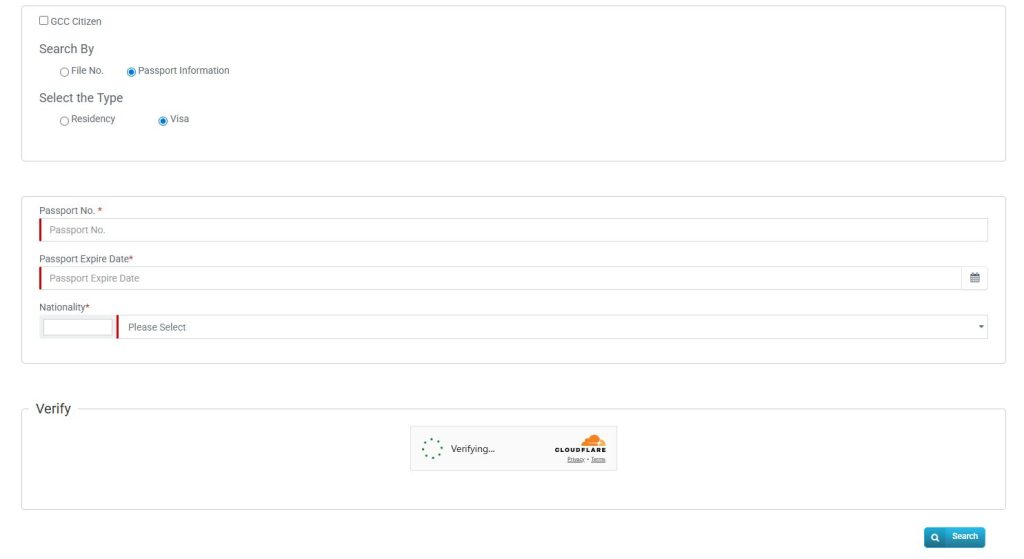
Step-by-Step Guide (ICP Visa Check by Passport)
- Open the ICP Smart Services link
- Select File Validity
- Choose Search By: Passport Information
- Select Visa
- Enter the following details:
- Passport Number
- Passport Expiry Date
- Nationality
- Complete CAPTCHA
- Click Search
What You Will See
- Visa status
- Visa number
- Issue date
- Expiry date
- Residency status
This is the easiest way to do a UAE visa check by passport number in ICP.
ICA Smart Services UAE Visa Status Check Online (Application Tracking)
If you recently applied for a visa and want to track it:

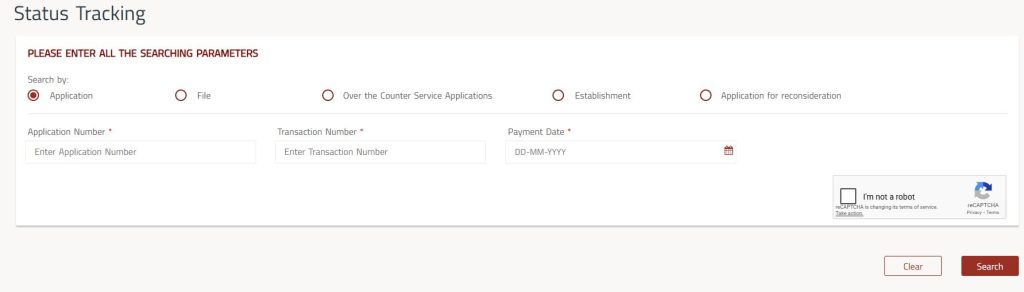
Steps to Track Visa Application (ICP)
- Visit ICP Smart Services
- Select Application Tracking
- Enter:
- Application Number
- Reference Number (if asked)
- Click Search
You may see:
- Submitted
- Under Process
- Approved
- Rejected
How to Check UAE Visa Status Using ICP UAE Smart Mobile App
Follow some of these steps below:
Step 1: Download the App
Get the “ICP UAE Smart” or “UAEICP” app from Apple App Store, Google Play Store, or Huawei App Gallery.
Step 2: Log in
Sign in with your UAE Pass credentials to activate your digital identity.
Step 3: Navigate to Application Status
Open the app and find the “Application Status” or a similar section to track your visa.
Step 4: Enter Your Details
Enter your application number or reference number, usually linked to your passport.
Step 5: View Your Visa Status
Check the status of your visa application. You will see if it is pending, approved, or rejected.
Features of ICP UAE Smart App
- Track visa applications
- Receive notifications
- Check Emirates ID status
- Access services using UAE Pass
This app is available on Android and iOS.
Dubai Visa Status Check GDRFA
If your visa is issued in Dubai, you must use GDRFA Dubai.
Official GDRFA Dubai Visa Status Link
How to Check Dubai Visa Status Online (GDRFA)
Step-by-Step Guide
- Visit GDRFA Dubai website
- Open Application Status Tracker
- Enter:
- Application Reference Number
- Email used in application
- Emirates ID (if used)
- Submit the form
You will see:
- Processing status
- Approval or rejection
Dubai Visa Validity Check
To check Dubai visa expiry:
- Visit GDRFA portal
- Choose Visa Validity
- Enter:
- Visa File Number or Passport Details
- Submit
Always check validity before travel or job change.
How to Check UAE Visa Status Using Emirates ID
If you already hold an Emirates ID, checking your UAE visa status becomes very simple. Your residency visa details are directly linked to your Emirates ID, which allows you to verify your visa validity online within minutes.
Follow these easy steps to check your visa status using your Emirates ID:
Step-by-Step Guide
- Step 1: Open the official ICA Smart Services – File Validity page on your browser.
- Step 2: From the available search options, select “Emirates ID Information.”
- Step 3: Carefully enter your Emirates ID number exactly as printed on your card.
- Step 4: Complete the CAPTCHA verification to confirm you are not a robot.
- Step 5: Click on the Search button to view your visa details.
Once the search is complete, your visa status will appear on the screen, including important information such as visa validity and residency status..
How to Check UAE Visa Status Offline
If you are unable to check your UAE visa status online, you can still use offline methods. These methods are useful when you do not have internet access or face issues with online portals. However, offline visa status checks usually take more time compared to online tools.

Below are the two main offline ways to check your UAE visa status, explained step by step.
Step 1: Call the ICP Helpline for Visa Status
The Federal Authority for Identity, Citizenship, Customs and Port Security (ICP) provides official support through its helpline.
How this method works:
- Call the ICP customer support number: 600522222.
- Inform the agent that you want to check your UAE visa status.
- Share your basic details, such as passport number or application number.
- The agent will check your record in the system and guide you about your visa status.
This method is helpful if your visa was issued outside Dubai or if you are facing issues with online tracking.
Step 2: Visit the UAE Embassy Near You
Another offline option is to visit the nearest UAE embassy or consulate in your country.
How this method works:
- Carry your passport and any visa-related documents.
- Visit the embassy during working hours.
- Go to the helpdesk or immigration assistance counter.
- Request help to check your UAE visa status.
- The staff will review your documents and provide guidance.
This option is suitable for people who prefer face-to-face assistance or are outside the UAE.
How to Apply for the UAE Golden Visa via ICP?
The UAE Golden Visa is a long-term residence permit that opens doors for investors, entrepreneurs, professionals, and exceptional students. It allows you to live, work, and study in the UAE without needing a local sponsor. Here’s a simple, step-by-step guide to apply through ICP Smart Services.
Step 1: Check Your Eligibility on the ICA Website
Before applying, confirm that you qualify for the Golden Visa. Categories include:
- Investors – Individuals investing in property, funds, or business.
- Entrepreneurs – Owners of innovative or startup projects.
- Specialists & Professionals – Experts in medicine, science, engineering, or other key fields.
- Outstanding Students – Top-performing students from UAE or top global universities.
Visit the official ICA website and use the eligibility information to ensure you meet the criteria for your category.
Step 2: Access ICP Smart Services
Once eligibility is confirmed:
- Go to the ICP Smart Services portal.
- Log in using your UAE Pass credentials.
- Navigate to the Residency & Citizenship eChannels section.
This portal is the official platform for all Golden Visa applications in the UAE.
Step 3: Use the Golden Visa Eligibility Checker
ICP provides an eligibility checker tool to simplify the process.
- Complete the online tool with your personal and professional details.
- The system will confirm if your profile meets the requirements for the selected visa category.
This step ensures you are applying for the correct Golden Visa type.
Step 4: Initiate Your Golden Visa Application
After confirming eligibility:
- Select the Golden Visa category that applies to you.
- Fill out the detailed application form with accurate personal, professional, and residency information.
Make sure all entries are correct, as errors can delay approval.
Step 5: Upload Required Documents
Supporting documents are critical to strengthen your application. Required documents vary depending on your category:
- Investors:
- Proof of investment (property deeds, share certificates, or fund deposits)
- Evidence of 100% foreign ownership (if applicable)
- Specialists & Professionals:
- Certified educational certificates
- Employment contracts
- Professional licenses or approvals from relevant authorities
- Entrepreneurs:
- Project or startup registration
- Investment proof and innovation validation
- Outstanding Students:
- Academic transcripts
- University ranking certificates
Ensure all documents are clear, authentic, and verifiable.
Step 6: Pay Fees & Submit Application
Golden Visa applications have higher fees compared to standard visas, but they grant long-term residency of up to 10 years.
- Pay the official fees through the ICP portal.
- Submit your complete application and supporting documents.
Once submitted, you will receive a confirmation receipt with an application number.
Step 7: Track Your Application & Receive Approval
- Use the ICP Smart Services portal to monitor your application status.
- The system will show updates such as under review, approved, or additional documents required.
- Upon approval, your Golden Visa will be issued electronically.
You can then use it for residency, employment, and family sponsorship without needing a local sponsor.

Realistic UAE Visa Processing Timelines for 2026
| Service Type | Average ICP Processing Time | Common Reasons for Delay | Shuraa Managed Estimated Timeline |
|---|---|---|---|
| Tourist Visa Renewal | 24 to 48 hours | Previous overstay fines, unclear or expired passport copies | Around 24 hours |
| New Employment Visa | 5 to 7 working days | Delay in medical test results, company license renewal issues | 3 to 5 working days |
| Emirates ID Renewal | 48 to 72 hours | Old photo not matching updated guidelines, address mismatch | 24 to 48 hours |
| Golden Visa (Investor Category) | 15 to 30 working days | Property valuation delays, incomplete proof of funds | 10 to 20 working days |
| Visa Status Change | 5 to 10 working days | Missing NOC from previous sponsor, exit permit not properly closed | 4 to 7 working days |
How to Renew Your Emirates ID or Passport While Abroad
If you are a UAE citizen or resident living outside the UAE, you can easily renew your Emirates ID or passport online through ICP Smart Services. Follow these simple steps:
Step 1: Log in to ICP Smart Services
Access the official ICP portal using your credentials.
Step 2: Select “Renew ID / Passport Outside UAE”
Choose the option for renewal abroad to start your application.
Step 3: Upload Required Documents
Provide a passport-style photo and submit biometric data, if requested.
Step 4: Enter Delivery Address
Specify the international address where you want your renewed ID or passport delivered.
Step 5: Pay the Renewal Fee
Complete the process by paying the required fees online.
Step 6: Wait for Approval and Delivery
Once approved, your renewed Emirates ID or passport will be delivered to your provided address.
ICP Smart Services Features
ICP Smart Services offers a wide range of digital solutions for individuals, businesses, tourists, and government entities. Here’s a clear breakdown of what you can do:
1. Features for Individuals
- Residency Visas – Apply, renew, or cancel your UAE residency visa easily.
- Emirates ID – Apply for a new ID or renew your existing one.
- Visa & ID Tracking – Check the status of your visa or Emirates ID online.
- Immigration Fines – Pay fines directly through the platform.
- Passport Updates – Update your passport or ID information as needed.
- Passport Renewal (UAE Citizens) – Renew your passport even if you are abroad.
2. Features for Businesses
- Work Permits – Apply for employee work permits efficiently.
- Employee Visa Management – Manage visas for your staff in one place.
- Overstay Fine Management – Check and pay fines for your employees.
- Company Registration with Immigration – Register your company for immigration-related processes.
3. Features for Tourists
- Entry Permits – Apply for UAE tourist entry permits.
- Tourist Visa Extension – Extend your tourist visa without visiting an office.
- Visa Status Tracking – Monitor the status of your tourist visa application online.
4. Features for Government Entities
- Bulk Processing – Access special tools for bulk visa and ID processing.
- Record Coordination – Coordinate immigration records across departments efficiently.
5. General & Platform Services
- Smart Pass Login – Secure login using UAE Smart Pass.
- Visa Status Verification – Verify visa authenticity quickly.
- ID Card Delivery Tracking – Track Emirates ID delivery online.
- Customer Support – Access live chat, create service tickets, and get help in multiple languages (Arabic, English, and more).
How to Register for ICP Smart Services Online?
Follow these simple steps:
- Visit the ICP Smart Services website
- Click on “Smart Services”
- Select “Individual Services”
- Click “Create Account”
- Enter your Emirates ID or Passport number
- Provide your mobile number and email
- Create a username and password
- Verify your account using the OTP sent to your mobile
After verification, your account will be active and ready to access all ICP services.
Alternative Ways to Register for ICP Smart Services
If you haven’t registered yet, here are simple alternatives to complete your registration easily:
1. At the Airport
- Visit the Smart Services counter upon arrival.
- Provide your Smart Number and your country of origin.
- Staff will help you complete the registration quickly.
2. By Phone
- Call the ICP Call Center at 600-522-222.
- The helpline is available 24/7.
- Provide your details, and the representative will guide you step by step.
3. Using the Mobile App
- Download the ICP Mobile App on iOS or Android.
- Follow the simple in-app instructions to register.
- Complete your profile anytime, anywhere.
How to Use ICP Smart Services Guide
Using ICP Smart Services is simple. Follow these steps:
Step 1: Log In
- Access the ICP Smart Services portal.
- Enter your credentials and log in securely.
Step 2: Select Your Service
- From the dashboard, choose the service you need:
- Visa
- Emirates ID
- Passport services
- Entry permit
Step 3: Fill in the Form
- Most of your information is auto-filled.
- Check all details carefully and make edits if needed.
Step 4: Upload Required Documents
- Upload necessary documents such as:
- Passport copy
- Photo
- Any supporting papers
Step 5: Pay the Fee (If Applicable)
- Some services require a payment.
- Complete the payment securely through the portal.
Step 6: Track Your Request
- Use your dashboard to monitor the status of your application.
- Get updates in real-time without visiting a service center.
Who Should Register for ICP Smart Services?
You need to register if you are:
- UAE Residents – Anyone holding a UAE visa or Emirates ID, including residents from GCC countries.
- UAE Citizens – Nationals of UAE or GCC countries.
- Tourists – Anyone applying for a UAE visa.
- Business Owners or PROs – Handling company visas or employee services.
- Students & Dependents – Sponsored in the UAE.
- Individuals under Corporate or Sheikh Sponsorship – Special sponsored categories.
- People of Determination (Disabilities) – Special provisions include:
- Priority processing
- Free Emirates ID
- Fee exemptions for some services
- Dedicated customer support
Tip: If you are a person of determination, upload proof of status to access these benefits.
How to Check and Pay Fines on ICP Smart Services
Paying fines in the UAE is now simple and quick with ICP Smart Services. Follow these steps to view and settle your fines safely online:
Step 1: Visit ICP Homepage
Go to the official ICP website to access all smart services.
Step 2: Select “Fines Payment”
From the menu, click on “Fines Payment” to start the process.

Step 3: Enter Your Details
Provide any of the following:
- Emirates ID number
- Visa number
- Passport number
Step 4: View Fine Details
The system will display:
- Fine type
- Amount
- Due date
Step 5: Make Payment
Pay securely using:
- Credit/Debit Card
- UAE Bank Account
Common Problems During UAE Visa Status Check
1. No Record Found
Reasons:
- Wrong platform used
- Incorrect application number
- Typing mistakes
2. Using ICP for Dubai Visa
This will never work.
3. Entering Invoice Number Instead of Application Number
Always use the official confirmation document.
UAE Visa Status Check Using Passport
| Emirate | Portal |
|---|---|
| Abu Dhabi | ICP |
| Sharjah | ICP |
| Ajman | ICP |
| RAK | ICP |
| Fujairah | ICP |
| Umm Al Quwain | ICP |
| Dubai | GDRFA |
Why Professional Assistance Helps
From my experience, most delays happen due to:
- Incorrect documents
- Small typing mistakes
- Not knowing latest rules
Professional assistance helps:
- Avoid rejection
- Save time
- Stay compliant
Benefits of Using ICP Smart Services
Using ICP Smart Services to manage your UAE visa and residency applications comes with several advantages. Here’s why it’s the preferred choice for residents, visitors, and businesses:
- Fully Online – Complete your visa and residency tasks without visiting immigration offices.
- Fast Processing & Real-Time Updates – Track your applications instantly and get timely notifications.
- Multilingual Support – Services available in multiple languages for easy navigation.
- Secure & Reliable – Your personal and visa information is protected with advanced security.
- Global Access – Check and manage your applications from anywhere in the world.
Tips
- Always double-check your details
- Use official government links only
- Do not rely blindly on agents
- Check visa validity before travel
- Save your application number safely
ICP Contact Centre for Visa Status Help
If online checking does not work:
ICP Contact Centre: 600 522 222
Keep these ready before calling:
- Application number
- Passport details
- Emirates ID (if available)
DubaiNow App & Amer Centers
DubaiNow App
- Mobile app for Dubai government services
- Supports visa enquiries
Amer Contact Numbers
- Inside UAE: 800 5111
- Outside UAE: +971 4 313 9999
FAQs About ICA Smart Services UAE Visa Status Check
What is ICA Smart Services UAE visa status check?
Ans: ICA Smart Services UAE visa status check is an official online service provided by the UAE government. It allows users to check visa application status, visa validity, and residency details for visas issued in Abu Dhabi and the Northern Emirates.
Can I check UAE visa status by passport number?

Ans: Yes, you can check UAE visa status by passport number through ICP Smart Services. This option is available for visas issued in Abu Dhabi, Sharjah, Ajman, Umm Al Quwain, Ras Al Khaimah, and Fujairah.
What is the official ICA Smart Services UAE visa status check link?
Ans: The official ICA / ICP visa status check link is:
https://smartservices.icp.gov.ae/echannels/web/client/default.html#/fileValidity
Always use the official government website to avoid incorrect information.
How do I check UAE visa status online using ICP?
Ans: To check UAE visa status online using ICP:
- Visit the ICP Smart Services website
- Select “File Validity”
- Choose search by passport information
- Enter passport number, expiry date, and nationality
- Click on search to view visa details
Can I check Dubai visa status on ICA Smart Services?
Ans: No, Dubai visa status cannot be checked on ICA Smart Services. Dubai visas are managed by GDRFA Dubai and must be checked through the GDRFA official website or Amer centers.
How can I check Dubai visa status online?
Ans: You can check Dubai visa status online through the GDRFA Dubai portal by entering your application reference number, email address used during application, and Emirates ID (if available).
What details are required for UAE visa status check?
Ans: Depending on the emirate, you may need:
- Passport number
- Passport expiry date
- Nationality
- Application number
- Emirates ID (if available)
All details must match exactly with the application records.
Why does ICP show “No Record Found”?
Ans: “No Record Found” usually appears due to:
- Entering incorrect passport or application details
- Using the wrong platform (ICP instead of GDRFA or vice versa)
- Typing errors in application number or passport information
How long does it take for visa status to update online?
Ans: Visa status updates depend on the application type and authority. Some updates appear within hours, while others may take several working days. Processing speed is controlled only by ICP or GDRFA.
Can I check UAE visa validity after approval?
Ans: Yes, after approval you can check UAE visa validity online. The system will show visa issue date, expiry date, and residency status.
Conclusion
Checking your UAE visa status is essential to avoid fines, travel problems, and legal issues. The UAE provides official online systems to help applicants stay updated. For Abu Dhabi and other northern emirates, ICA / ICP Smart Services allows visa status and validity checks using passport or application details. For Dubai-issued visas, GDRFA Dubai, DubaiNow, and Amer centres should be used. By using the correct platform, entering accurate information, and checking regularly, you can stay legally safe, informed, and stress-free in the UAE.


About The Author