How To Create a PayPal Account In UAE 2027: A Complete Step-by-Step Guide
How To Create a PayPal Account In UAE. Online shopping and global business have made one thing clear: you need a fast, safe and simple way to send and receive money across borders. If you live in the UAE and you are tired of high bank charges or slow international transfers, opening a PayPal account might be the easiest fix.
This guide walks you through everything, from what PayPal actually is, to opening your account, verifying it, linking your bank, understanding the fees, and staying safe while using it. Let’s get started.
What Is a PayPal Account?
PayPal is an online payment platform that lets people send and receive money electronically. Instead of typing in your card number every time you shop online, you simply log into your PayPal account and confirm the payment. It works like a digital wallet that sits between your bank or card and the seller.
Both individuals and businesses use PayPal. You can:
- Pay for goods and services online
- Transfer money to friends, family, or clients
- Get paid for freelance work or business sales
- Link your bank account, debit card, or credit card for quick payments
- Send invoices to clients
- Use buyer and seller protection if something goes wrong with a purchase
Why PayPal Matters for People in the UAE
The UAE is home to a large expat population, a growing freelance economy, and thousands of small online businesses. Many people here need a way to pay international suppliers, receive payments from clients abroad, or simply shop from global websites without worrying about hidden bank charges. PayPal fills that gap nicely.
Traditional bank transfers often come with high fees, slow processing times, and confusing paperwork, especially when money is crossing borders. PayPal simplifies this by giving you one account that works across many countries, one dashboard to track your transactions, and one login to manage everything. This is exactly why so many freelancers, small business owners, and everyday shoppers in the UAE have started relying on it.
Read Also: International License Dubai: Complete Guide to Fees And Online Apply
Does PayPal Work in the UAE?
Yes, PayPal works in the UAE. Anyone living in the country can download the PayPal app, enter their details, and connect their bank account. Once your account is set up, you can use it to shop online, pay bills, send money abroad, or accept payments from customers.
PayPal UAE gives users a safe way to handle both online and offline payments. The platform’s strong security system and flexible fee structure make it a popular option for people who want convenience without added stress.
For businesses, PayPal offers extra tools such as:
- Online invoicing
- PayPal Checkout for websites
- Reporting and tracking tools
- Dispute resolution support
- PayPal.Me, a personal payment link that makes it easy for others to pay you directly
If you run a small business or work as a freelancer, these tools can save you a lot of time when collecting payments from clients around the world.
PayPal’s Growing Presence in the UAE
PayPal has been steadily expanding across the Middle East, and Dubai plays a big part in that plan. The company opened its first MENA (Middle East and North Africa) office in Dubai to strengthen its position in the region.
Here is a quick look at PayPal’s regional growth:
- PayPal already serves around one million customers in the MENA region.
- It holds close to a 5% share of the region’s e-commerce market.
- The company is aiming to reach 25,000 merchants by 2050.
- PayPal wants to tap into the Middle East’s massive online audience, which includes 110 million internet users and 290 million mobile subscribers.
One interesting fact is that Cash on Delivery still makes up more than 80% of e-commerce payments across MENA. PayPal is positioning itself as a safer, faster online alternative to cash payments. Since its launch in 1998, PayPal has built a strong track record of low fraud rates compared to many competitors, which helps build trust with new users.

Personal Account vs Business Account
PayPal offers two types of accounts in the UAE, and choosing the right one matters.
| Personal Account | Business Account |
|---|---|
| Best for personal purchases and payments | Best for selling goods or services |
| Good for occasional online selling | Works under a registered business name |
| Simple personal account details | Comes with payment and reporting tools |
| Made for individual, everyday use | Supports online checkout and invoicing |
A Personal account is perfect if you mostly want to shop online, send money to family, or occasionally sell an item or two. A Business account is built for people who regularly collect payments from customers, even if you are a freelancer or a one-person operation.
With a Business account, you get extra features such as:
- Accepting customer payments smoothly
- Creating and sending invoices
- Adding a PayPal button to your website checkout
- Generating payment links to share with clients
- Giving limited account access to employees, if needed
If you are running any kind of online store, freelance service, or consulting business, a Business account is usually the smarter choice.
What to Prepare Before Opening a PayPal Account
Getting your documents ready ahead of time makes the sign-up process much faster. Here’s what you’ll typically need:
For a Personal Account
- An active email address
- Your full legal name and UAE address
- A valid mobile number
- A debit or credit card, or a bank account to link later
For a Business Account
- An active email address
- Accurate personal information matching your ID
- Your business name and contact details
- A short description of the products or services you offer
- An eligible bank account, debit card, or credit card
How to Create a PayPal Account in UAE
Here a simple information of the whole process, one step at a time.
Step 1: Pick Your Account Type
Open the PayPal UAE website or app and pick Personal or Business.
- Planning to get paid by customers on a regular basis, even as a freelancer? Go with Business. It comes with tools made for collecting payments.
Step 2: Fill in Your Real UAE Details
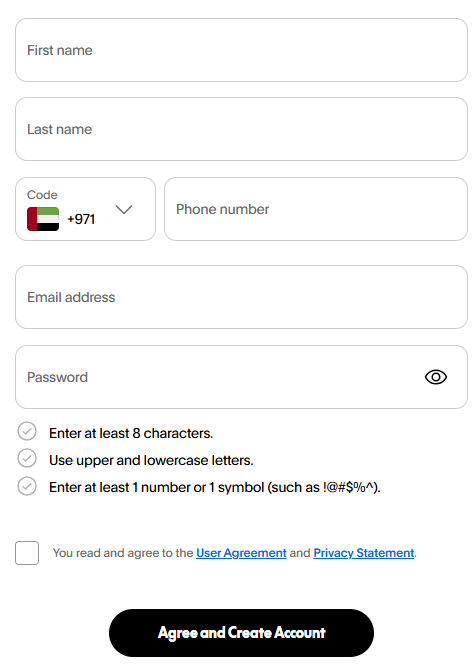
Add your legal name, email, phone number, and UAE address, matching your official ID.
- Don’t register under another country just because your clients live abroad. Your account should show where you and your business actually operate from.
Step 3: Add Business Info (Business Accounts Only)
You’ll need to share:
- Company name
- Business category
- Contact details
- Anything else PayPal asks for at sign-up
Keep this in line with your UAE trade license so nothing gets flagged or delayed.
Step 4: Connect a Payment Method
Add a bank account, debit card, or credit card. Some options depend on your account type and your bank.
PayPal may ask you to confirm this method before unlocking every feature, so treat this as a normal part of setup.
Step 5: Finish Verifying Your Account
Confirm your email and follow whatever steps show up on your dashboard.

PayPal might ask for more documents or add temporary limits while it reviews your account. Timing varies from person to person, so there’s no fixed wait.
Step 6: Check Out What’s Available to You
Once your account is live, look through the features on offer, such as:
- Collecting customer payments
- Sending digital invoices
- Adding checkout to your website
- Sharing payment links
- Viewing transaction reports
- Connecting to e-commerce platforms
Not every feature shows up for every account, so give your dashboard a quick look before building your payment process around it.
How to Verify Your PayPal Account in UAE
Verification is one of the most important steps after opening your account. A verified account unlocks higher transaction limits, stronger security, and access to PayPal’s buyer and seller protection.
Why Verification Matters
- Higher withdrawal limits: Verified accounts can withdraw larger amounts.
- Better security: Verification adds an extra layer of protection around your funds.
- Protection eligibility: Only verified accounts can access PayPal’s buyer and seller protection for dispute resolution.
- More payment options: Some merchants only accept payments from verified PayPal accounts.
- Increased trust: A verified account looks more credible to buyers and sellers alike.
How the Verification Process Works
- Log in to your PayPal dashboard.
- Go to the “Wallet” section and select your linked card.
- Request verification. PayPal will make a small test charge to your card.
- Check your bank or card statement for a 4-digit code listed next to the PayPal charge.
- Enter that code back into PayPal to confirm your card.
Once this is done, your account should be ready for full, unrestricted use, including sending and receiving money without extra limits.
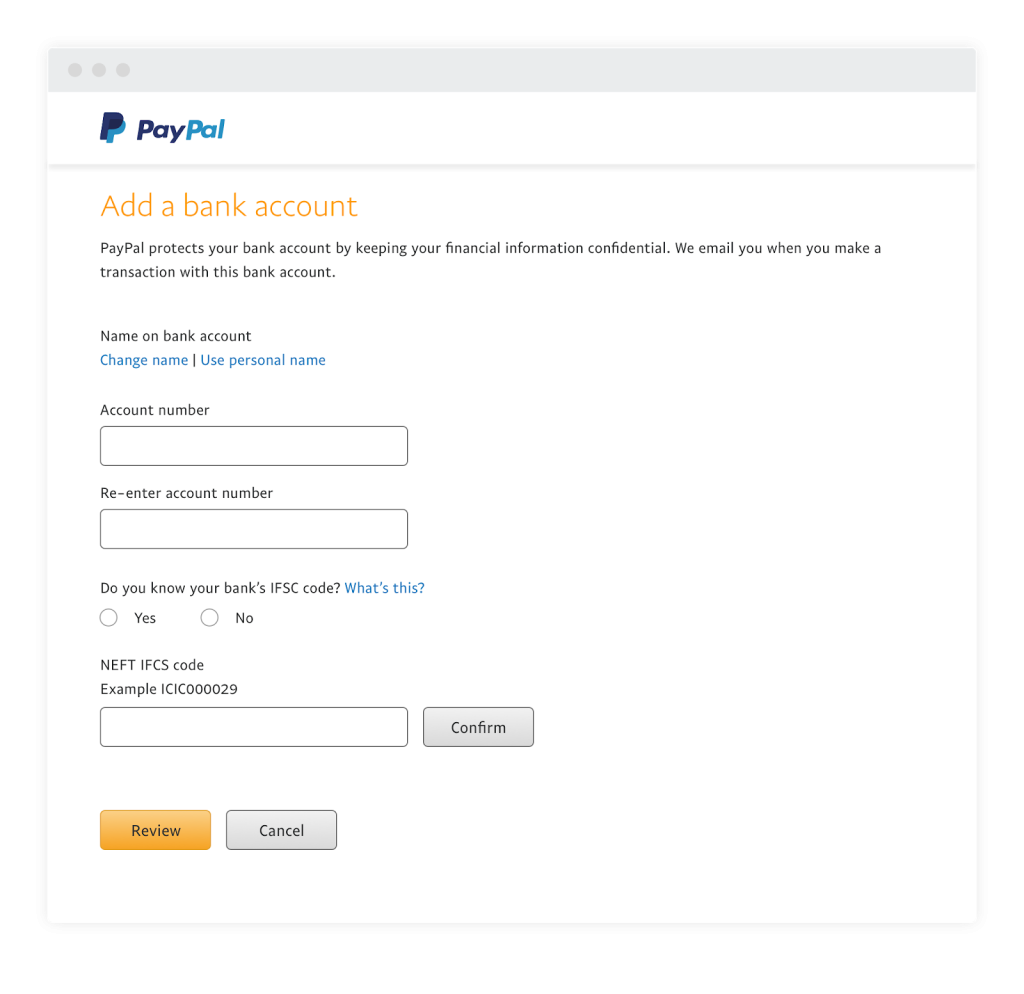
Linking Your Bank Account or Card to PayPal in the UAE
You can connect your bank account or card through either the PayPal website or the mobile app. Here’s how to do both.
Linking Through the Website
- Go to the “Wallet” section of your PayPal account.
- Click “Link a card or bank,” then choose “Link a bank account.”
- Search for your bank’s name and follow the on-screen steps to enter your account details.
Linking Through the App
- Open the PayPal app and tap the menu icon.
- Go to “Banks and Cards,” then select “Banks.”
- Search for your bank and follow the prompts to add your account or debit card.
Whichever method you choose, this step is essential. Without a linked bank account or card, you won’t be able to withdraw funds from your PayPal balance.
PayPal’s Currency Conversion Charges
If you’re sending or receiving money in a currency other than your own, PayPal automatically converts it for you. However, this convenience comes at a cost.
PayPal’s conversion rate usually includes a markup on top of the standard wholesale exchange rate. This means you might pay slightly more than the “real” exchange rate you’d see on Google or a currency converter site.
On top of this, PayPal applies separate fees depending on the type of transaction, such as:
- Buying from a seller in another currency
- Sending money internationally
- Converting your PayPal balance from one currency to another
For businesses, these charges can add up fast. Transaction fees can reach as high as 5% of the original amount, and that’s before adding the currency conversion fee on top.
PayPal Account Fees in UAE
Understanding PayPal’s fee structure helps you avoid surprises later. Here’s a breakdown of the current fees for different merchant transaction types.
| Merchant Transaction Type | Domestic Fee (% of Amount) | Fixed Fee |
|---|---|---|
| Invoicing | 3.49% | Varies by currency received |
| PayPal Checkout | 3.49% | Varies by currency received |
| PayPal Guest Checkout | 3.49% | Varies by currency received |
| Guest Checkout (American Express) | 3.50% | No fixed fee |
| QR Code Transactions (USD 10.01 and above) | 1.90% | Varies by currency received |
| QR Code Transactions (USD 10.00 and below) | 2.40% | Varies by currency received |
| QR Code via Third-Party Integrator | 2.29% | Plus a fixed USD 0.09 |
| Pay with Venmo | 3.49% | Varies by currency received |
| Send/Receive Money for Goods and Services | 2.89% | Varies by currency received |
| Standard Credit and Debit Card Payments | 2.99% | Varies by currency received |
| Other Commercial Transactions | 3.49% | Varies by currency received |
| Other Commercial Transactions (American Express) | 3.49% | No fixed fee |
For international commercial transactions, UAE accounts generally fall under the “all other markets” pricing group. Based on PayPal’s current fee schedule, this usually works out to around:

- 3.40% plus a fixed fee for receiving domestic commercial payments
- 4.40% plus a fixed fee for receiving international commercial payments
Keep in mind that the fixed portion of the fee changes depending on the currency you’re receiving. On top of the standard rates, you might also face:
- Currency conversion charges
- Cross-border transaction costs
- Withdrawal fees
- Dispute or chargeback fees
- Fees related to refunds
If you plan to sell in multiple currencies, it’s worth reviewing these costs carefully before setting your prices, so you don’t end up losing more than expected on each sale.
How to Withdraw Funds From Your PayPal App
Once money starts coming into your account, you’ll want to move it to your bank. Here’s how to withdraw funds using the PayPal app:
- Open the PayPal app and log in.
- Go to your “PayPal Balance.”
- Select “Withdraw Funds.”
- Follow the on-screen steps to complete the withdrawal.
How to Transfer Funds to Your Bank Account
You can also transfer funds directly through the website or app using these steps:
- Log in to your PayPal Wallet on the website or app.
- Tap “Transfer Funds.”
- Select “Transfer to Bank Account.”
- Follow the remaining on-screen instructions to finish the transfer.
Keep in mind that you must complete account verification before you’re allowed to withdraw or transfer any funds.
Benefits of Using PayPal in the UAE
Here are some of the biggest reasons people in the UAE choose PayPal over other payment methods:
- Buyer and Seller Protection: PayPal offers protection policies that help both buyers and sellers feel secure during transactions.
- Wide Merchant Acceptance: A large number of merchants, both locally and internationally, accept PayPal payments.
- Easy International Transfers: Sending money abroad through PayPal is simple and doesn’t require complicated bank forms.
- Strong Security: PayPal uses encryption to protect your personal and financial information during every transaction.
- Multiple Payment Methods: You can pay using credit cards, debit cards, or direct bank transfers, whichever suits you best.
Is PayPal Safe to Use in the UAE?
PayPal has a solid reputation in the UAE thanks to its easy-to-use interface and strong security setup. That said, users should still be aware of a few UAE-specific details, such as withdrawal limits and transaction fees that may differ from other countries. It’s always a good idea to check PayPal’s current terms and fee structure for UAE accounts before relying on it heavily.
Even with strong security in place, scammers still try their luck. Watch out for common tricks such as:
- Advance fee fraud
- Phishing emails pretending to be from PayPal
- Fake charity payment requests
To protect yourself, avoid clicking on suspicious links, keep antivirus software updated on your devices, and report any questionable PayPal-related emails or messages directly to PayPal.
Simple Ways to Keep Your PayPal Account Safe
Beyond what PayPal itself does to protect your account, there are a few simple habits that go a long way in keeping your money safe:
- Use a strong, unique password that you don’t reuse on other websites.
- Turn on two-factor authentication so a code is needed every time you log in from a new device.
- Never share your PayPal login details or one-time codes with anyone, even if they claim to be from PayPal support.
- Always type “paypal.com” directly into your browser instead of clicking links from emails or text messages.
- Check your transaction history regularly so you notice anything unusual right away.
- Log out of your account after using PayPal on a shared or public computer.
These small habits take only a few minutes to set up but can save you from a lot of stress later on.
Pros, Cons And Alternatives to PayPal
| Pros | Cons | Alternatives |
|---|---|---|
| Easy and user-friendly for sending money | Business transactions come with noticeable charges | Google Pay |
| Payment details are encrypted for safety | Bank transfers can sometimes feel slower than expected | Apple Pay |
| Strong fraud prevention and refund support | Accounts can occasionally be frozen without a quick fix | Skrill |
If PayPal’s fees or restrictions don’t work for your situation, it’s worth comparing it against alternatives like Google Pay, Apple Pay, or Skrill to see which fits your needs better.
Using PayPal for Business Transactions in the UAE
PayPal Business accounts work well for a wide range of UAE-based businesses and professionals, including:

- E-commerce stores
- Consultants and professional service providers
- Freelancers
- SaaS companies
- Coaches and trainers
- Digital agencies
- Businesses that serve clients internationally
That said, PayPal is simply a payment tool. It doesn’t make an activity legal on its own, and it doesn’t replace the actual legal structure behind your business. If you’re running a UAE-based company, the income you collect through PayPal should match the activity listed on your trade license or other required authorization.
Tips for Freelancers Using PayPal in the UAE
If you’re a freelancer working with international clients, here are a few practical tips to make the most out of your PayPal account:
- Set clear payment terms upfront. Let clients know which currency you’ll be charging in and who covers the transaction fee.
- Use PayPal invoices instead of informal payment requests. Invoices look more professional and keep a clear record for both sides.
- Factor fees into your pricing. Since PayPal charges a percentage plus a fixed fee, build this into your rates so you don’t lose money on smaller payments.
- Withdraw funds regularly. Instead of letting a large balance sit in your PayPal account, transfer it to your bank account on a set schedule, such as weekly or monthly.
- Keep records of every transaction. This makes tax season and accounting much easier, especially if you need to report income from international clients.
Following these habits helps you avoid surprises and keeps your freelance business running smoothly.
What PayPal Does Not Replace
While a PayPal Business account is a helpful tool, it shouldn’t be treated as a full replacement for the other essentials your business needs. Along with PayPal, a UAE business typically still requires:
- A suitable trade license
- A properly registered legal entity
- Reliable banking arrangements
- Accurate invoices and accounting records
- VAT and Corporate Tax assessments where applicable
- Any sector-specific approvals your business may need
Common PayPal Problems in the UAE and How to Fix Them
Even with a smooth setup process, you might run into a few bumps along the way. Here are some common issues and their fixes.
| Problem | Likely Fix |
|---|---|
| Verification declined | Check that your card supports international transactions and hasn’t expired |
| Transfer delays | Transfers can take 3 to 5 business days depending on your card issuer |
| Account restrictions | Submit requested documents, such as ID proof or your trade license, for review |
| Login errors | Reset your password and update your registered phone number |
If none of these fixes work, PayPal’s customer support team can usually help resolve more specific account issues.
FAQs PayPal Account
1. Can I open a PayPal account in the UAE without an Emirates ID?
Ans: Typically, PayPal asks for your Emirates ID details as part of the registration process, especially for identity verification. Having it ready before you start makes the process faster.
How long does PayPal verification take in the UAE?
Ans: There’s no fixed timeline. It depends on your account type and the checks PayPal applies, but most verifications are completed within a few days.
Can I have both a Personal and a Business PayPal account?
Ans: Yes, but they need to be linked to different email addresses since PayPal doesn’t allow duplicate accounts under the same email.
Can I use PayPal to pay UAE-based online stores?

Ans: Yes, many UAE online stores accept PayPal, though it’s always a good idea to check at checkout before assuming it’s supported.
What happens if I don’t verify my PayPal account?
Ans: An unverified account usually comes with lower transaction and withdrawal limits, and you won’t have access to buyer or seller protection.
Can I close my PayPal account and open a new one later?
Ans: Yes, you can close your account at any time. If you plan to reopen one later, make sure all previous balances and disputes are settled first.
Does PayPal charge a fee just for holding money in my account?
Ans: No, PayPal does not charge you simply for keeping a balance in your account. Fees usually apply when you send money, receive commercial payments, convert currency, or withdraw funds under certain conditions.
Can I link more than one bank account or card to my PayPal account?
Ans: Yes, PayPal allows you to link multiple bank accounts and cards. This gives you flexibility to choose which one to use for a specific payment or withdrawal.
What should I do if I forget my PayPal password?
Ans: Simply click “Forgot Password” on the login page, and PayPal will guide you through resetting it using your registered email or phone number.
Conclusion
Setting up a PayPal account in the UAE is a fairly straightforward process once you know what to expect. Whether you’re an individual who wants an easier way to shop online and send money abroad, or a business owner looking to accept payments from international clients, PayPal offers a flexible and secure option worth considering.
About The Author