FEWA Quick Pay UAE 2027: Complete Guide To Without Login, Check and Pay FEWA Bill Online
FEWA Quick Pay UAE 2027. Paying electricity and water bills in the UAE has become much easier with online services. If you are searching for FEWA Quick Pay, you can now check your utility bill and make a payment online through the current Etihad Water and Electricity (EtihadWE) service.
The term FEWA Quick Pay is still widely searched because FEWA was the former name associated with electricity and water services in the Northern Emirates. Today, EtihadWE manages these services and provides an official online View and Pay Bill service.
In this complete guide, we will explain FEWA Quick Pay, FEWA bill check, how to pay FEWA bill online, payment methods, Quick Pay without login, mobile app payment, payment limits, service channels, common problems and customer support.
What Is FEWA Quick Pay?
FEWA Quick Pay refers to the quick online method used by customers to check and pay their electricity and water bills.
The current official service is provided through Etihad Water and Electricity (EtihadWE). Its Payment Service allows customers to view the amount due according to their monthly invoice and proceed with bill payment.
The service is designed for customers who want to make a payment without going through a long account login process.
With the online View and Pay Bill option, customers can:
- Check the amount due
- Enter their account number
- Select a payment method
- Agree to the terms and conditions
- Enter card details
- Complete the bill payment
This makes the service useful when you simply want to pay a bill quickly.
FEWA VS EtihadWE
Many people still use the word FEWA when searching for their electricity and water bill services. However, the current organization is EtihadWE.
EtihadWE states that it was established in 2020 under Federal Decree-Law No. 31 and builds on the legacy of the Federal Electricity & Water Authority. So, when you search for terms such as:
- FEWA Quick Pay
- FEWA bill payment
- FEWA bill check
- FEWA online payment
- FEWA Quick Pay without login
you should use the official EtihadWE website for the current service.
What Does FEWA Quick Pay Offer?
The official EtihadWE Payment Service is made for viewing the amount due and paying the monthly bill. The official service page lists the following details.
| Service Detail | Information |
|---|---|
| Service Name | Payment Service |
| Common Search Term | FEWA Quick Pay |
| Service Code | 357-04-002-000 |
| Service Fee | Amount due according to monthly invoice |
| Expected Time | 1 working day |
| Service Category | Individual and Non-Individual |
| Website | EtihadWE |
| Mobile App | Available |
| Website Availability | 24 hours/day |
| Online Submission Time | About 3 minutes |
| Kiosk Availability | 24 hours/day |
| Bank Availability | 24 hours/day |
| Service Centre | Official working hours |
The official page also lists payment through banks, kiosks, Al Ansari Exchange, and EtihadWE service centres.
How to Use FEWA Quick Pay Online
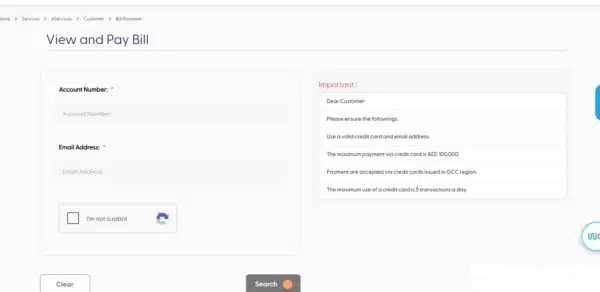
One of the easiest ways to pay your bill is through the official EtihadWE website. You do not have to log into your customer account when using the View and Pay Bill option.
Step 1: Open the EtihadWE Website
- Open the official EtihadWE website using your web browser.
- It is always better to use the official website instead of random third-party websites when entering your account or card information.
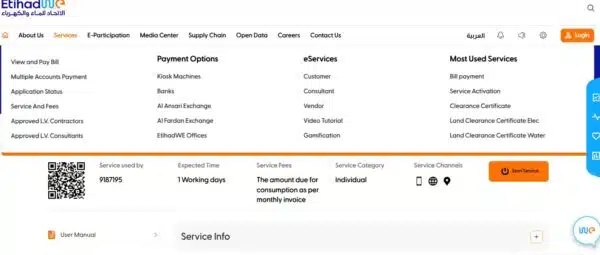
Step 2: Open “Services”
- From the main menu, look for the Services section.
- Select View and Pay or the relevant bill payment option.
- The official Payment Service specifically states that customers can pay their bills without logging in through the View and Pay Bill option.
Step 3: Enter Your Account Number
- Enter your EtihadWE account number in the required field.
- Make sure that you enter the correct number because your account number is used to locate the relevant billing information.
Step 4: Check Your Bill
- After entering the required information, the system can show the amount due according to your monthly invoice.
- Before paying, carefully check the account and bill amount.
Step 5: Select a Payment Method
- Choose the available payment option that is suitable for you.
- For card payments, make sure your card is valid and that you have enough available balance or credit.
Step 6: Accept the Terms and Conditions
- Read and accept the applicable terms and conditions before continuing.
Step 7: Enter Your Card Details
- Enter the required card information and proceed with the payment.
Step 8: Complete the Transaction
- Submit the payment and wait for the transaction to finish.
- Keep the payment confirmation or transaction reference for your records.
FEWA Bill Check Without Login
One of the most useful features for customers is the ability to check and pay a bill without going through a full account login.
The official EtihadWE service specifically says customers can pay their bills without logging into their account through the View and Pay Bill option.

How to Check FEWA Bill Without Login
Follow these basic steps:
- Open the official EtihadWE website.
- Go to Services.
- Select View and Pay.
- Enter your account number.
- Review the bill amount shown.
- Select your payment method if you want to pay.
- Accept the terms and conditions.
- Enter the required card details.
- Complete the payment.
This option is especially helpful if you are using a shared computer, making a one-time payment, or simply do not want to log into your account.
What Information Is Needed for FEWA Quick Pay?
For the quick payment service, you should keep your account information ready. The most important information is your:
- EtihadWE account number
- Valid payment card
- Valid email address where required
- Payment details
The official payment service specifically asks customers to use a valid credit card and email address. You should also carefully check your account number before making a payment.
How to Pay FEWA Bill Online Through EtihadWE Account
Customers who regularly pay their bills can also use the EtihadWE online services portal. This method requires you to log in to your customer account.
Steps to Pay FEWA Bill After Login
- Open the official EtihadWE website.
- Click Login.
- Select Customer.
- Sign in using UAE PASS.
- Open the account you want to pay.
- Click Pay Now.
- Select your saved card or enter new card details.
- Continue with the payment.
- Complete the transaction.
The official EtihadWE payment instructions confirm this login-based payment process.
Why Use the Login Method?
The login option can be more useful for customers who manage their utility services regularly.
Instead of entering your account details every time, you can access your account dashboard and use the available account services.
FEWA Quick Pay Through Mobile App
If you prefer using your smartphone, EtihadWE also provides a mobile application. The official Payment Service lists the Smart App as one of its service channels.
Mobile App Payment Steps
Follow these steps:
- Download the App: Search for the official EtihadWE app on the Google Play Store or Apple App Store and install it on your phone.
- Open the App: Launch the application and look for the available bill payment or Quick Pay option.
- Enter Your Account Number: Enter your FEWA/EtihadWE account number carefully to access your current bill details.
- Check Your Bill: Review the outstanding amount and make sure the billing information is correct before proceeding.
- Choose Payment Method: Select your preferred available payment option and enter the required payment details.
- Confirm the Payment: Check all transaction details and confirm the payment to complete the process.
- Save Your Receipt: Keep the payment confirmation for your records and future reference.
- Download Your Bill: If the app provides the option, you can also view or download your bill and keep a digital copy.
FEWA Quick Pay Payment Methods
Customers have several channels available for paying EtihadWE bills. According to the official service information, the payment service is available through:
- EtihadWE website
- Mobile application
- Payment machines or KIOSK
- Banks
- Al Ansari Exchange
- EtihadWE service centres
The EtihadWE website also lists payment options including kiosk machines, banks, Al Ansari Exchange, Al Fardan Exchange, and Etihad WE offices.
FEWA Bill Payment Through Banks
Many banks in the UAE provide convenient options for customers to pay their FEWA bills directly through online banking or mobile banking apps.
- Open your bank’s online banking or mobile app and go to the bill payment section.
- Select FEWA Bill Payment from the list of available utility services.
- Enter your correct FEWA account number to find your outstanding bill.
- Check the bill amount carefully and confirm the payment.
- Save or download the payment receipt for future reference.
Benefits of Paying FEWA Bills Through Banks
- Scheduled Payments: Some banks allow you to set up recurring payments for regular monthly bills.
- Avoid Late Payments: Automatic payment options can help ensure your bill is paid before the due date.
- Secure Transactions: Bank payment systems use standard security measures to protect your financial information.
- Easy Access: You can pay your utility bill from your phone or computer without visiting a payment centre.
FEWA Payment Through Self-Service Kiosks
Self-service payment kiosks provide another convenient way to pay your FEWA bills, especially for customers who prefer an in-person payment option without waiting in a queue.
- Find an available FEWA payment kiosk at an authorized location.
- Enter your FEWA account number and check the bill details displayed on the screen.
- Select your preferred payment method, such as cash or an accepted card.
- Confirm the payment after checking the amount shown on the kiosk.
- Keep the printed or digital receipt after completing the transaction.
Advantages of FEWA Payment Kiosks
- Easy to Use: Simple on-screen instructions make the payment process easy for most customers.
- Multiple Languages: Many self-service systems offer multilingual options for better accessibility.
- Quick Bill Updates: Payment information can be processed quickly through the connected system.
- Useful Without Internet: Kiosks can help customers who do not have convenient access to online banking.
Pay FEWA Bill Through Exchange Companies
Customers can also make utility payments through authorized exchange companies in the UAE, subject to the services available at the selected branch.

- Visit an authorized exchange branch with your FEWA account number.
- Provide your account details to the staff for bill verification.
- Pay the outstanding amount using the available cash or card payment option.
- Check the payment details before confirming the transaction.
- Collect and keep the official payment receipt.
Benefits of Using Exchange Houses
- Convenient Locations: Exchange branches are available in many areas across the UAE.
- Flexible Hours: Some branches offer extended operating hours for customer convenience.
- In-Person Assistance: Staff can help customers complete the payment process.
- Easy Documentation: You receive a payment receipt after the transaction.
FEWA Bill Payment at Emirates Post Offices
Customers may also find utility payment services through selected postal service locations, depending on the services currently available at the branch.
- Visit a participating Emirates Post location with your FEWA account number.
- Provide the required account information to the service representative.
- Pay your bill using the payment methods accepted at that location.
- Verify the amount and account details before completing the payment.
- Collect the official receipt and keep it for your records.
Advantages of Paying at Post Offices
- Wide Reach: Postal service locations can provide convenient access to customers in different areas.
- Personal Assistance: Staff can guide customers through the payment process.
- Useful for Offline Payments: This option is suitable for people who prefer face-to-face service.
- Payment Receipt: Customers can receive documentation confirming their payment.
FEWA Bill Payment Through Direct Debit or AutoPay
If you pay your utility bill every month, setting up an automatic payment arrangement can make bill management easier.
- Link your eligible bank account or payment method to the available automatic payment service.
- Set up the payment according to the available instructions and required authorization.
- The bill amount can then be collected automatically when payment becomes due.
- Automatic payments can help reduce the chance of forgetting your monthly bill.
- Regular payment records can also make household or business budgeting easier.
Benefits of AutoPay
- Never Miss a Due Date: Automatic payments help you pay your recurring utility bills on time.
- Less Manual Work: You do not need to repeat the full payment process every month.
- Better Budget Management: Regular payments make monthly expense planning easier.
- Convenient for Businesses: Businesses managing multiple recurring bills may find automatic payment options useful.
FEWA Quick Pay Credit Card Limit
If you want to use a credit card, you should know the payment rules before starting the transaction. The official EtihadWE payment page currently states:
- Maximum payment via credit card: AED 10,000
- A fee of 0.0068 applies to amounts above AED 10,000
- Credit card payments are accepted from cards issued in the GCC region
- A credit card can be used for a maximum of 5 transactions per day
- Customers should use a valid credit card and email address
Because payment rules can change, always check the official EtihadWE payment page before making a large transaction.
Is There a FEWA Quick Pay Service Fee?
The official Payment Service lists the service fee as:
“The amount due for consumption as per monthly invoice.”
In simple words, your normal bill amount is based on the consumption shown on your monthly invoice.
However, payment-related charges or card-related conditions may apply according to the payment method and current service rules.
For this reason, check the amount displayed on the official payment page before confirming your transaction.
FEWA Quick Pay Service Time
Online bill payment is designed to be quick. The official EtihadWE page currently shows:
| Channel | Service Hours | Time to Submit |
|---|---|---|
| Website | 24 hours/day | 3 minutes |
| Mobile App | 24 hours/day | 3 minutes |
| Payment KIOSK | 24 hours/day | 3 minutes |
| Banks | 24 hours/day | 3 minutes |
| Al Ansari Exchange | Saturday–Thursday | 10 minutes |
| Service Centres | Official working hours | 10 minutes |
The actual time for a payment to appear in an account can depend on transaction processing and the payment channel.
Who Can Use FEWA Quick Pay?
The service is not limited only to residential customers. The official EtihadWE Payment Service lists these target customer categories:
- Individuals
- Companies
- Businesses and commercial customers
- Agricultural customers
- Industrial customers
- Governmental customers
This makes the payment service useful for both individual and organizational utility accounts.
How to Download and Print Your FEWA Bill
If you need a copy of your FEWA or EtihadWE bill, you can easily download and print it for your records. This is useful for keeping proof of payment and managing personal or business documents.
Steps to Download Your FEWA Bill
- Log in to your EtihadWE account using your registered login details.
- Open the Billing History section to view your previous and current bills.
- Select the bill you want to download or save.
- Download the bill as a PDF and keep it safely on your device.
- Print the downloaded bill if you need a physical copy.
Keeping a digital or printed copy of your FEWA bill can be especially useful for business owners, tenants, landlords, and customers who need proof of billing or payment.

Where Does EtihadWE Provide Services?
EtihadWE provides electricity and water services across the Northern Emirates. Its official website currently lists service areas including:
- Ajman
- Ras Al Khaimah
- Fujairah
- Umm Al Quwain
- Al Dhaid
- Dibba – Al Fujairah
This is important because FEWA is an older name that many people still use when searching online.
FEWA Quick Pay vs Full Account Login
Both payment methods can be useful, but they are designed for slightly different needs.
| Feature | Quick Payment | Account Login |
|---|---|---|
| Login required | No for View and Pay | Yes |
| Account number | Required | Account available in dashboard |
| Check current bill | Yes | Yes |
| Pay bill | Yes | Yes |
| Useful for one-time payment | Yes | Yes |
| UAE PASS | Not required for guest payment | Used for login |
| Best for | Quick payment | Regular account management |
If you only want to pay one bill, the View and Pay Bill option can be more convenient. If you manage your utility account regularly, logging in may give you a better account-management experience.
Benefits of FEWA Quick Pay
There are several reasons why customers prefer online utility payments.
1. No Long Login Process
- The biggest benefit is the availability of the View and Pay Bill option without logging into your account.
2. Available 24 Hours
- The official service page lists the website, mobile app, KIOSK and banks as available 24 hours a day.
- This gives customers more flexibility.
3. Quick Bill Payment
- The online submission time shown by EtihadWE is around three minutes for several digital and payment channels.
4. Multiple Payment Channels
- Customers can select from several channels instead of depending on only one option.
5. Less Paperwork
- Online payment reduces the need to visit a physical centre just to settle a normal monthly bill.
6. Convenient for Busy Customers
- You can make your payment from home, office, or while travelling, provided you have the required information and a suitable payment method.
How to Reduce Your FEWA Bill
You can lower your monthly FEWA bill by making a few simple changes to your daily electricity and water usage. Small habits, such as using less power, avoiding water waste, and maintaining your appliances, can help reduce your monthly utility costs.
Smart Ways to Save Electricity
- Use energy-efficient appliances to consume less electricity.
- Turn off lights, fans, and electronic devices when they are not needed.
- Keep your air conditioner clean and properly maintained for better efficiency.
- Replace traditional bulbs with energy-saving LED lights.
- Set your air conditioner to a reasonable temperature instead of using very low settings.
Simple Ways to Save Water
- Fix leaking taps, pipes, and toilets as soon as you notice them.
- Install water-saving taps and shower fixtures to reduce unnecessary water use.
- Turn off the tap while brushing your teeth or doing other tasks.
- Avoid leaving water running when it is not needed.
- Use only the amount of water required for cleaning, washing, and other daily activities.
Common FEWA Quick Pay Problems
Online payments are usually simple, but sometimes users can face problems. Here are some common issues.
Wrong Account Number
If you enter an incorrect account number, the system may not show the expected billing information.
Solution: Check the account number from your previous bill and enter it carefully.
Card Payment Rejected
Your payment may be rejected by the card issuer or payment system.
Solution:
- Check whether the card is valid.
- Check available balance or credit.
- Confirm that the card meets the applicable payment requirements.
- Try another supported payment method if available.
Internet Connection Problem
A weak internet connection can interrupt the payment process.
Solution: Wait for a stable connection before submitting the transaction again.
Payment Completed but Bill Still Shows Due
Sometimes payment status updates may take time depending on transaction processing.
Solution: Keep your transaction confirmation and check the account again later. If the issue continues, contact EtihadWE support.

Payment Charged but No Confirmation
- Do not immediately make another payment if your bank has already deducted the amount.
- First, check your bank transaction and payment confirmation.
- If necessary, contact EtihadWE with your transaction details.
Important Tips Before Using FEWA Quick Pay
Before paying your bill online, follow these simple tips.
Check Your Account Number
Always confirm that the account number belongs to the correct utility account.
Check the Bill Amount
Make sure the amount shown before payment is correct.
Use a Valid Card
The official EtihadWE page asks customers to use a valid credit card and email address.
Do Not Share OTPs
Never share an OTP or banking verification code with another person.
Use the Official Website
Avoid entering account or card information on websites that are not official.
Save Your Receipt
After payment, save the confirmation page, receipt, or transaction reference.
Is FEWA Quick Pay Safe?
Online payment security is naturally an important concern.
The safest approach is to use the official EtihadWE website or official mobile application and follow the payment process provided by the utility provider.
Do not use unofficial websites asking for your FEWA or EtihadWE account number, card number, password, or OTP.
Also remember that EtihadWE provides its official customer support channels for payment-related assistance.
FEWA Customer Service
If you experience a problem with your bill, payment, or account, you can contact EtihadWE. The current official contact details are:
| Contact Method | Official Information |
|---|---|
| Phone | 800 3392 |
| [email protected] | |
| +971 800 3392 | |
| Website | EtihadWE official website |
These details are listed on the official EtihadWE website. If your payment problem involves a bank or card transaction, you may also need to contact your bank or card provider.
FAQs About FEWA Quick Pay
What is FEWA Quick Pay?
Ans: FEWA Quick Pay is the common term used for quick online payment of electricity and water bills associated with FEWA. The current service is provided by Etihad Water and Electricity (EtihadWE) through its Payment Service and View and Pay Bill option.

Can I pay my FEWA bill without login?
Ans: Yes. EtihadWE states that customers can pay their bills without logging into their account through the View and Pay Bill option.
What do I need for FEWA Quick Pay?
Ans: You should have your EtihadWE account number and a valid supported payment method. The official service also asks customers to use a valid credit card and email address where applicable.
How can I check my FEWA bill online?
Ans: Go to the official EtihadWE website, open the View and Pay service, enter your account number, and check the amount due.
What is the FEWA credit card payment limit?
Ans: The official EtihadWE payment page currently states that the maximum credit card payment is AED 10,000 and also lists specific conditions for amounts above AED 10,000.
Which areas does EtihadWE cover?
Ans: EtihadWE’s official website lists Ajman, Ras Al Khaimah, Fujairah, Umm Al Quwain, Al Dhaid and Dibba–Al Fujairah among its service areas.
Is FEWA still the official name?
Ans: FEWA is the former name associated with the Federal Electricity & Water Authority. EtihadWE states that it was established in 2020 and builds on FEWA’s legacy.
Can businesses use the payment service?
Ans: Yes. The official Payment Service lists individuals, companies/businesses, agricultural, industrial, and governmental customers.
Conclusion
FEWA Quick Pay is a useful search term for customers looking for a fast way to check and pay their electricity and water bills in the Northern Emirates. However, it is important to understand that the current utility provider is Etihad Water and Electricity (EtihadWE), which continues the service legacy of the former FEWA.


About The Author