Dewa Registration 2027: Complete Guide to Fees, Open And Activate Your Account
Dewa Registration 2027. Moving into a new home or office in Dubai? One of the first things you need is DEWA registration. Without an active DEWA account, you cannot use electricity and water services at your property.
Whether you are a tenant, property owner, investor, or business owner, this guide explains the complete DEWA registration process in simple way.
You will learn about the required documents, security deposit, activation charges, online registration steps, account management, and much more.
What is DEWA?
Dubai Electricity and Water Authority (DEWA) is the official government authority responsible for providing electricity and water services across Dubai.
Every residential and commercial property must have an active DEWA account before electricity and water can be used. DEWA services include:
- Electricity supply
- Water supply
- Utility bill payments
- Move-in and Move-out services
- Account management
- Smart online services
- Consumption tracking
- Security deposit refund
What is DEWA Registration?
DEWA Registration is the process of opening an electricity and water account with the Dubai Electricity and Water Authority (DEWA). After your application is approved and the required fees are paid, DEWA activates electricity and water services for your property.
This service is required for:
- New tenants moving into a rented property
- Property owners moving into a new home
- Commercial businesses
- Government and semi-government organizations
- Local UAE citizens
- Expatriate residents
Once your account is activated, DEWA provides continuous electricity and water supply and sends monthly utility bills.
Why is DEWA Registration Important?
Every residential and commercial property in Dubai must have an active DEWA account before it can be occupied. Without DEWA registration, you cannot:
- Receive electricity supply
- Receive water supply
- Move into a rented apartment
- Start business operations
- Complete the move-in process legally
Simply put, DEWA registration is one of the most important steps after renting or buying a property in Dubai.
How Does DEWA Registration Work?
DEWA has made the process much easier through digital integration with government departments.
For tenants, once the Ejari tenancy contract is registered, DEWA automatically receives the tenancy details from the Dubai Land Department. After this:
- DEWA creates your account
- A welcome email is sent
- Your account number is generated
- Security deposit details are shared
- Payment link is provided
After payment, electricity and water are activated within the standard processing time.
DEWA Services Included
When registering, customers receive several important services. These include:
- Electricity connection
- Water connection
- Move-In Service
- Online account management
- Bill payment
- Meter activation
- Consumption tracking
- Digital invoices
Documents Required for DEWA Registration
The required documents depend on whether you are a tenant or a property owner.
Documents for Tenants
If you are renting a property, prepare the following documents.
- Valid Emirates ID
- Ejari Certificate
- Passport copy (if required)
- Mobile number
- Email address
A valid Ejari registration is mandatory before DEWA can process the application.
Documents for Property Owners
Property owners do not require an Ejari certificate. Instead, they need:
- Title Deed
- Emirates ID
- Passport copy (if required)
- Contact details
The title deed acts as proof of ownership.

Documents for Commercial Customers
Business customers must provide additional documents. These include:
- Trade License
- Emirates ID
- Ejari or Title Deed
- Company details
- Authorized signatory information
Information Required During Registration
During the application, you will be asked to enter several details. These include:
- Full Name
- Email Address
- Mobile Number
- Nationality
- Property Type
- Premise Number
- Move-In Date
- Password
- Number of household residents (optional)
Make sure all information matches your official documents.
DEWA Security Deposit
DEWA requires every new customer to pay a refundable security deposit before electricity and water services are activated. The amount depends on your property type.
| Property Type | Security Deposit | Refundable |
|---|---|---|
| Apartment | AED 2,000 | Yes |
| Villa | AED 4,000 | Yes |
| Commercial Property | Based on estimated consumption | Yes |
The deposit remains with DEWA until the account is closed. After paying all outstanding bills, the remaining deposit is refunded.
DEWA Activation Charges
Besides the refundable deposit, customers must also pay activation fees.
| Fee Type | Small Meter | Large Meter |
|---|---|---|
| Electricity & Water Connection | AED 125 | AED 300 |
| Registration Fee | AED 10 | AED 10 |
| Knowledge Fee | AED 10 | AED 10 |
| Innovation Fee | AED 10 | AED 10 |
| Total | AED 155 | AED 330 |
Note: VAT is applied according to UAE regulations.
How Long Does DEWA Registration Take?
The activation process is usually very fast. After:
- Documents are verified
- Security deposit is paid
- Activation fees are paid
DEWA generally activates electricity and water within 15 working hours. In many cases, services are activated within the same day.
If activation takes longer than expected, customers can contact the DEWA Customer Care Centre for assistance.
Can You Have Multiple DEWA Accounts?
Yes. If you own or rent more than one property in Dubai, you can have multiple DEWA accounts under your profile. Each property receives:
- A separate account number
- Individual monthly bill
- Separate consumption records
- Independent service requests
This feature is especially useful for landlords, investors, and business owners managing multiple properties.
DEWA Registration Process
DEWA has made the registration process fully digital. You can complete your application anytime through the official DEWA website or the DEWA Smart App without visiting a customer service center. Follow these simple steps.
Step 1: Complete Ejari Registration (For Tenants)
If you are renting a property, your tenancy contract must first be registered through Ejari. After Ejari is issued:
- DEWA automatically receives your tenancy details.
- You receive a welcome email or SMS.
- Your new account number is generated.
- A payment link for the security deposit is shared.
Property owners can skip this step because they use their Title Deed instead of an Ejari certificate.
Step 2: Visit the DEWA Website or Smart App
Open the official DEWA website or download the DEWA Smart App. Existing customers can log in using:
- UAE Pass
- DEWA ID
First-time users should create a new account by entering their personal details.
Step 3: Select the Move-In Service
Choose Activation of Electricity and Water (Move-In). This service is designed for:

- New tenants
- Property owners
- Commercial customers
Step 4: Enter Property Details
Provide all required information carefully. You will need:
- Premise Number
- Move-in Date
- Emirates ID
- Ejari Number (for tenants)
- Title Deed (for owners)
- Contact information
Always double-check the details before submitting the application.
Step 5: Upload Required Documents
Upload clear copies of your documents. Usually required:
- Emirates ID
- Ejari Certificate
- Title Deed (for owners)
- Passport copy (if applicable)
Blurry or incomplete documents may delay approval.
Step 6: Pay the Security Deposit
After verification, DEWA displays the total amount payable. This normally includes:
- Security Deposit
- Activation Charges
- VAT (where applicable)
Payments can be made online using:
- Credit Card
- Debit Card
- Online Banking
Step 7: Receive Confirmation
Once your payment is successful, DEWA processes your application. You will receive:
- Account Number
- Business Partner Number
- Confirmation Email
- Electricity Activation Notification
- Water Activation Notification
In most cases, services are activated within 15 working hours.
How to Register for the DEWA Ideal Home E-Training Course
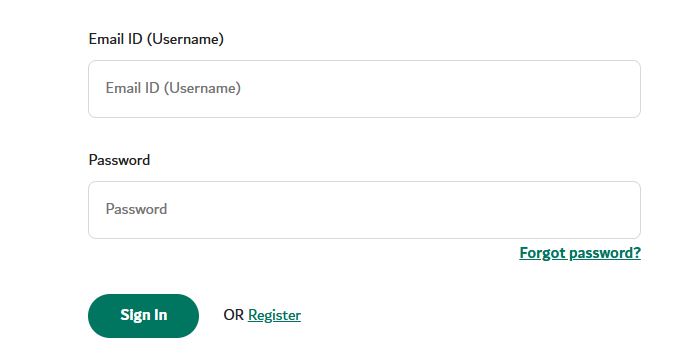
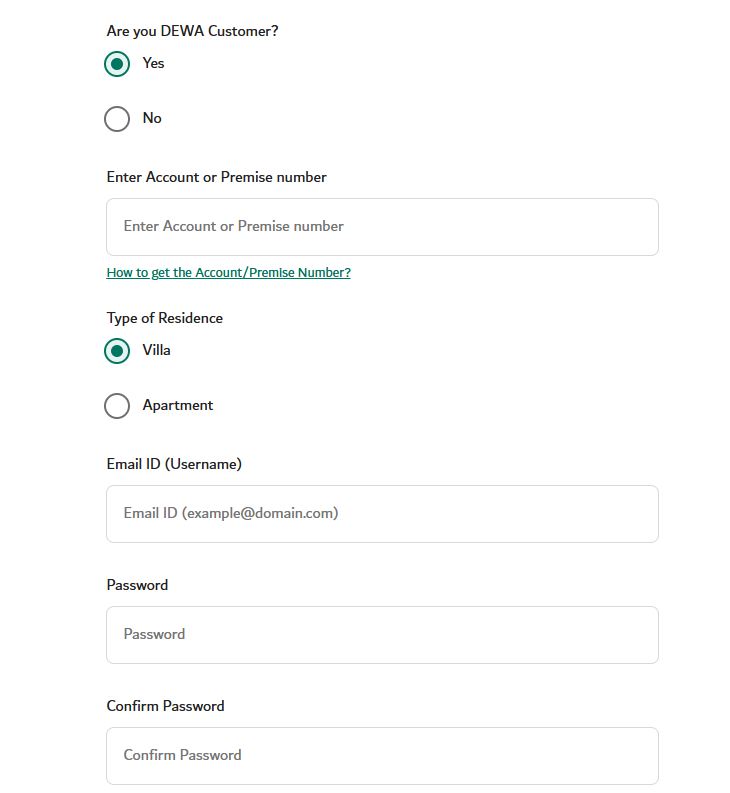
To join the DEWA Ideal Home E-Training Course, complete the online registration form by entering the required information below.
- Visit to the Official “DEWA” website.
- Email ID (Username): Enter your registered email address.
- Password: Enter your account password. (Note: Forgot Password? Use this option to reset your password if you cannot remember it)
- Sign In: Click Sign In to access your account.
- Are You a DEWA Customer? Select Yes if you already have a DEWA account, otherwise choose No.
- Account or Premise Number: Enter your DEWA account number or your property’s premise number.
- How to Get the Account/Premise Number? Use the provided guide if you do not know your account or premise number.
- Type of Residence: Choose whether your home is a Villa or an Apartment.
- Email ID (Username): Enter a valid email address that will be used to log in.
- Password: Create a secure password for your account.
- Confirm Password: Re-enter the same password to confirm it.
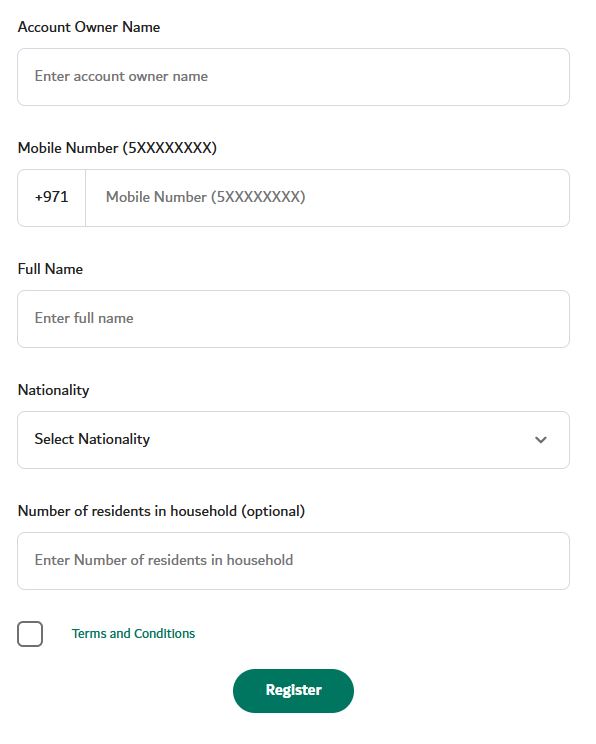
- Account Owner Name: Enter the name of the DEWA account holder.
- Mobile Number: Provide your active UAE mobile number.
- Full Name: Enter your complete name as per your official documents.
- Nationality: Select your nationality from the available list.
- Number of Residents: Enter the total number of people living in your home (optional).
- Terms and Conditions: Read and accept the terms before continuing.
- Registration Button: Click the Register button to submit your application and create your account.
How to Register a DEWA Account Online
Creating an online DEWA account is simple. Follow these steps:
- Visit the DEWA website.
- Click Login.
- Choose Consumer.
- Select UAE Pass or DEWA ID.
- Enter your Business Partner Number.
- Verify your email or mobile number.
- Create a username and password.
- Accept the terms and conditions.
- Complete your registration.
After registration, you can manage all DEWA services online.
DEWA Registration Through Customer Happiness Centres
Customers who prefer in-person assistance can visit a DEWA Customer Happiness Centre. Staff members can help with:
- New Account Registration: Staff can help you open a new DEWA account.
- Move-In Services: They assist with activating utilities for your new property.
- Bill Payments: They can guide you through paying your DEWA bills.
- Account Updates: Staff help update your personal or account information.
- Technical Support: They provide assistance for electricity and water service issues.
DEWA Customer Happiness Centre Locations
Most centres have a short waiting time of around 3 to 5 minutes making the process quick and convenient.
- Monday to Thursday: 7:30 AM to 3:00 PM
- Friday: 7:30 AM to 11:30 AM
- Ibn Battuta Mall Future Centre follows the mall’s operating hours.
It’s always a good idea to check the latest timings before your visit, as they may change during public holidays or special occasions.
| Customer Happiness Centre | Address |
|---|---|
| DEWA Head Office | Sheikh Rashid Road, Umm Hurair 2 |
| Dubai Municipality – Al Twar Centre | Inside Dubai Municipality Building, Al Twar Centre, Al Nahda Road, Al Qusais |
| Al Quoz Sustainable Building | Street 6, Al Quoz, Next to the Civil Defense Station |
| Hatta Customer Happiness Centre | Hatta Road, Dubai |
| Burj Nahar Centre | Omar Bin Al Khattab Road, Al Muteena, Deira |
| Ibn Battuta Mall Future Centre | China Court, Ibn Battuta Mall (Follows mall operating hours) |
DEWA Registration Processing Time
After submitting your application and paying the required security deposit and activation charges, DEWA usually activates electricity and water services within 15 working hours.
In some cases, activation may take up to 24 hours, depending on document verification and payment confirmation.
If your electricity or water service is not activated within the expected time, you can contact the DEWA Customer Care Centre for assistance.

DEWA Move-In Service
If you are moving from one property to another within Dubai, you can use the Move-In Service.
Instead of starting from scratch, this service helps activate utilities at your new home. You will need:
- Current DEWA Account Number
- Existing Ejari Number
- New Property Premise Number
- Move-out Date
- Move-in Date
This makes the relocation process faster and more convenient.
Who Can Apply for DEWA Registration?
The following customers can register for DEWA:
- UAE Nationals
- UAE Residents
- Expats
- Property Owners
- Tenants
- Business Owners
- Government Organizations
- Semi-Government Organizations
How to Check Your DEWA Account Number
Your DEWA account number is very important because it is used for:
- Paying Bills: It is required to pay your monthly DEWA bills.
- Tracking Electricity Usage: It helps you monitor your electricity consumption.
- Tracking Water Usage: It allows you to check your monthly water usage.
- Customer Support: It helps DEWA quickly find your account details.
- Service Requests: It is needed to submit DEWA service requests.
You can find it on:
- Monthly DEWA Bill: Your account number is printed on every bill.
- Welcome Email: DEWA sends your account number after registration.
- DEWA Smart App: You can view your account number after logging in.
- Online Customer Portal: Your account number appears on your dashboard.
DEWA Login Services
After registration, you can log in anytime to access your account. Available services include:
- View monthly bills
- Download invoices
- Check payment history
- Monitor electricity usage
- Monitor water consumption
- Submit service requests
- Update contact information
- Close your account
- Request move-out service
Everything can be managed from your phone or computer.
How to Pay Your DEWA Bill
DEWA offers several payment options to make bill payments quick and easy.
Online Payment Methods
- DEWA Website – Pay directly by logging into your account anytime.
- DEWA Smart App – Mobile app se bill check aur payment dono ho jata hai.
- UAE Online Banking – Apne bank ke internet banking se direct payment.
- Credit Card – Visa/MasterCard se instant payment.
- Debit Card – Bank account se direct deduction hota hai.
- DubaiNow App – Government app jahan se multiple bills pay ho jate hain.
- MPay – Dubai government ka secure payment system.
Offline Payment Methods
- Customer Happiness Centres – DEWA office ja kar cash ya card se payment.
- ENOC & EPPCO Stations – Petrol pumps par bhi bill pay kar sakte ho.
- Zoom Stores – Nearby convenience stores se payment option available.
- Selected Banks – Kuch UAE banks ke branches par direct payment facility.
Note: Online payment sab se fast, safe aur convenient method hai kyun ke isme payment instantly update ho jata hai aur aapko kahin jane ki zarurat nahi hoti.
Dubai Municipality Housing Fee
Besides electricity and water charges, many residents also pay the Dubai Municipality Housing Fee through their DEWA bill.
Important points include:
- Charged monthly
- Based on annual rental value
- Added as a separate item on the bill
- Usually applies to expatriate residents
- UAE nationals living in their own homes may be exempt
Example
| Annual Rent | Annual Housing Fee | Monthly Charge |
|---|---|---|
| AED 50,000 | AED 2,500 | AED 208 |
| AED 80,000 | AED 4,000 | AED 333 |
| AED 120,000 | AED 6,000 | AED 500 |
The fee is collected by DEWA on behalf of Dubai Municipality.
Monthly DEWA Bill Components
Your monthly bill usually includes the following:
- Electricity Consumption
- Water Consumption
- Housing Fee (if applicable)
- Sewerage Charges
- Fuel Surcharge
- Fixed Meter Charges
- VAT (where applicable)
Review your bill each month to monitor your utility usage and identify opportunities to save on electricity and water.
How to Transfer Your DEWA Account When Moving to Another Property
If you are moving to a new home within Dubai, you don’t need to worry about managing your utility services. DEWA provides a Move-To Service, which allows you to close your current account and activate a new one for your new property.
Information Required for DEWA Transfer
Before starting the transfer process, keep the following details ready:
- Existing DEWA Account Number
- New Property Premise Number
- New Ejari Number (for tenants)
- Move-in Date
- Move-out Date
- Emirates ID
Steps to Transfer Your DEWA Account
- Log in to your DEWA account.
- Select the Move-To Service.
- Enter the details of your current and new property.
- Submit the required documents.
- Pay any remaining balance.
- Confirm your move-out and move-in dates.
- Receive confirmation from DEWA.
Once approved, electricity and water services will be activated at your new property.

How to Cancel a DEWA Account
When leaving a property permanently, you should close your DEWA account to avoid receiving future bills. You should cancel your account if:
- You are moving to another country.
- You are relocating to another emirate.
- Your tenancy contract has ended.
- You have sold your property.
Closing your account ensures that all utility services are disconnected and your final bill is prepared.
Steps to Close a DEWA Account
The cancellation process is simple and can be completed online.
Step 1: Log in to Your Account
Access your DEWA account through the official website or Smart App.
Step 2: Select Move-Out Service
Choose the Move-Out option from the available services.
Step 3: Enter Move-Out Date
Provide the exact date when electricity and water services should be disconnected.
Step 4: Final Meter Reading
DEWA records the final electricity and water meter readings. This helps calculate your final bill accurately.
Step 5: Pay Outstanding Bills
Clear any unpaid bills before your account can be closed.
Step 6: Receive Deposit Refund
After settling the final bill, your refundable security deposit is returned using your selected payment method.
DEWA Account Deactivation Charges
Customers are required to pay a small fee when closing their account.
| Fee Type | Small Meter | Large Meter |
|---|---|---|
| Electricity & Water Disconnection | AED 100 | AED 300 |
| Knowledge Fee | AED 10 | AED 10 |
| Innovation Fee | AED 10 | AED 10 |
Some eligible customer categories may receive discounts according to DEWA policies.
How to Get Your Security Deposit Refund
The security deposit paid during registration is refundable after account closure.
Refund Options
You can receive your refund through:
- Bank Transfer
- Cheque
- Western Union
Before requesting the refund, make sure:
- Your account has been closed.
- All outstanding bills have been paid.
- Your bank details are correct.
Refunds are usually processed shortly after the final bill is settled.
DEWA Services Available Online
DEWA’s online platform allows customers to manage almost everything without visiting an office. Available services include
- New Account Registration
- Move-In Service
- Move-Out Service
- Bill Payment
- Download Bills
- Consumption Tracking
- Account Updates
- Security Deposit Payment
- Refund Requests
- Service Status Tracking
These digital services save both time and effort.
Benefits of DEWA Registration
Having an active DEWA account offers several advantages. Some of the biggest benefits include:

- 24/7 online account access
- Secure online payments
- Fast electricity activation
- Water supply activation
- Digital bills
- Usage monitoring
- Mobile app services
- Quick move-in process
- Easy account management
- Multiple payment options
Tips for a Smooth DEWA Registration
To avoid delays during registration, follow these useful tips:
- Register your Ejari before applying.
- Keep your Emirates ID updated.
- Double-check your Premise Number.
- Upload clear and readable documents.
- Use the same email address and mobile number throughout the application.
- Pay the security deposit as soon as you receive the payment link.
- Save your DEWA account number for future use.
- Check your email regularly for activation updates.
Common Reasons for Registration Delays
Although DEWA registration is generally fast, delays may happen because of:
- Incorrect Ejari details
- Wrong Premise Number
- Blurry document uploads
- Pending security deposit payment
- Invalid Emirates ID
- Technical verification issues
Review all information carefully before submitting your application to avoid these problems.
DEWA Customer Support
If you need assistance with your account, billing, or electricity and water services, you can contact DEWA through its official customer support channels.
Customer Care Services
DEWA can assist with:
- New registrations
- Account activation
- Bill inquiries
- Payment issues
- Electricity interruptions
- Water supply issues
- Move-in and move-out requests
- Security deposit refunds
If your electricity and water supply is not activated within the expected time after payment, contact DEWA Customer Care for assistance.
DEWA Contact Information
If you need help with your DEWA account or utility services, you can contact DEWA through the following official channels:
- Emergency Helpline: 991
- Customer Care: +971-4-601-9999
- Email: [email protected]
- Fax: +971-4-324-8111
- Rammas AI Chatbot: Chat with DEWA’s AI assistant on the official website for quick support in English and Arabic.
FAQs
Is DEWA registration mandatory in Dubai?
Ans: Yes. Every residential and commercial property in Dubai requires an active DEWA account before electricity and water services can be used.
How long does DEWA activation take?
Ans: Electricity and water services are usually activated within 15 working hours after payment of the security deposit and activation fees.
Can I apply for DEWA registration online?
Ans: Yes. You can complete the entire registration process through the official DEWA website or the DEWA Smart App.
Can I have more than one DEWA account?
Ans: Yes. Customers who own or rent multiple properties can manage several DEWA accounts under one profile.
Can I pay my DEWA bill online?
Ans: Yes. Bills can be paid using the DEWA website, Smart App, online banking, debit cards, or credit cards.
Conclusion
DEWA registration is one of the first and most important steps when moving into a new home or commercial property in Dubai. Whether you are a tenant, homeowner, or business owner, having an active DEWA account ensures uninterrupted electricity and water services.


About The Author